> For the complete documentation index, see [llms.txt](https://ai-docs.fptcloud.com/llms.txt). Markdown versions of documentation pages are available by appending `.md` to page URLs; this page is available as [Markdown](https://ai-docs.fptcloud.com/account/billing/tutorials/billing-plans.md).
# Billing plans
### **What is Billing Plans?**
A **Billing Plan** defines **how your subscription or service usage is priced, billed, and renewed**. It specifies the exact products or services you are entitled to use, your payment schedule, and how your balance is managed throughout the billing cycle..
Each Billing Plan includes the following key elements:
#### **1/ Services Included**
* Each Billing Plan clearly defines **which service(s) or product(s)** you are authorized to use.Depending on your setup, a plan can apply to:
* A **specific service** such as **GPU Container**, **Model Fine-tuning**, or **AI Inference**.
* Or, a **comprehensive plan** that covers **all available services** under your account.
* This ensures that both you and the system know exactly which usage is covered and which will be billed separately.
#### **2/ Duration**
* Your Billing Plan also determines **how long it remains active**.
* The duration is flexible and can be set **monthly, yearly**, or based on **your actual usage period**.
* This allows customers to choose a plan that fits their business needs — whether short-term testing or long-term operations.
#### **3/ Payment Options**
* Billing Plans are designed to support multiple payment structures for maximum convenience:
* **All Upfront:** Pay the full amount at the start of the plan.
* **Partial Upfront:** Pay part of the total cost upfront and the remaining balance later.
* **Postpaid:** Use first, pay later according to actual usage or after the billing cycle ends.
* In addition, we support both **online** (e.g. credit card, e-wallet) and **offline** (bank transfer) payment methods, giving customers complete flexibility in how they manage transactions.
#### **4/ Plan Amount and Expiration Rules**
Each Billing Plan comes with a **total plan amount** — the maximum credit or spending limit allocated to your account.
When this total amount or the plan duration is reached:
* The plan will **automatically expire**.
* Any further usage will be **charged to your available Voucher Credits or Top-up Credits**.
* Charges will follow **on-demand pricing** until a new plan is activated or renewed.
This mechanism ensures seamless service continuity while maintaining billing transparency and cost control.
***
### **How a Billing Plan Helps You**
Billing Plans are designed to give you **flexibility, transparency, and control**:
* You can choose a plan that best matches your usage and budget.
* You always know what’s included and how your cost is calculated.
* You can upgrade, downgrade, or pause your plan anytime bases on your requiments
* Support renewals and invoices, so you never have to worry about missing a payment.
***
### **Steps to Use a Billing Plan**
#### **Step 1: Contact Sales or Customer Support for Consultation**
To start using a Billing Plan, customers can proceed in one of the following ways:
1. **Contact the Sales or Customer Support team** of AI Factory directly for consultation.
2. **Access AI Factory** → navigate to **Billing → Billing Plan**, then click **“Contact Sales”** to send a consultation request online.
Once your request is received, the AI Factory team will reach out to **advise you on suitable Billing Plan options** based on your usage and needs.
#### **Step 2: AI Factory Processes and Creates the Billing Plan**
After the consultation, AI Factory will **process and create a Billing Plan** tailored to your requirements.
Each Billing Plan is configured based on specific information, including:
* **Type of service/product** you wish to use — for example: *GPU Container*, *Model Fine-tuning*, or *AI Inference*.
* **Usage duration** — monthly or yearly, depending on your preference.
* **Total plan amount** (credit or budget limit) assigned to your account.
* **Pricing details and payment method**, either online or via offline bank transfer.
Once the plan is created, AI Factory will send the full plan details to you for confirmation before activation.
#### **Step 3: Use Services Within the Granted Billing Plan Scope**
When your Billing Plan is activated:
* You can **use all services within the plan’s defined time and total amount limits**.
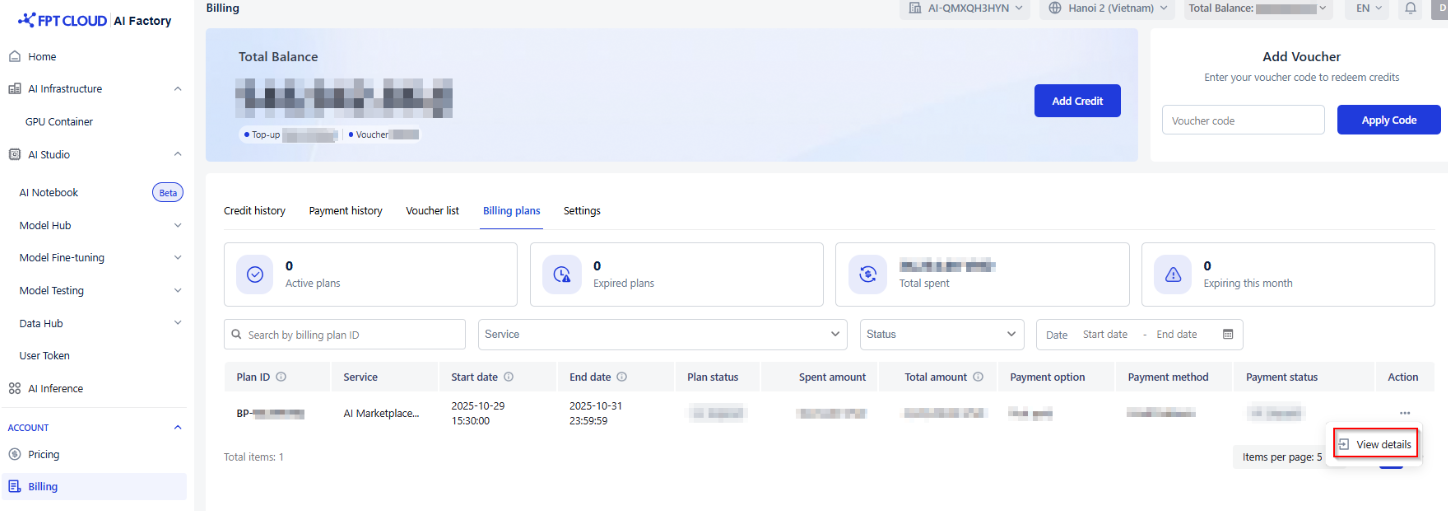
* To **track your usage**, visit the **Credit history Tab** in your AI Factory Billing.
* To **view full details of your Billing Plan**, go to:
**Billing → Billing Plan → View Details**.
In this section, you’ll find:
* Which services are included in your Billing Plan.
* Remaining usage balance and time limit.
* Total amount spent.
* The current status of your plan (Active, Expired, or Pending Renewal).
If your Billing Plan includes **multiple services**, the **Service Details** section help user see a breakdown of each service’s usage, including:
* The **specific services** covered under your plan (e.g., GPU Container, Model Fine-tuning, AI Inference, etc.).
* How much **amount has been spent** on each service.
* **Remaining quota per service**, allowing you to easily track and plan future usage.
This helps you **manage your resources efficiently**, understand **where your spending goes**, and **optimize your usage**across different AI Factory services.
[](https://fptcloud.com/wp-content/uploads/2025/05/information-fill-1.png)**Notice:**\
• When the total plan amount or duration has been fully used, the Billing Plan will automatically expire.\
• Any additional usage will be charged to your Voucher Credits or Top-up Credits at on-demand pricing.\
• To maintain continuous service, please contact the Sales team to renew or create a new Billing Plan before your current plan expires.
---
# Agent Instructions
This documentation is published with GitBook. GitBook is the documentation platform designed so that both humans and AI agents can read, navigate, and reason over technical content effectively. Learn more at gitbook.com.
## Querying This Documentation
If you need additional information that is not directly available in this page, you can query the documentation dynamically by asking a question.
Perform an HTTP GET request on the current page URL with the `ask` query parameter, and the optional `goal` query parameter:
```
GET https://ai-docs.fptcloud.com/account/billing/tutorials/billing-plans.md?ask=&goal=
```
`ask` is the immediate question: it should be specific, self-contained, and written in natural language.
`goal` is optional and describes the broader end goal you are ultimately trying to accomplish on behalf of the user. GitBook uses it to tailor the answer towards what is most useful for that goal.
The response will contain a direct answer to the question and relevant excerpts and sources from the documentation.
Use this mechanism when the answer is not explicitly present in the current page, you need clarification or additional context, or you want to retrieve related documentation sections.