> For the complete documentation index, see [llms.txt](https://ai-docs.fptcloud.com/llms.txt). Markdown versions of documentation pages are available by appending `.md` to page URLs; this page is available as [Markdown](https://ai-docs.fptcloud.com/account/billing/tutorials/top-up-credits.md).
# Top-up credits
### Billing Information
Before you can add credits, you must provide your **Billing Information** for invoicing and tax purposes.
1. From the left-side menu, go to **Account → Billing**, **or** on the **FPT AI Factory Homepage**, click **Add Credit.**
2. If your billing information is not yet provided, a pop-up will appear asking you to complete it.
### Adding Credits
To start using the AI Factory services with the PAYG billing plan, you need to buy credits first.
1. In the left-side menu, click **Billing** under the **Account** section
2. Click the **Add credit** button
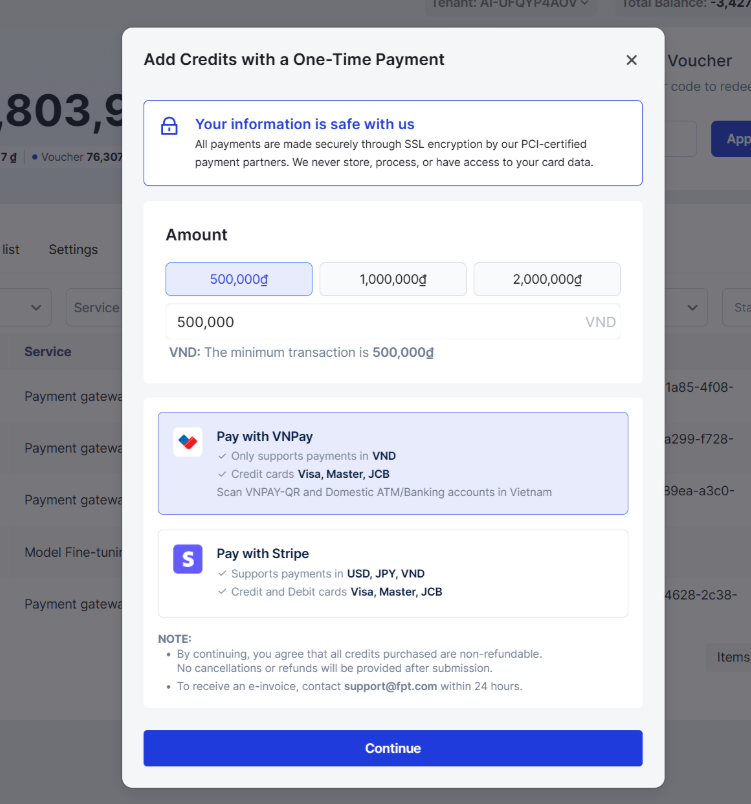
3. In the **Add Credit pop-up**, you can select a suggested amount or **enter the amount of credits you** want to add to your balance. \**A minimum amount is required—you can't add less.*
4. Then select a **payment method**:
* **VNPay**: Only supports the Vietnam region and Vietnamese dongs. You will complete the transaction on the VNPay checkout website.
* **PayPal**: Only supports the Vietnam region and US dollar. You will complete the transaction on the PayPal checkout pop-up.
* **Stripe**: Enter the card details in the pop-up window to proceed with the payment. **All transactions are securely processed by Stripe, and FPT does not store card information.**
An OTP may be required to verify the payment transaction. It depends on your card issuer.
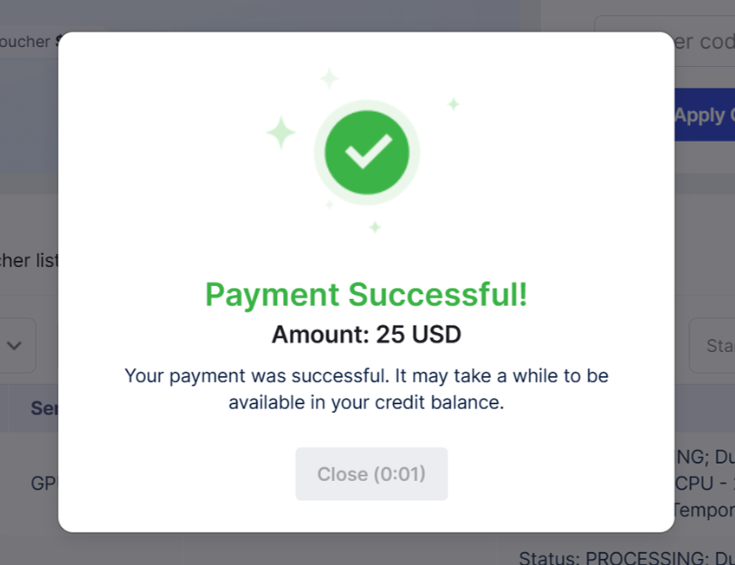
5. After the payment is completed, a pop-up will appear displaying a success notification, and your **Total Balance** and **Top-up Balance** will be updated accordingly.
6. You can also check out your adding credit transaction in the [**Credit history**](https://ai-docs.fptcloud.com/~/revisions/mtxMIIoZsNgmjlYqBg8O/account/billing/tutorials/how-to-manage-credit-history) table.
---
# Agent Instructions
This documentation is published with GitBook. GitBook is the documentation platform designed so that both humans and AI agents can read, navigate, and reason over technical content effectively. Learn more at gitbook.com.
## Querying This Documentation
If you need additional information that is not directly available in this page, you can query the documentation dynamically by asking a question.
Perform an HTTP GET request on the current page URL with the `ask` query parameter, and the optional `goal` query parameter:
```
GET https://ai-docs.fptcloud.com/account/billing/tutorials/top-up-credits.md?ask=&goal=
```
`ask` is the immediate question: it should be specific, self-contained, and written in natural language.
`goal` is optional and describes the broader end goal you are ultimately trying to accomplish on behalf of the user. GitBook uses it to tailor the answer towards what is most useful for that goal.
The response will contain a direct answer to the question and relevant excerpts and sources from the documentation.
Use this mechanism when the answer is not explicitly present in the current page, you need clarification or additional context, or you want to retrieve related documentation sections.