> For the complete documentation index, see [llms.txt](https://ai-docs.fptcloud.com/llms.txt). Markdown versions of documentation pages are available by appending `.md` to page URLs; this page is available as [Markdown](https://ai-docs.fptcloud.com/ai-factory-guideline-jp/akaunto/ke-jin/chtoriaru/artono.md).
# 低残高閾値アラートの設定方 法?
クレジット不足はFPT AI Factory上のアプリケーションに障害を引き起こす可能性があります。これを回避
するため、**低残高アラート**を有効化できます。このアラートは、設定した閾値を下回った際にメールで通
知します。\
デフォルトでは、この機能は無効になっています。
#### 残高不足アラートの有効化方法
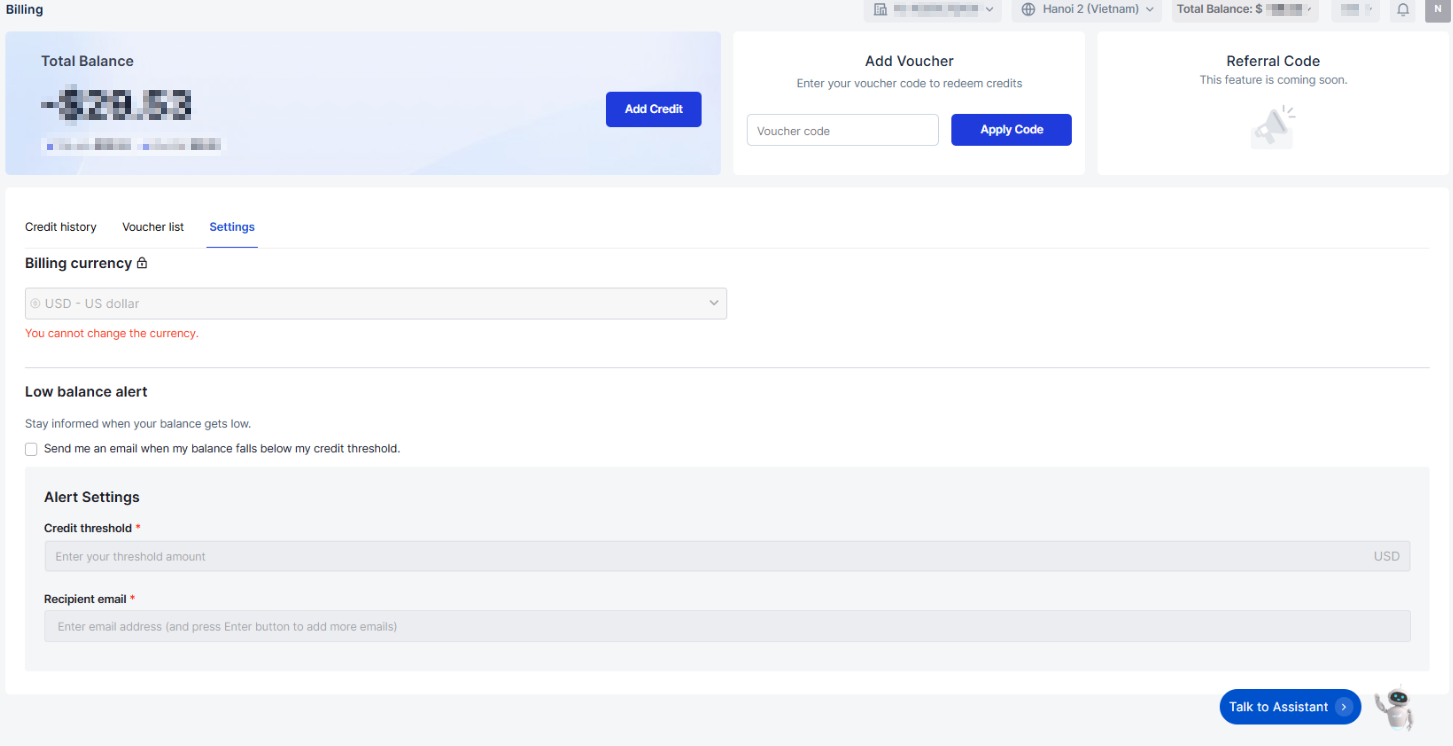
1. 請求ページに移動し、設定タブを開きます。
2. **残高不足**アラートセクションで、通知を有効にするチェックボックスを選択してください。
3. **クレジット閾値**を設定してください – 通知を受け取りたい残高金額です。
4. アラート通知を受け取る**メールアドレス**を最大5件まで入力してください。
5. 設定を完了するには「**保存**」をクリックしてください。
#### 推奨事項
サービスの中断を防ぐため、残高に関する**アラートメール**を少なくとも3通受け取れるよう通知設定を行う
\
ことをお勧めします。これにより、クレジットがなくなる前に十分な時間をかけて再チャージできます。
---
# Agent Instructions
This documentation is published with GitBook. GitBook is the documentation platform designed so that both humans and AI agents can read, navigate, and reason over technical content effectively. Learn more at gitbook.com.
## Querying This Documentation
If you need additional information that is not directly available in this page, you can query the documentation dynamically by asking a question.
Perform an HTTP GET request on the current page URL with the `ask` query parameter, and the optional `goal` query parameter:
```
GET https://ai-docs.fptcloud.com/ai-factory-guideline-jp/akaunto/ke-jin/chtoriaru/artono.md?ask=&goal=
```
`ask` is the immediate question: it should be specific, self-contained, and written in natural language.
`goal` is optional and describes the broader end goal you are ultimately trying to accomplish on behalf of the user. GitBook uses it to tailor the answer towards what is most useful for that goal.
The response will contain a direct answer to the question and relevant excerpts and sources from the documentation.
Use this mechanism when the answer is not explicitly present in the current page, you need clarification or additional context, or you want to retrieve related documentation sections.