> For the complete documentation index, see [llms.txt](https://ai-docs.fptcloud.com/llms.txt). Markdown versions of documentation pages are available by appending `.md` to page URLs; this page is available as [Markdown](https://ai-docs.fptcloud.com/ai-factory-guideline-jp/akaunto/ke-jin/chtoriaru/bauchnokie.md).
# バウチャーの引き換え方法?
AI Factoryサービスの利用を開始するには、**クレジットのチャージ**または**バウチャークレジット**をご
\
利用いただけます。
プロモーション特典などで**バウチャーコード**を受け取った場合、それを適用してクレジットを交換できま
\
す!
#### ご注意
* バウチャーは**有効期限内に交換**する必要があります。期限切れのコードは使用できません。
* **バウチャークレジットも有効期限が過ぎると失効し、期限切れ後は使用できません。**
* **トップアップクレジットとバウチャークレジットの両方をお持ちの場合**、AI Factoryサービス利用時
\
にはバウチャークレジットが優先的に引き落とされます。
#### バウチャーを追加する
バウチャーコードを受け取ったら、以下の手順に従ってください:
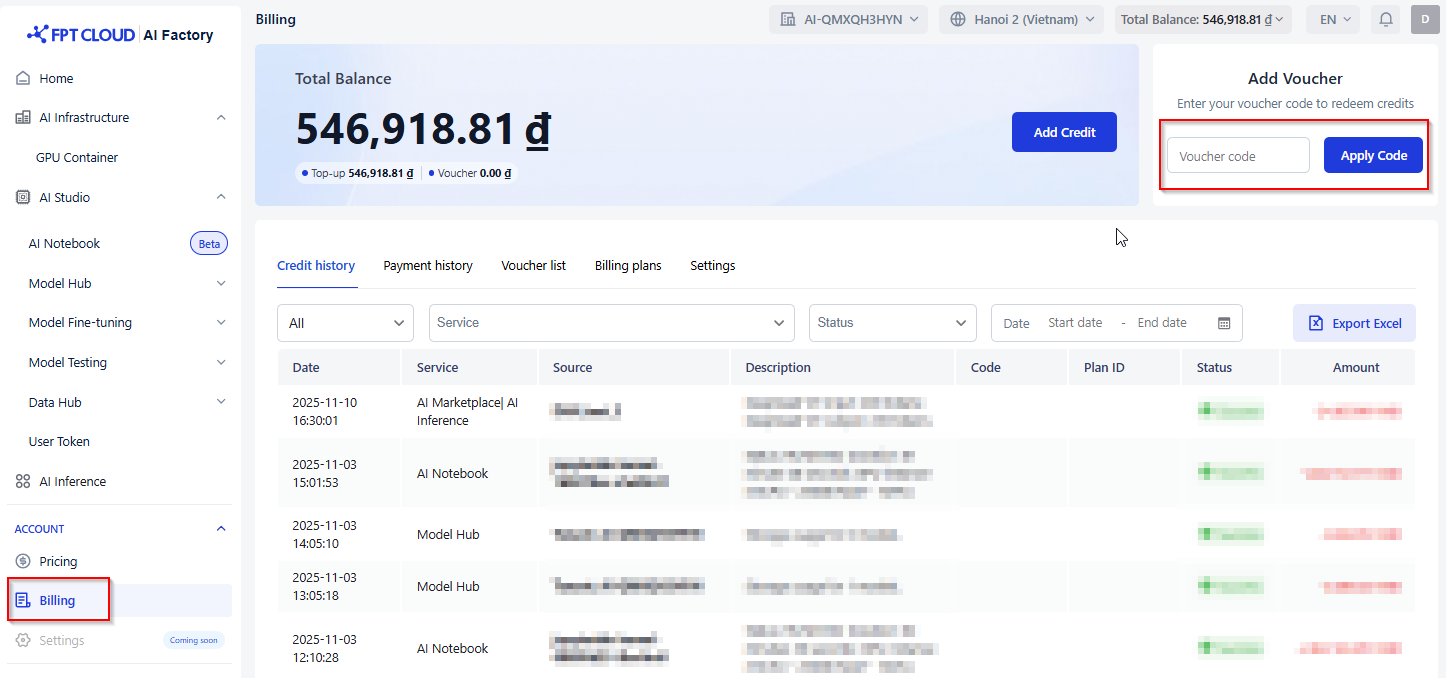
1. 左側のメニューで、アカウントセクションの「**請求**」をクリックしてください
2. 「**バウチャーを追加**」エリアでバウチャーコードを入力し、「**コードを適用**」をクリックしてくださ
\
い。*(注:バウチャーコードは英字と数字を含む10文字で構成されます。)*
3. 適用が成功すると、確認メッセージが表示されます:「**クーポンが正常に適用されました**」。
4. 適用されたバウチャーは、参照用に「バウチャー一覧」タブに表示されます。
---
# Agent Instructions
This documentation is published with GitBook. GitBook is the documentation platform designed so that both humans and AI agents can read, navigate, and reason over technical content effectively. Learn more at gitbook.com.
## Querying This Documentation
If you need additional information that is not directly available in this page, you can query the documentation dynamically by asking a question.
Perform an HTTP GET request on the current page URL with the `ask` query parameter, and the optional `goal` query parameter:
```
GET https://ai-docs.fptcloud.com/ai-factory-guideline-jp/akaunto/ke-jin/chtoriaru/bauchnokie.md?ask=&goal=
```
`ask` is the immediate question: it should be specific, self-contained, and written in natural language.
`goal` is optional and describes the broader end goal you are ultimately trying to accomplish on behalf of the user. GitBook uses it to tailor the answer towards what is most useful for that goal.
The response will contain a direct answer to the question and relevant excerpts and sources from the documentation.
Use this mechanism when the answer is not explicitly present in the current page, you need clarification or additional context, or you want to retrieve related documentation sections.