> For the complete documentation index, see [llms.txt](https://ai-docs.fptcloud.com/llms.txt). Markdown versions of documentation pages are available by appending `.md` to page URLs; this page is available as [Markdown](https://ai-docs.fptcloud.com/ai-factory-guideline-jp/akaunto/ke-jin/chtoriaru/no-1.md).
# 残高の管理方法?
**残高は特定のテナントおよびリージョンに関連付けられています。**
* 現在、複数のリージョンやテナントにまたがる単一の残高はサポートされていません。
* **ベトナムのGPU H100と日本のGPU H200**の両方をインフラとして使用したい場合、各リージョンご
\
とに**個別のテナント**を作成する必要があります。\*
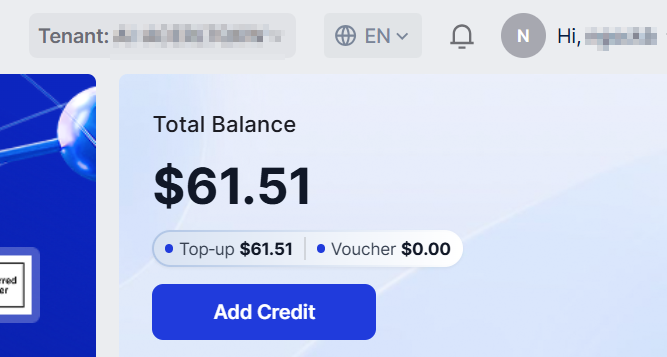
**ご利用可能残高は**、当社サービスで現在ご利用可能なクレジット残高です。
これは以下の2つの要素で構成されます:
* チャージ済み残高:**VNPAY、Stripe、PayPal**などの支払い方法で購入したクレジット。
* **バウチャー残高:バウチャーコードから**引き換えられたクレジット。通常、**FPTがトライアル**、概
\
**念実証(POC)、プロモーション**、その他の特別プログラム向けに提供します。
\*ai.fptcloud.com(ベトナムリージョン)またはai.fptcloud.jp(日本リージョン)のポータルに正
\
常にサインインすると、新しいテナントが自動的に作成されます。なお、これら2つのリージョ
\
ンのテナントは、残高とサービスリソースの面で完全に分離されていることにご注意ください。
---
# Agent Instructions
This documentation is published with GitBook. GitBook is the documentation platform designed so that both humans and AI agents can read, navigate, and reason over technical content effectively. Learn more at gitbook.com.
## Querying This Documentation
If you need additional information that is not directly available in this page, you can query the documentation dynamically by asking a question.
Perform an HTTP GET request on the current page URL with the `ask` query parameter, and the optional `goal` query parameter:
```
GET https://ai-docs.fptcloud.com/ai-factory-guideline-jp/akaunto/ke-jin/chtoriaru/no-1.md?ask=&goal=
```
`ask` is the immediate question: it should be specific, self-contained, and written in natural language.
`goal` is optional and describes the broader end goal you are ultimately trying to accomplish on behalf of the user. GitBook uses it to tailor the answer towards what is most useful for that goal.
The response will contain a direct answer to the question and relevant excerpts and sources from the documentation.
Use this mechanism when the answer is not explicitly present in the current page, you need clarification or additional context, or you want to retrieve related documentation sections.