> For the complete documentation index, see [llms.txt](https://ai-docs.fptcloud.com/llms.txt). Markdown versions of documentation pages are available by appending `.md` to page URLs; this page is available as [Markdown](https://ai-docs.fptcloud.com/ai-factory-guideline-jp/fpt-ai-studio/sbisu/moderutesuto-sesshon/chtoriaru/sesshonno.md).
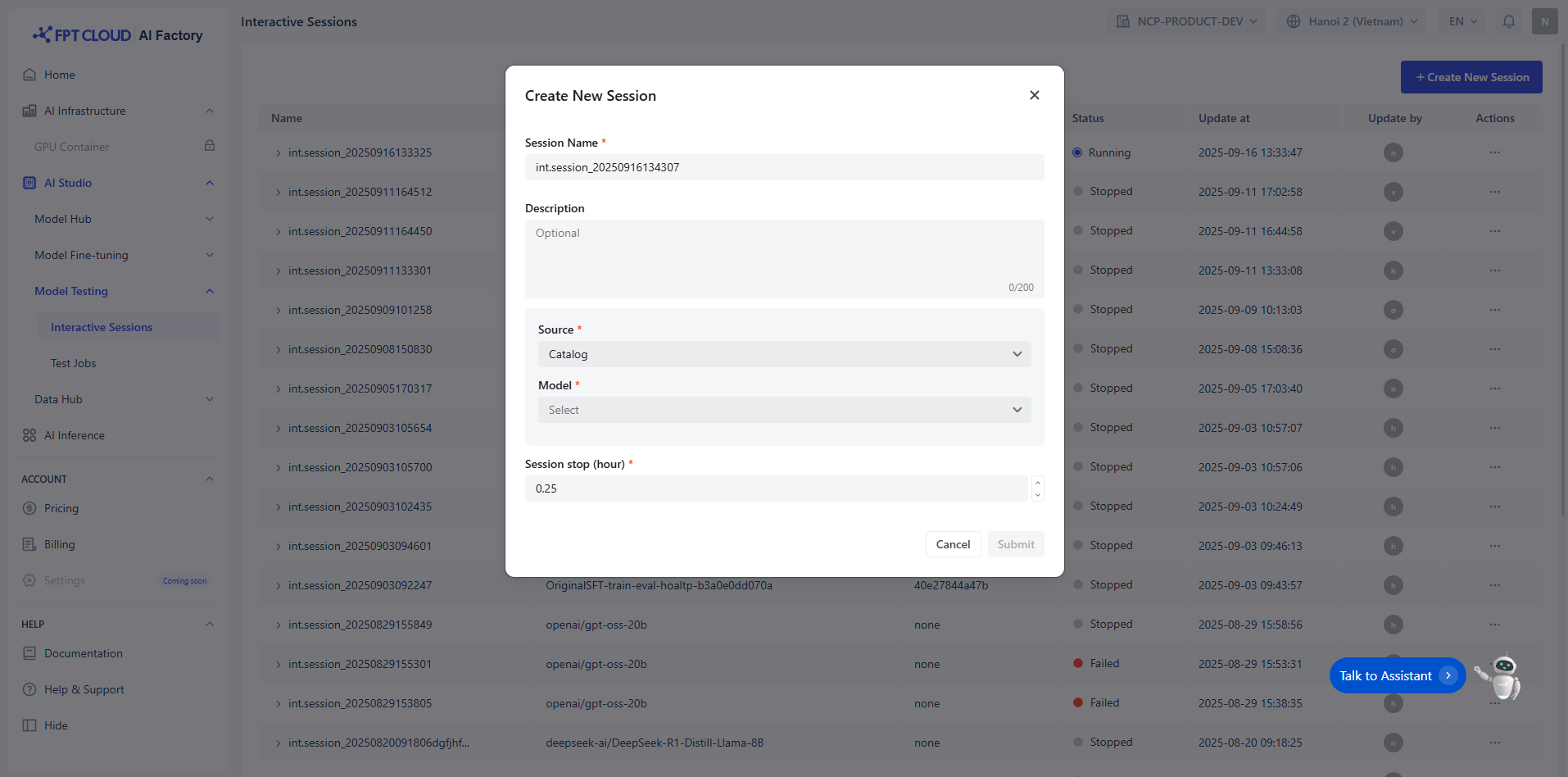
# セッションの作成方法
{% stepper %}
{% step %}
### セッション名と説明を入力
セッションには一意の名前(例:int.session\_20250915155915)を入力する必要があります。以下の条
件を満たす必要があります:
* 最大100文字
オプションのセッション説明(最大200文字)。
{% endstep %}
{% step %}
### モデルを選択
**モデルハブ**からモデルを選択する方法は2通りあります:
* **モデルカタログ:**DeepSeek、Gemma、Llama、Qwenなど、様々なプロバイダーからのモデ
\
ルソースを保管するリポジトリ。
* **プライベートモデル**:ユーザー所有モデルおよび微調整済みモデルのリポジトリ。これらのモ
\
デルには**必要なファイルがすべてアップロード済みである**必要があります。互換性と準備完了
\
を示す**特定のタグ**を含める必要があります。
{% hint style="info" %}
注記:インタラクティブセッションで使用するには、モデルは以下の条件を満たす必要があります:
* **モデルタイプ:**
* LLM: テキスト入力のみ対応
* VLM: テキストと画像の両方の入力に対応
* **モデルサイズ** > 0
* **学習段階**: 必ず**指示調整**済みであること
{% endhint %}
例:
| モデル名 | モデル バージョ ン | モデル ファミ リー | モデルタイプ | モデルサイズ | 学習 ステージ |
| ----------------------------------------------------- | ----------- | ---------- | ------------------------------------------- | ------------------------------------------ | --------------------------------------------------------- |
| ft\_Llama-3.1-8B\_20250508124054\_samples-15d5e2f6fe7 | 15d5e2f6fe7 | Llama |
LLM
(→ 利用可能)
|
8B
(→ 利用可能)
|
Instruction-tuned
(→ 利用可能)
|
| {% endstep %} | | | | | |
{% step %}
### **利用可能**
セッションの終了時刻を選択するには、アイコンを上下に動かして調整してください。
セッションが自動的に終了する条件として、以下のいずれかまたは複数を定義することを推奨します
:
* 最大インタラクション回数
* 継続時間
* モデル固有の制限
これにより、リソースの使用効率が確保され、意図しない長時間セッションが防止されます。
{% endstep %}
{% step %}
### 送信
セッションを確認して送信します
{% hint style="info" %}
注:従量課金制ユーザー向け
パイプラインを正常に実行するには、以下を確
認してください:
* 残高に十分な資金があること。参照ページ:
* 合計で最大20本のパイプラインを作成できます
* 同時に起動できるパイプラインは最大2つまでです
* 各パイプラインは最大2ノードで構成できます
{% endhint %}
{% hint style="info" %}
注:契約書への署名が必要な場合
パイプラインを正常に実行するには、以下を確
認してください:
* 残高に十分な資金があること。参照ページ: [https://ai.fptcloud.com/prici](https://ai.fptcloud.com/pricing)
{% endhint %}
{% endstep %}
{% endstepper %}
---
# Agent Instructions
This documentation is published with GitBook. GitBook is the documentation platform designed so that both humans and AI agents can read, navigate, and reason over technical content effectively. Learn more at gitbook.com.
## Querying This Documentation
If you need additional information that is not directly available in this page, you can query the documentation by asking a question.
Perform an HTTP GET request on the following URL with the `ask` and `goal` query parameters:
```
GET https://ai-docs.fptcloud.com/ai-factory-guideline-jp/fpt-ai-studio/sbisu/moderutesuto-sesshon/chtoriaru/sesshonno.md?ask=&goal=
```
`ask` is the immediate question: it should be specific, self-contained, and written in natural language.
`goal` is what the user is ultimately trying to achieve, the reason they need the answer. Sharing it helps GitBook give you a better, more relevant answer. A goal is most helpful when it describes the outcome the user wants rather than restating the question. For example, with `ask=how do I create an API token`, a goal like `automate deployments from our CI pipeline` lets GitBook tailor the answer to that use case.
The response will contain a direct answer to the question and relevant excerpts and sources from the documentation.
Use this mechanism when the answer is not explicitly present in the current page, you need clarification or additional context, or you want to retrieve related documentation sections.