> For the complete documentation index, see [llms.txt](https://ai-docs.fptcloud.com/llms.txt). Markdown versions of documentation pages are available by appending `.md` to page URLs; this page is available as [Markdown](https://ai-docs.fptcloud.com/ai-factory-guideline-jp/fpt-gpu-cloud/gpu-cluster/gpu-cluster-managed-k8s-with-gpu-virtual-machine/gaidochtoriaru/kurasutasukringu.md).
# クラスタ自動スケーリング
## コンテナレベルの自動スケーリング
* 水平ポッド自動スケーラー(HPA)は、ワークロードリソース(DeploymentやStatefulSetなど)を自動的に更新し、アプリケーションの需要に合わせてリソースを自動スケーリングすることを目的としています。基本的に、Kubernetes上のアプリケーションのワークロードが増加すると、HPAはリソース需要を満たすためにより多くのポッドをデプロイします。負荷が低下しPod数が設定された最小値を超えた場合、HPAはワークロードリソース(Deployment、StatefulSet、その他類似リソース)を縮小します。つまりPod数を再び削減します。GPU向けHPAはDCGMのカスタムメトリクスを使用し、GPU利用アプリケーションのワークロードに基づいてPodを監視・スケーリングします。
* GPUベースのアプリケーション向けにHPAを設定するには、以下の構成を参照してください:
```
apiVersion: autoscaling/v2beta2
kind: HorizontalPodAutoscaler
metadata:
name: my-gpu-app
spec:
maxReplicas: 3 # Update this accordingly
minReplicas: 1
scaleTargetRef:
apiVersion: apps/v1beta1
kind: Deployment
name: my-gpu-app # Add label from Deployment we need to autoscale
metrics:
- type: Pods # scale pod based on gpu
pods:
metric:
name: DCGM_FI_PROF_GR_ENGINE_ACTIVE # Add the DCGM metric here accordingly
target:
type: AverageValue
averageValue: 0.8 # Set the threshold value as per the requirement
```
* 以下のコマンドを使用して、HPAがGPUベースのアプリケーションを起動したかどうかを確認してください:
## ノードレベルの自動スケーリング
通常のクラスター自動スケーリングと同様に、KubernetesクラスターはワーカーグループのGPU使用率要件に基づきワーカーノードを自動的にスケールアップ/ダウンします。具体的には、ワーカーグループで実行中のアプリケーションが当該プール内のワーカーノードから十分なリソース(GPU)を取得できていない場合、そのワーカーグループ内で新しいワーカーを自動的にスケールアップします。
この時点で、ノードリソース不足により保留中だったポッドは、スケールアップ後の新規ワーカーノードによって処理されます。クラスタ自動スケーリング機能は、十分な利用率(デフォルトは50%)に達していないノードも自動的に削除します。
ワーカーグループノード数の設定は、FPT CLOUD Portal上で以下のように定義されます:
## クラスタの自動スケーリングを有効にする
{% stepper %}
{% step %}
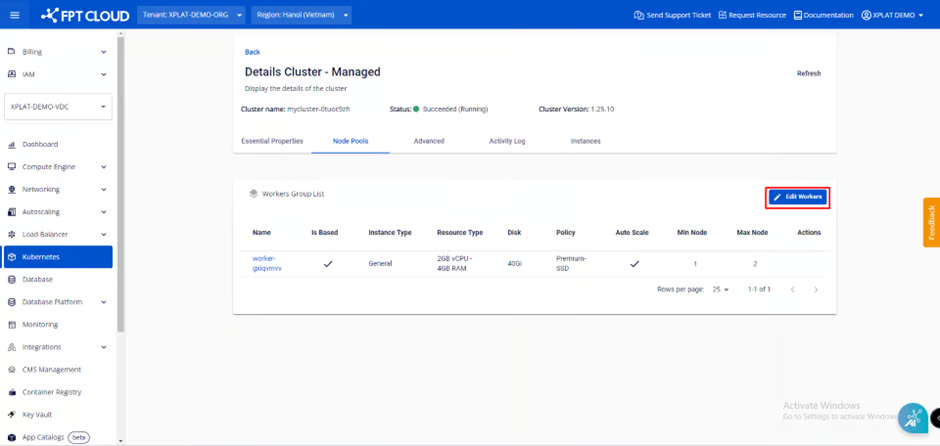
#### ステップ1: メニューから[コンテナ]>[Kubernetes]を選択し、Kubernetes管理ページを表示します。クラスタ自動スケーリング機能を有効化したいクラスタを選択します。
{% endstep %}
{% step %}
#### ステップ2: ノードプールを選択 > ワーカーを編集
{% endstep %}
{% step %}
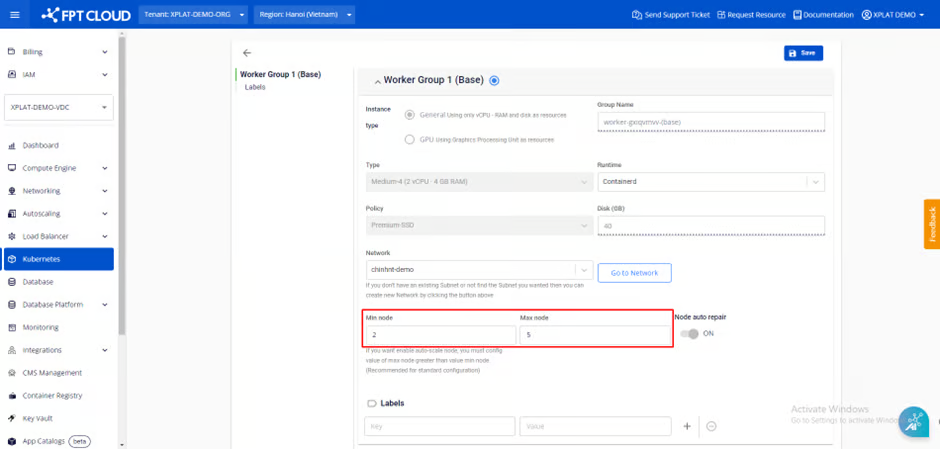
#### ステップ3:ユーザーが選択したサイズ設定に基づき、ワーカーの最小数と最大数を調整する。
#### 注:ワーカーの最大数が最小数より大きい場合、クラスターの自動スケーリング機能が自動的に有効になります。
{% endstep %}
{% step %}
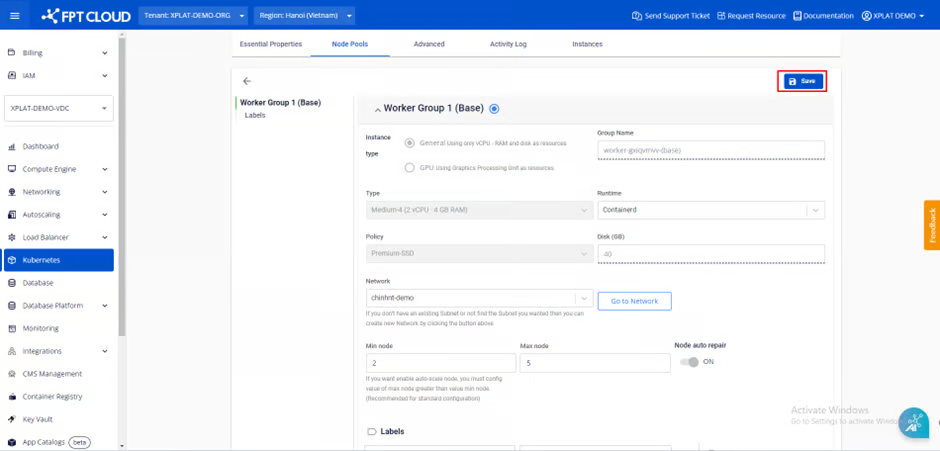
#### ステップ4: 情報を確認し、\[保存]を選択してクラスター自動スケーリング機能を有効にします。
{% endstep %}
{% endstepper %}
## クラスタ自動スケーリングの無効化
{% stepper %}
{% step %}
### ステップ1: メニューから「Kubernetes」を選択し、Kubernetes管理ページを表示します。クラスタ自動スケーリング機能を無効化したいクラスタを選択します。
{% endstep %}
{% step %}
#### ステップ2: ノードプールを選択 > ワーカーを編集
{% endstep %}
{% step %}
#### ステップ3:最小ワーカー数と最大ワーカー数を同じ数値に調整する。
#### 注記: ワーカープールの最小ワーカー数と最大ワーカー数が同じ場合、クラスターの自動スケーリング機能は自動的に無効化されます。
{% endstep %}
{% step %}
#### ステップ4:情報を確認し、「保存」を選択してください。
{% endstep %}
{% endstepper %}
## クラスタの自動スケーリング設定の変更
{% stepper %}
{% step %}
#### ステップ1: メニューから[コンテナ]>[Kubernetes]を選択し、Kubernetes管理ページを表示します。クラスタの自動スケーリング設定をカスタマイズする対象のクラスタを選択します。
{% endstep %}
{% step %}
#### ステップ2: ノードプールを選択 > ワーカーを編集
{% endstep %}
{% step %}
#### ステップ3: 使用状況に応じてワーカーの数を調整してください。
{% endstep %}
{% step %}
#### ステップ4:情報を確認し、「保存」を選択してください。
{% endstep %}
{% endstepper %}
---
# Agent Instructions
This documentation is published with GitBook. GitBook is the documentation platform designed so that both humans and AI agents can read, navigate, and reason over technical content effectively. Learn more at gitbook.com.
## Querying This Documentation
If you need additional information that is not directly available in this page, you can query the documentation dynamically by asking a question.
Perform an HTTP GET request on the current page URL with the `ask` query parameter, and the optional `goal` query parameter:
```
GET https://ai-docs.fptcloud.com/ai-factory-guideline-jp/fpt-gpu-cloud/gpu-cluster/gpu-cluster-managed-k8s-with-gpu-virtual-machine/gaidochtoriaru/kurasutasukringu.md?ask=&goal=
```
`ask` is the immediate question: it should be specific, self-contained, and written in natural language.
`goal` is optional and describes the broader end goal you are ultimately trying to accomplish on behalf of the user. GitBook uses it to tailor the answer towards what is most useful for that goal.
The response will contain a direct answer to the question and relevant excerpts and sources from the documentation.
Use this mechanism when the answer is not explicitly present in the current page, you need clarification or additional context, or you want to retrieve related documentation sections.