> For the complete documentation index, see [llms.txt](https://ai-docs.fptcloud.com/llms.txt). Markdown versions of documentation pages are available by appending `.md` to page URLs; this page is available as [Markdown](https://ai-docs.fptcloud.com/ai-factory-guideline-jp/fpt-gpu-cloud/gpu-cluster/gpu-cluster-managed-k8s-with-gpu-virtual-machine/gaidochtoriaru/kurasutataguke.md).
# クラスタタグ付け
タグ付け機能により、ユーザーは仮想マシンにカスタムタグを割り当てることができ、リソースの分類、検索、管理をより効率的に行えます。
* インテリジェントな分類:環境(本番、ステージング、開発)、プロジェクト、部門、管理プロセスなど、任意の基準に基づいて仮想マシンを簡単に整理できます。
* クイック検索:タグに基づいて、複雑な名前を覚える必要なく、VMを簡単にフィルタリングして検索できます。
* 効率的な管理:タグ付けされたVMグループごとに、コスト追跡、リソース使用状況の監視、レポート生成をサポートします。
* 柔軟なカスタマイズ:タグはカスタマイズ可能で、特定の企業ニーズに合わせて様々な目的に適用できます。
タグ付け機能により、仮想化インフラのより科学的な管理が可能となり、時間の節約とシステム運用効率の向上を実現します。
ポータルでは、タグ付け機能を次のように操作できます:
## 1. タグの作成
MFKEワーカーグループ内の仮想マシンにタグを付けるには、ユーザーは使用目的に応じて事前にタグを作成する必要があります。
## 2. M-FKEに属するワーカーグループを使用するためのタグの割り当て
### 2.1. 新しいクラスターを作成する場合
{% stepper %}
{% step %}
#### ステップ1: Unify Portal で、Kubernetes → マネージド → Kubernetes Engine の作成 を選択し、新しいクラスターを作成します。
{% endstep %}
{% step %}
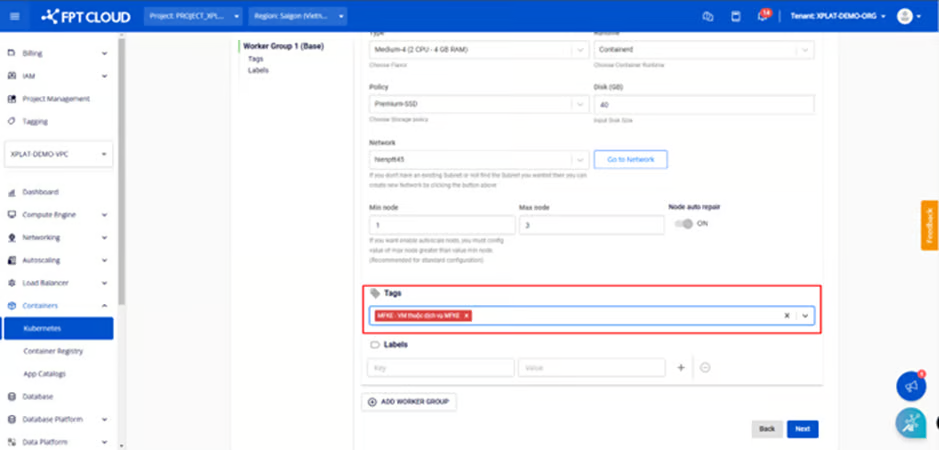
#### ステップ2: \[ノードプール] で、ワーカーグループに使用するタグを選択します。
クラスタに必要なすべての情報を入力し、「Kubernetes Engineを作成」ボタンをクリックします。
{% endstep %}
{% endstepper %}
### 2.2. ワーカーグループのタグ編集
{% stepper %}
{% step %}
#### ステップ1: メニューから「コンテナ」>「Kubernetes」を選択し、Kubernetes管理ページを表示します。編集したいタグを持つクラスターを選択します。
{% endstep %}
{% step %}
#### ステップ2: ノードプールを選択 > ワーカーを編集
{% endstep %}
{% step %}
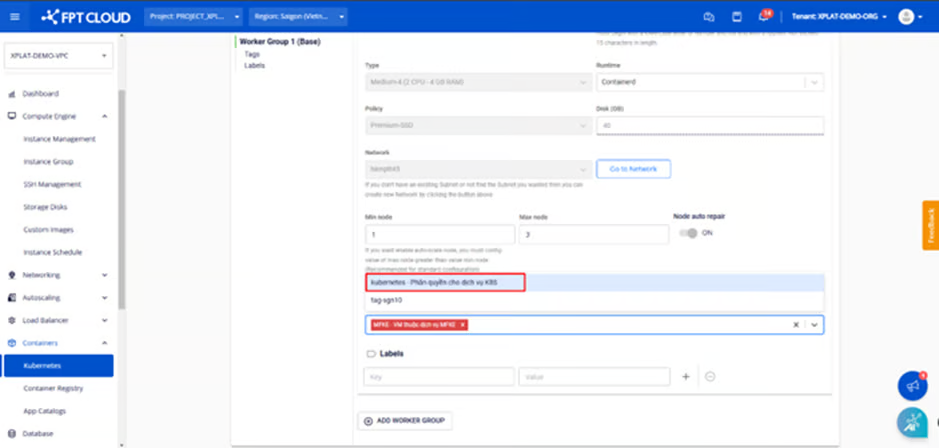
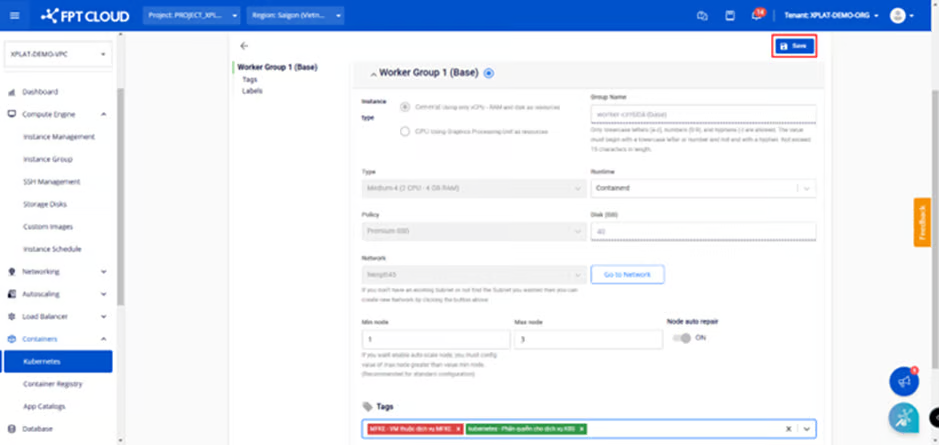
#### ステップ3: ワーカーグループにタグを追加し、\[保存]ボタンをクリックします。
タグ編集は数分で完了し、クラスターのステータスは「処理中」に変わります。この処理中は、ユーザーはクラスターを編集できません。
{% endstep %}
{% endstepper %}
### 2.3. ワーカーグループからのタグの削除
{% stepper %}
{% step %}
#### ステップ1: ノードプールを選択 > ワーカーを編集
{% endstep %}
{% step %}
#### ステップ2:❎マークをクリックしてワーカーグループからタグを削除し、\[保存]をクリックします。
タグの削除は数分以内に実行され、クラスターのステータスは「**処理中**」に変わります。プロセスが完了するまで、ユーザーはクラスター編集操作を実行できません。
{% endstep %}
{% endstepper %}
---
# Agent Instructions
This documentation is published with GitBook. GitBook is the documentation platform designed so that both humans and AI agents can read, navigate, and reason over technical content effectively. Learn more at gitbook.com.
## Querying This Documentation
If you need additional information that is not directly available in this page, you can query the documentation dynamically by asking a question.
Perform an HTTP GET request on the current page URL with the `ask` query parameter, and the optional `goal` query parameter:
```
GET https://ai-docs.fptcloud.com/ai-factory-guideline-jp/fpt-gpu-cloud/gpu-cluster/gpu-cluster-managed-k8s-with-gpu-virtual-machine/gaidochtoriaru/kurasutataguke.md?ask=&goal=
```
`ask` is the immediate question: it should be specific, self-contained, and written in natural language.
`goal` is optional and describes the broader end goal you are ultimately trying to accomplish on behalf of the user. GitBook uses it to tailor the answer towards what is most useful for that goal.
The response will contain a direct answer to the question and relevant excerpts and sources from the documentation.
Use this mechanism when the answer is not explicitly present in the current page, you need clarification or additional context, or you want to retrieve related documentation sections.