> For the complete documentation index, see [llms.txt](https://ai-docs.fptcloud.com/llms.txt). Markdown versions of documentation pages are available by appending `.md` to page URLs; this page is available as [Markdown](https://ai-docs.fptcloud.com/ai-factory-guideline-jp/fpt-gpu-cloud/gpu-cluster/gpu-cluster-managed-k8s-with-metal-cloud/chtoriaru/2-kurasutnoniakusesusuru.md).
# 2. クラスターの詳細情報にアクセスする
{% stepper %}
{% step %}
**ステップ 1**:メニューで**「マネージド GPU クラスター」**を選択すると、システムは**「Managed GPU Management」**ページを表示します。詳細情報を表示したいクラスターを選択してください
{% endstep %}
{% step %}
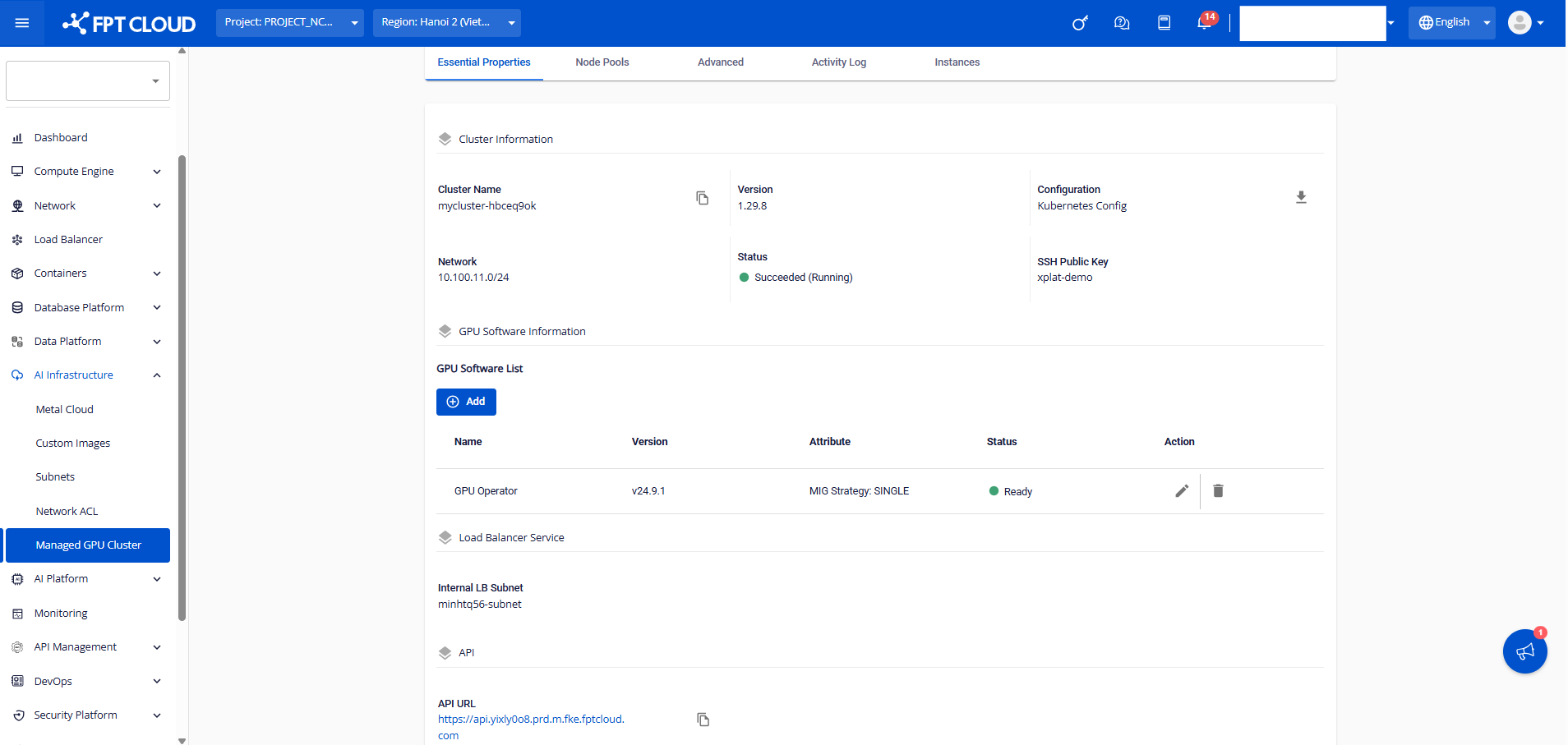
**ステップ 2: \[Essential Properties]** タブにクラスターの情報が表示されます。
**1. クラスター情報**:クラスターに関する基本情報には、以下のものが含まれます。
\- Cluster Name:クラスターの作成時に設定した名前
\- Version:クラスターのバージョン
\- Configuration:クラスターと通信するために kube-config をダウンロードできるようにします。
\- ネットワーク:クラスター作成時に選択したサブネット範囲
\- ステータス:クラスターの実際のステータス
\- SSH 公開鍵:クラスターの作成時に選択した公開鍵の情報
**2. GPU ソフトウェアリスト**:クラスターにインストールされているすべての GPU ソフトウェアを表示
**3. Load Balancer Service:** 入力した内部 LB サブネットの情報
**4. API:**クラスターへのAPI URL
{% endstep %}
{% step %}
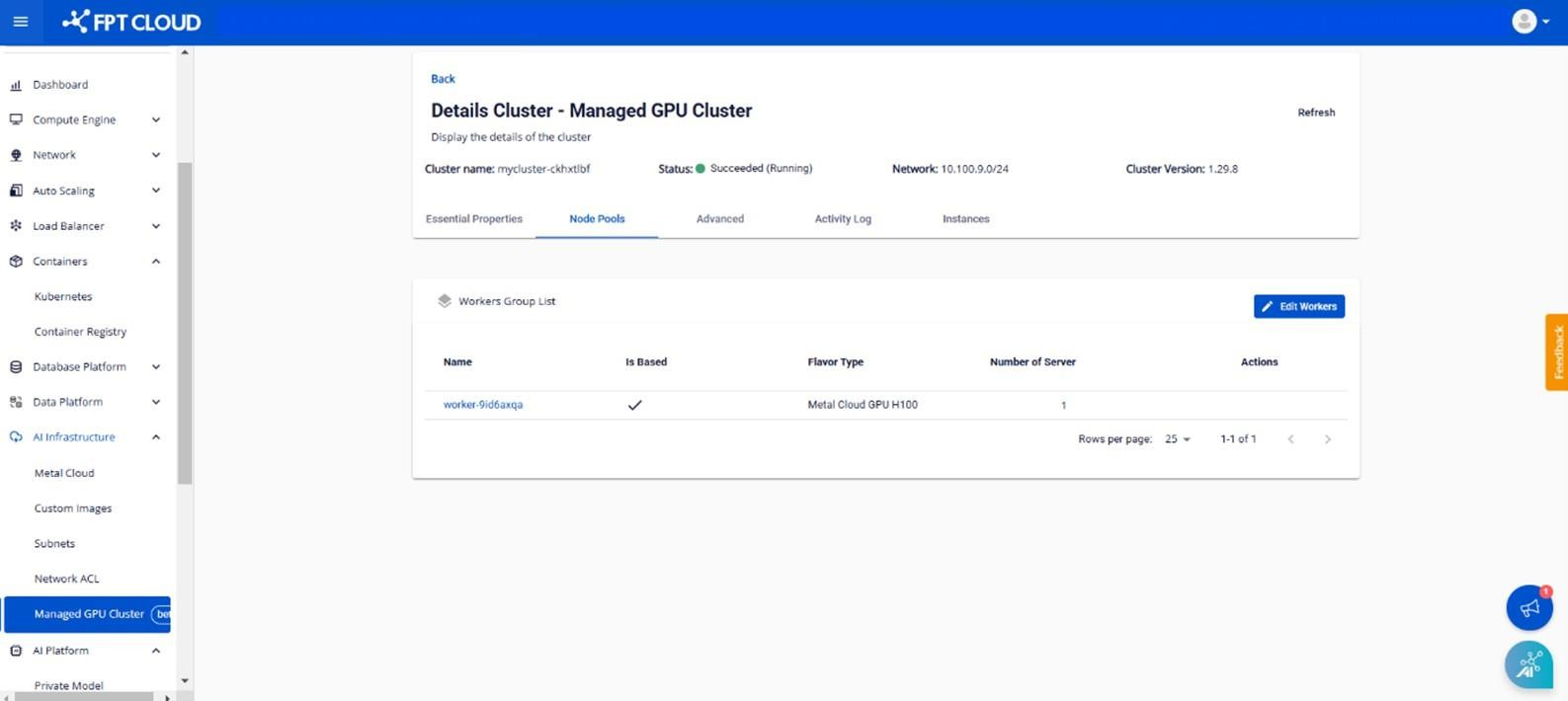
**ステップ 3: \[Node Pools]** タブには、クラスターに属するすべてのワーカーグループと、各ワーカーグループの設定情報が表示されます。
\- **Name:**ワーカーグループの名前
\- **Is Based:** ワーカーベースの場合は (✅)、ワーカーベースでない場合は (✘) を表示
\- **Flavor Type:** 選択したリソースフレーバーを表示
\- **Number of Server:** ワーカーのメタルクラウドサーバーの数
{% endstep %}
{% endstepper %}
---
# Agent Instructions
This documentation is published with GitBook. GitBook is the documentation platform designed so that both humans and AI agents can read, navigate, and reason over technical content effectively. Learn more at gitbook.com.
## Querying This Documentation
If you need additional information that is not directly available in this page, you can query the documentation dynamically by asking a question.
Perform an HTTP GET request on the current page URL with the `ask` query parameter, and the optional `goal` query parameter:
```
GET https://ai-docs.fptcloud.com/ai-factory-guideline-jp/fpt-gpu-cloud/gpu-cluster/gpu-cluster-managed-k8s-with-metal-cloud/chtoriaru/2-kurasutnoniakusesusuru.md?ask=&goal=
```
`ask` is the immediate question: it should be specific, self-contained, and written in natural language.
`goal` is optional and describes the broader end goal you are ultimately trying to accomplish on behalf of the user. GitBook uses it to tailor the answer towards what is most useful for that goal.
The response will contain a direct answer to the question and relevant excerpts and sources from the documentation.
Use this mechanism when the answer is not explicitly present in the current page, you need clarification or additional context, or you want to retrieve related documentation sections.