> For the complete documentation index, see [llms.txt](https://ai-docs.fptcloud.com/llms.txt). Markdown versions of documentation pages are available by appending `.md` to page URLs; this page is available as [Markdown](https://ai-docs.fptcloud.com/ai-factory-guideline-jp/fpt-gpu-cloud/gpu-cluster/gpu-cluster-managed-k8s-with-metal-cloud/chtoriaru/4-kurasutni-gpu-sofutoweawosuru.md).
# 4. クラスターに GPU ソフトウェアを追加する機能
**GPUソフトウェアは、GPUが**コンテナ/Kubernetes環境で正しく動作するためのサポートソフトウェアです。
FPT CLOUD は、クラスターの作成時から GPU ソフトウェアのインストールをサポートしています。また、お客様は既存のクラスターにインストールすることもできます。GPU ソフトウェアを追加するには、以下の手順に従ってください。
{% stepper %}
{% step %}
**ステップ 1:**メニューで**「AIインフラ」**>**「マネージド GPU クラスター」**を選択すると、**GPU Cluster Management** ページが表示されます。GPU ソフトウェアを追加するクラスターを選択してください。
{% endstep %}
{% step %}
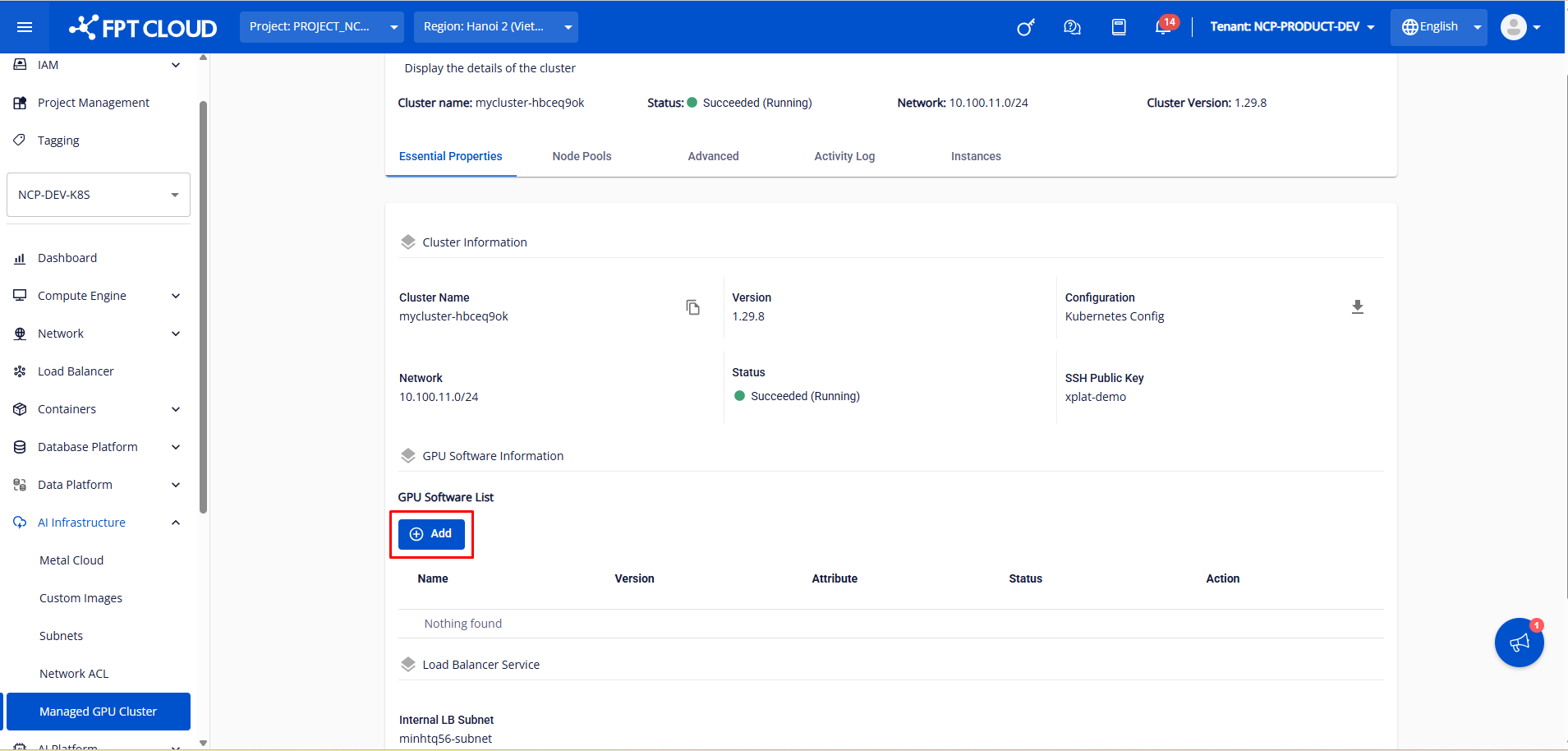
**ステップ 2:\[Essential Properties]** タブで、**\[Add]** ボタンをクリックします
{% endstep %}
{% step %}
**ステップ 3:**クラスターにインストールする GPU ソフトウェアを選択し、**\[保存]** ボタンをクリックします
システムは、GPUオペレータをクラスターに数分でインストールします。インストールが成功すると、ステータスは「Ready」に変わります
GPU オペレータをクラスターにインストールすると、システムは自動的に Worker MIG Strategy = None をインストールします。お客様は、使用ニーズに応じて Worker MIG Strategy および MIG Profile を変更することができます。
{% endstep %}
{% endstepper %}
---
# Agent Instructions
This documentation is published with GitBook. GitBook is the documentation platform designed so that both humans and AI agents can read, navigate, and reason over technical content effectively. Learn more at gitbook.com.
## Querying This Documentation
If you need additional information that is not directly available in this page, you can query the documentation dynamically by asking a question.
Perform an HTTP GET request on the current page URL with the `ask` query parameter, and the optional `goal` query parameter:
```
GET https://ai-docs.fptcloud.com/ai-factory-guideline-jp/fpt-gpu-cloud/gpu-cluster/gpu-cluster-managed-k8s-with-metal-cloud/chtoriaru/4-kurasutni-gpu-sofutoweawosuru.md?ask=&goal=
```
`ask` is the immediate question: it should be specific, self-contained, and written in natural language.
`goal` is optional and describes the broader end goal you are ultimately trying to accomplish on behalf of the user. GitBook uses it to tailor the answer towards what is most useful for that goal.
The response will contain a direct answer to the question and relevant excerpts and sources from the documentation.
Use this mechanism when the answer is not explicitly present in the current page, you need clarification or additional context, or you want to retrieve related documentation sections.