> For the complete documentation index, see [llms.txt](https://ai-docs.fptcloud.com/llms.txt). Markdown versions of documentation pages are available by appending `.md` to page URLs; this page is available as [Markdown](https://ai-docs.fptcloud.com/ai-factory-guideline-jp/fpt-gpu-cloud/gpu-cluster/gpu-cluster-managed-k8s-with-metal-cloud/chtoriaru/8-wkgurpuwosuru.md).
# 8. ワーカーグループを追加する
マネージド GPU クラスターでは、ユーザーは使用ニーズに応じてクラスターにワーカーグループを追加できます。ワーカーを追加するには、ポータルで以下の操作を行ってください。
{% stepper %}
{% step %}
**ステップ 1:**メニューで**「AIインフラ」**>**「マネージド GPU クラスター」**を選択すると、システムが**「Managed GPU Management」**ページを表示します。**Managed GPU Management** が表示されます。ワーカーグループを追加したいクラスターを選択してください
{% endstep %}
{% step %}
**ステップ 2:Node Pools** > **Edit Workers** を選択しま
{% endstep %}
{% step %}
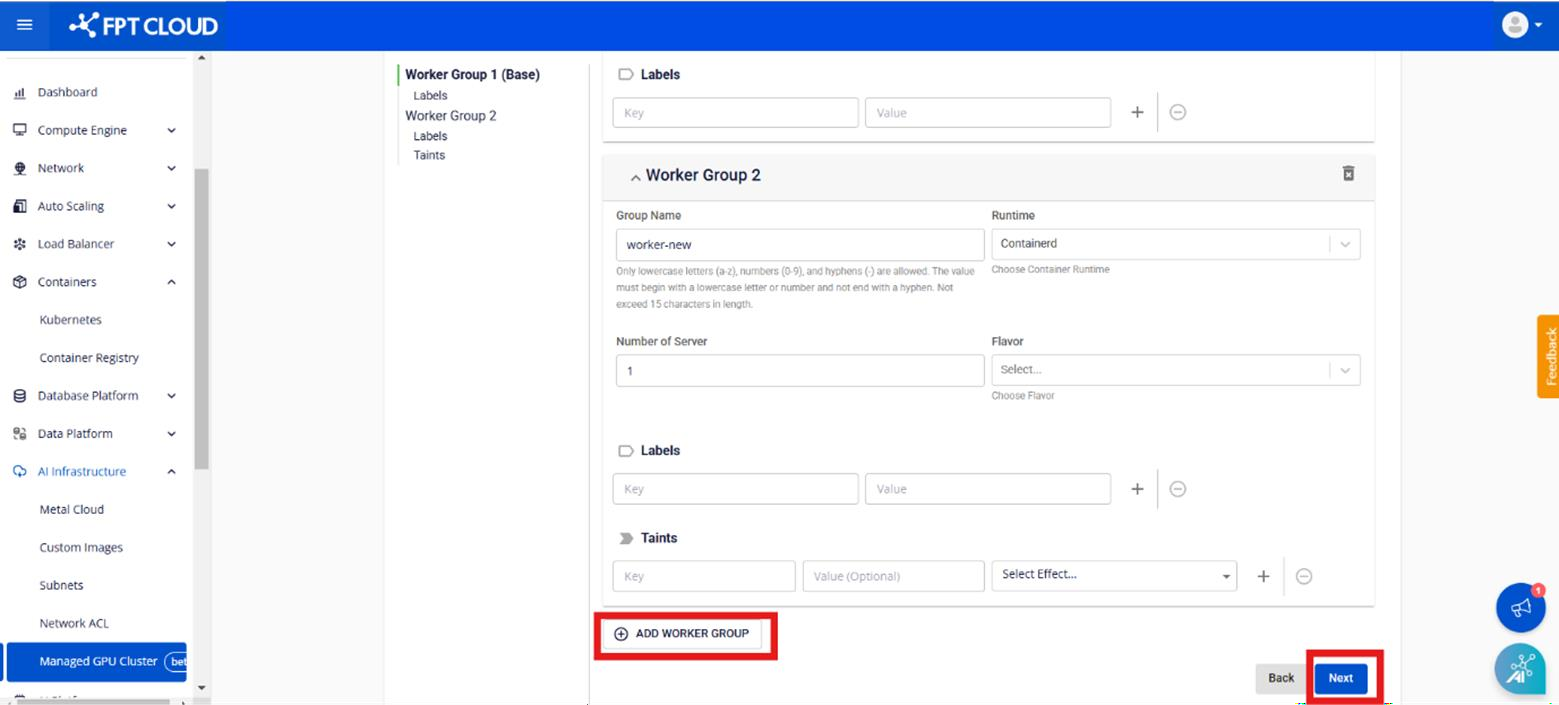
**ステップ 3: Add Worker Group** を選択します。
{% endstep %}
{% step %}
**ステップ 4:**必要な情報を各フィールドに入力し、**\[保存]** をクリックします。
**- グループ名:**ワーカーグループを区別するためにワーカーグループに名前を付けます。
**- コンテナランタイム:**コンテナランタイムを選択します。現在、システムは Containerd コンテナランタイムのみをサポートしています
**- フレーバー:**ワーカー GPU のフレーバーリソース
**- サーバー数:**クラスター内でワーカーを実行するために作成される Metal Cloud サーバーの数
**- ラベル:**ワーカーグループにラベルを付ける
\- **Taint:** ワーカーグループに Taint を付ける
#### 注意:クラスターの追加プロセスは数分以内に実行され、クラスターのステータスは「処理中」に変わります。新しいワーカーグループの追加を実行しても、クラスターは正常に動作し続けます。
{% endstep %}
{% endstepper %}
---
# Agent Instructions
This documentation is published with GitBook. GitBook is the documentation platform designed so that both humans and AI agents can read, navigate, and reason over technical content effectively. Learn more at gitbook.com.
## Querying This Documentation
If you need additional information that is not directly available in this page, you can query the documentation dynamically by asking a question.
Perform an HTTP GET request on the current page URL with the `ask` query parameter, and the optional `goal` query parameter:
```
GET https://ai-docs.fptcloud.com/ai-factory-guideline-jp/fpt-gpu-cloud/gpu-cluster/gpu-cluster-managed-k8s-with-metal-cloud/chtoriaru/8-wkgurpuwosuru.md?ask=&goal=
```
`ask` is the immediate question: it should be specific, self-contained, and written in natural language.
`goal` is optional and describes the broader end goal you are ultimately trying to accomplish on behalf of the user. GitBook uses it to tailor the answer towards what is most useful for that goal.
The response will contain a direct answer to the question and relevant excerpts and sources from the documentation.
Use this mechanism when the answer is not explicitly present in the current page, you need clarification or additional context, or you want to retrieve related documentation sections.