> For the complete documentation index, see [llms.txt](https://ai-docs.fptcloud.com/llms.txt). Markdown versions of documentation pages are available by appending `.md` to page URLs; this page is available as [Markdown](https://ai-docs.fptcloud.com/ai-factory-guideline-jp/fpt-gpu-cloud/gpukontena/kuikkusutto.md).
# クイックスタート
#### アカウント登録
**ステップ 1: アカウントを作成**
1. にアクセスし、FPT ID アカウントに登録するか、Google アカウントで続行してください。
2. FPT ID アカウントで登録した場合は、FPT Smart Cloud ( ) からの指示が記載されたメールを確認してアカウントを認証してください。
**ステップ 2:** [**https://ai.fptcloud.jp/**](https://ai.fptcloud.jp/) **に戻り、新規アカウントでログインしてください(FPT ID をご利用の場合)。**
[](https://fptcloud.com/wp-content/uploads/2025/07/Screenshot-2025-07-04-175942.png)
#### ステップバイステップ
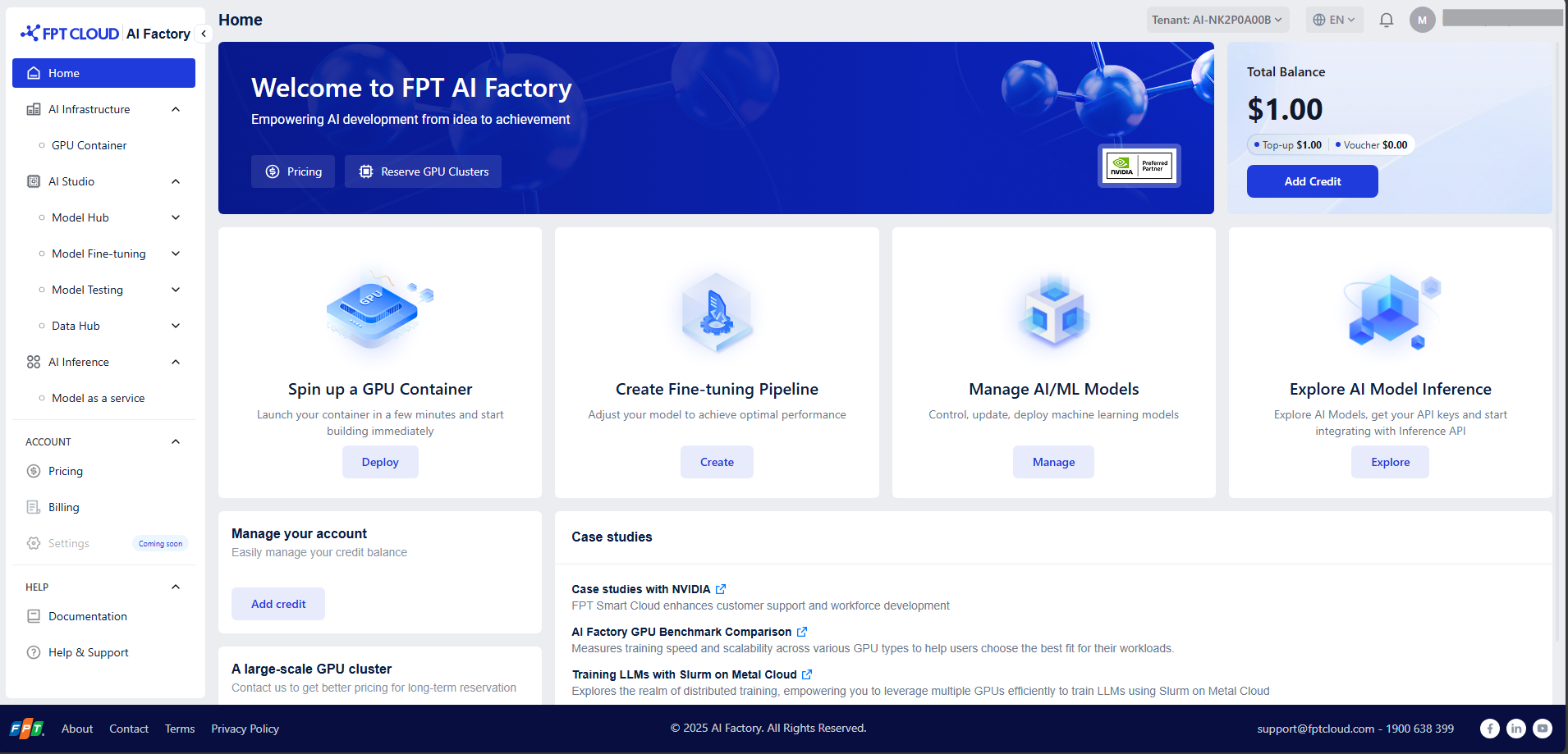
ai.fptcloud.com の FPT AI Factory ポータルにログイン後、以下の手順に従ってください:
**ステップ1: アカウントへのクレジット追加**
1. 「ACCOUNT」セクションに移動し、「Billing」をクリック
2. 「Add Credit」ボタンをクリックし、金額と支払い情報を入力して完了してください。
または、FPT発行のバウチャーをお持ちの場合は、「Add Voucher」セクションで有効なコードを入力し、クレジットを交換してください。
**ステップ2: GPUコンテナの作成**
1. サイドメニューで「GPUコンテナ」を選択します。
2. 「Create New GPU Container」ボタンをクリックし、コンテナのデプロイメントを設定します。
3. 詳細なガイドは[こちら](/ai-factory-guideline-jp/fpt-gpu-cloud/gpukontena/chtoriaru/kontenano.md)をご覧ください:
**ステップ3: コンテナへの接続**
1. コンテナ一覧ページで、コンテナ名をクリックするとコンテナ詳細画面にアクセスできます。
2. 「コンテナへのアクセス」セクションの設定に応じて、接続方法を選択してください:HTTPエンドポイント、ターミナル経由のSSH接続
3. 詳細な手順は[こちら](/ai-factory-guideline-jp/fpt-gpu-cloud/gpukontena/chtoriaru/kontenaheno.md)を参照してください
**ステップ4: コンテナを停止する**
不要な課金が発生しないよう、必ず以下の操作を行ってください:
1. コンテナ一覧ページに戻ります。
2. 操作列の停止ボタンをクリックしてコンテナを停止します。
3. 「確認」をクリックして確定してください。
コンテナを完全に削除するには、[こちら](/ai-factory-guideline-jp/fpt-gpu-cloud/gpukontena/chtoriaru/kontenano-1.md)の詳細ガイドに従ってください[。](https://fptsoftware362.sharepoint.com/:w:/r/sites/FCI_CLOUD/XPLAT/Shared%20Documents/PRODUCT/FKE/Documentation/2.%20T%C3%A0i%20li%E1%BB%87u%20h%E1%BB%87%20th%E1%BB%91ng/GPU%20-%20MLops/GPU%20Container/00.%20User%20Guide/%5BGPU%20Container%5D%20User%20Guide_Customer.docx?d=w1fad2eb2405b4182843cf457a81791f9\&csf=1\&web=1\&e=5RhvqI\&nav=eyJoIjoiODk2NTc0NTE1In0%3D)
---
# Agent Instructions
This documentation is published with GitBook. GitBook is the documentation platform designed so that both humans and AI agents can read, navigate, and reason over technical content effectively. Learn more at gitbook.com.
## Querying This Documentation
If you need additional information that is not directly available in this page, you can query the documentation dynamically by asking a question.
Perform an HTTP GET request on the current page URL with the `ask` query parameter, and the optional `goal` query parameter:
```
GET https://ai-docs.fptcloud.com/ai-factory-guideline-jp/fpt-gpu-cloud/gpukontena/kuikkusutto.md?ask=&goal=
```
`ask` is the immediate question: it should be specific, self-contained, and written in natural language.
`goal` is optional and describes the broader end goal you are ultimately trying to accomplish on behalf of the user. GitBook uses it to tailor the answer towards what is most useful for that goal.
The response will contain a direct answer to the question and relevant excerpts and sources from the documentation.
Use this mechanism when the answer is not explicitly present in the current page, you need clarification or additional context, or you want to retrieve related documentation sections.