> For the complete documentation index, see [llms.txt](https://ai-docs.fptcloud.com/llms.txt). Markdown versions of documentation pages are available by appending `.md` to page URLs; this page is available as [Markdown](https://ai-docs.fptcloud.com/ai-factory-guideline-jp/fpt-gpu-cloud/metal-cloud/chtoriaru/sabunetto.md).
# サブネット
サブネットは、クラウドネットワーク内のIPアドレスの範囲です。この範囲のアドレスは、Metal Cloud内の1つまたは複数のサーバーに割り当てられます。IPv4のみがサポートされています。
#### サブネットの作成
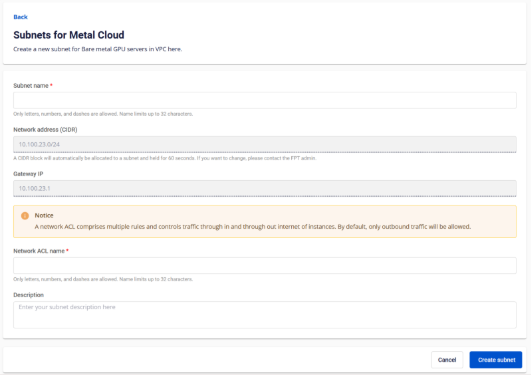
* CIDR範囲は自動的に割り当てられます。画面上では60秒間保持され、その後新しい範囲に更新されます。
* サブネット作成にはネットワークACLが必要です。デフォルトでは、ベアメタルGPUサーバーからインターネットへのアウトバウンドトラフィックのみ許可されます。
* サブネットのクォータは、ベアメタルGPUサーバーのクォータと同等です。
1. FPT Cloudアカウントにサインインし、テナント、リージョン、VPCを選択します(複数存在する場合は)。
2. サイドバーで「AI Infrastructure」と「Metal Cloud」の「Subnet」に移動し、「Create subnet」をクリックします
3. サブネット名を入力します
4. ネットワークACL名を入力します
5. ネットワークACLの説明を入力します(任意)
6. 「サブネットの作成」をクリックします
#### サブネットを削除する
`他のリソースに関連付けられているサブネットは削除できません。`
1. Metal Cloud の AI インフラストラクチャとサブネットに移動
2. サーバーリストを表示するには、サイドバーで「AI インフラストラクチャ」と「Metal Cloud のサブネット」に移動します
3. サブネットを選択し、「アクション」をクリック
4. 削除をクリック
5. 「DELETE」と入力して削除を確認
#### サブネット名の更新
`サブネット名は既存の名前と重複することができます。`
1. サブネットを選択し、\[操作] をクリックします
2. 名前を変更をクリック
3. 新しいサブネット名を入力します。ルールに従ってください:名前は最大32文字までで、使用できるのは英字、数字、ハイフンのみです
4. サブネットの名前変更をクリック
#### サブネットの説明を更新する
1. サブネットを選択し、\[アクション] をクリックします
2. 説明を更新をクリック
3. 新しい説明を入力します。長さは63文字以下である必要があります
4. 保存をクリック
---
# Agent Instructions
This documentation is published with GitBook. GitBook is the documentation platform designed so that both humans and AI agents can read, navigate, and reason over technical content effectively. Learn more at gitbook.com.
## Querying This Documentation
If you need additional information that is not directly available in this page, you can query the documentation by asking a question.
Perform an HTTP GET request on the following URL with the `ask` and `goal` query parameters:
```
GET https://ai-docs.fptcloud.com/ai-factory-guideline-jp/fpt-gpu-cloud/metal-cloud/chtoriaru/sabunetto.md?ask=&goal=
```
`ask` is the immediate question: it should be specific, self-contained, and written in natural language.
`goal` is what the user is ultimately trying to achieve, the reason they need the answer. Sharing it helps GitBook give you a better, more relevant answer. A goal is most helpful when it describes the outcome the user wants rather than restating the question. For example, with `ask=how do I create an API token`, a goal like `automate deployments from our CI pipeline` lets GitBook tailor the answer to that use case.
The response will contain a direct answer to the question and relevant excerpts and sources from the documentation.
Use this mechanism when the answer is not explicitly present in the current page, you need clarification or additional context, or you want to retrieve related documentation sections.