> For the complete documentation index, see [llms.txt](https://ai-docs.fptcloud.com/llms.txt). Markdown versions of documentation pages are available by appending `.md` to page URLs; this page is available as [Markdown](https://ai-docs.fptcloud.com/ai-factory-guideline-jp/fpt-gpu-cloud/metal-cloud/chtoriaru/server-deployment.md).
# サーバーの作成
FPTカスタマーポータルからベアメタルサーバーを展開できます。FPTがプロビジョニング、OSインストール、設定を、お客様が選択した設定に基づいて行います。展開が完了すると、SSHキーまたはパスワードを使用してSSH経由でサーバーにアクセスできます。
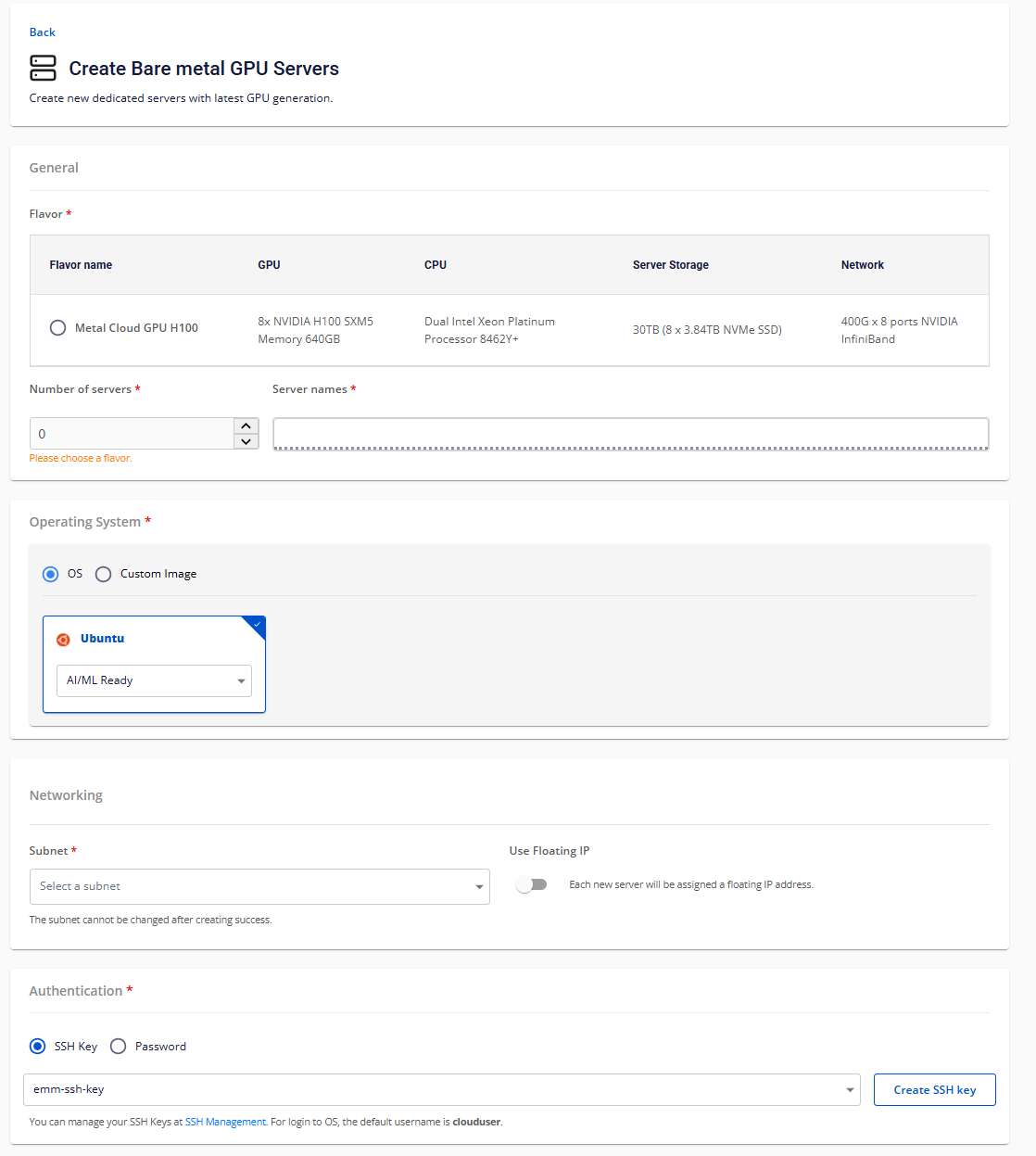
1. FPT Cloudアカウントにサインインし、**テナント、リージョン、VPC**を選択します(複数存在する場合は)。
2. サイドバーの「**AIインフラストラクチャ**」→「**Metal Cloud**」に移動し、「**サーバーを作成**」をクリックします。
3. **Flavor**を選択します(利用可能な種類はリージョンによって異なります)。
4. 一度にデプロイする**サーバーの数**を入力します(最大数はクォータによって異なります)。
5. **サーバー名**を入力してください
6. オペレーティングシステムを選択します \
ご希望のOSが提供されていない場合は、[カスタムイメージ](https://wiki.fci.vn/display/NCPP/Metal+Cloud+OS+and+Images?src=contextnavpagetreemode)を使用できます。
7. 利用可能な**サブネット**を選択してください
\
サブネットなしではサーバーを展開できません。サーバーの作成と展開前に必ず作成してください。
8. **フローティングIP**の接続を選択(任意)
9. 認証方法として、SSHキーまたはコンソールパスワードを選択できます:
利用可能なSSHキーを選択するか、新規に追加してください(SSHキーの作成と追加についてはこちらをご覧ください)
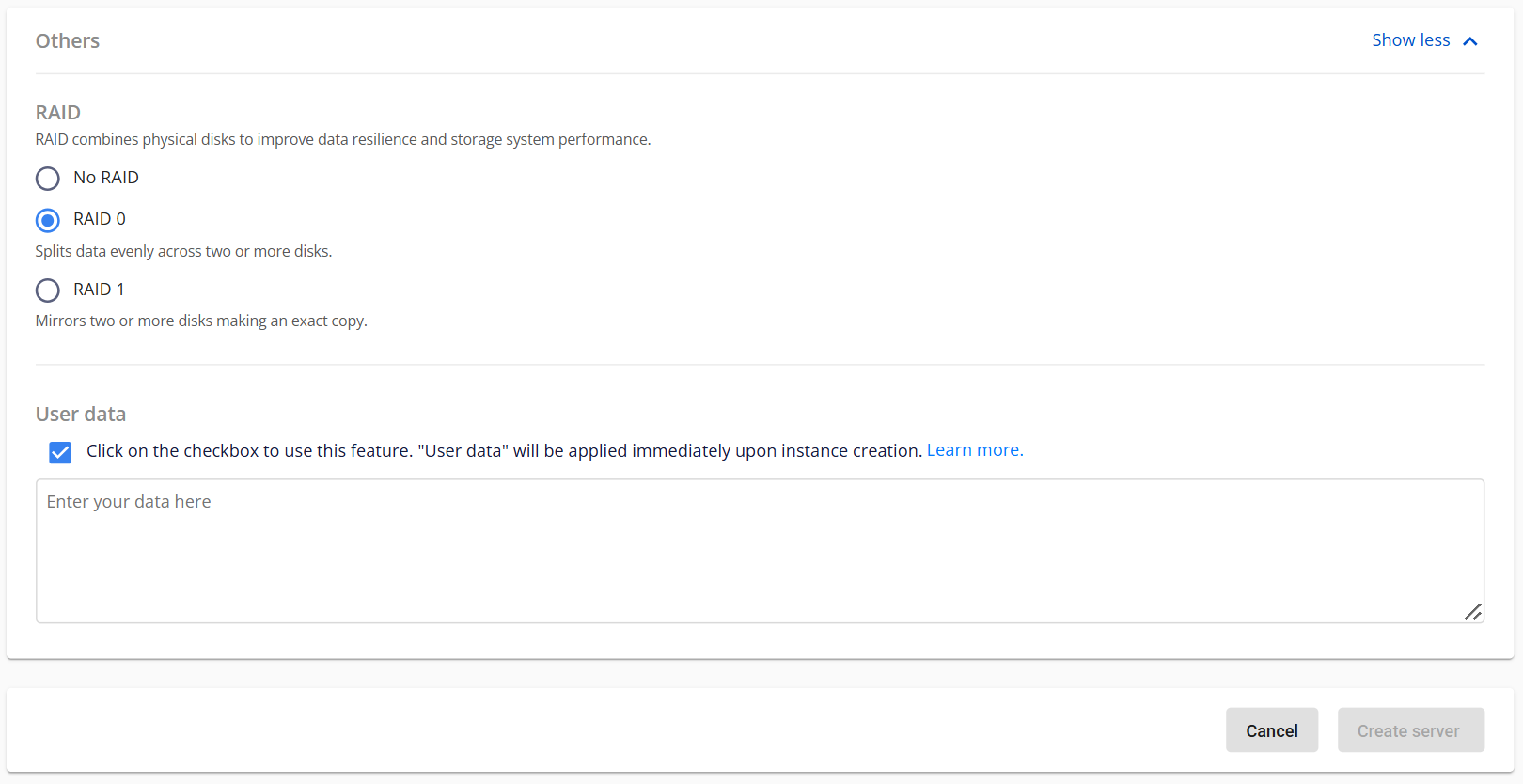
10. RAIDの設定(オプション)
11. ユーザーデータスクリプトの選択または作成(オプション)ユーザーデータスクリプトは、クラウドイニシャライゼーションプロセスを通じてサーバーの初回起動時に自動的に実行されます。
12. サーバーの作成をクリック
---
# Agent Instructions
This documentation is published with GitBook. GitBook is the documentation platform designed so that both humans and AI agents can read, navigate, and reason over technical content effectively. Learn more at gitbook.com.
## Querying This Documentation
If you need additional information that is not directly available in this page, you can query the documentation dynamically by asking a question.
Perform an HTTP GET request on the current page URL with the `ask` query parameter, and the optional `goal` query parameter:
```
GET https://ai-docs.fptcloud.com/ai-factory-guideline-jp/fpt-gpu-cloud/metal-cloud/chtoriaru/server-deployment.md?ask=&goal=
```
`ask` is the immediate question: it should be specific, self-contained, and written in natural language.
`goal` is optional and describes the broader end goal you are ultimately trying to accomplish on behalf of the user. GitBook uses it to tailor the answer towards what is most useful for that goal.
The response will contain a direct answer to the question and relevant excerpts and sources from the documentation.
Use this mechanism when the answer is not explicitly present in the current page, you need clarification or additional context, or you want to retrieve related documentation sections.