> For the complete documentation index, see [llms.txt](https://ai-docs.fptcloud.com/llms.txt). Markdown versions of documentation pages are available by appending `.md` to page URLs; this page is available as [Markdown](https://ai-docs.fptcloud.com/api-reference/ai-marketplace/guideline-for-fine-tuning-with-lora-md.md).
# Guideline for Fine-tuning with LoRA.md
> This guide focuses on fine-tuning with LoRA and deploying a model with on-demand and serverless hosting.
### 1. Recommended configuration
We currently support fine-tuning models with the following architectures:
| Model (Resource) | Learning Rate | Suggested Epochs |
| ----------------------------------------------- | ------------------------------------------------------------------------------------------------ | ---------------------------------------- |
| **Qwen-3 / Qwen3-4B-Instruct** (template 1 GPU) | Small dataset: 1e-5 → 5e-5
medium/large dataset: 5e-5 → 1e-4
| Small dataset: 1–3
medium: 3–5
|
| **google/gemma-3-27b-it** (template 2 GPUs) | Small dataset: 1e-5 → 5e-5
medium/large dataset: 5e-5 → 1e-4
| 3 (start) |
| **meta-llama/Llama-3.3-70B** (template 4 GPUs) | Small dataset: 1e-5 → 2e-5
medium/large dataset: 2e-5 → 1e-4
| 3 (start) |
* Small dataset: Under 1000 samples
* Medium: 1K-10K samples
* Large: Over 10K samples
### 2. Dataset Format
| Dataset Type | Link to Sample | Note |
| ------------------- | ----------------------------------------------------------------------------------------------------------------------- | ------------------------------------------------------------------------------------------------ |
| **Alpaca** | [Alpaca Sample](https://github.com/fpt-corp/ai-studio-samples/tree/main/sample-datasets/alpaca) | Easy to prepare, suitable for basic instruction tuning use cases (summarization, QA, rewriting). |
| **ShareGPT** | [ShareGPT Sample](https://github.com/fpt-corp/ai-studio-samples/tree/main/sample-datasets/sharegpt/sharegpt_3k_samples) | Suitable when users want to fine-tune a chatbot with multi-turn conversation capability. |
| **ShareGPT\_Image** | [ShareGPT\_Image Sample](https://github.com/fpt-corp/ai-studio-samples/tree/main/sample-datasets/sharegpt-image) | Designed for advanced users working on multimedia AI. |
In the fine-tuning process, **data** refers to a curated set of example inputs and outputs used to retrain a pre-trained AI model.\
This data teaches the model to adapt its behavior to suit your **specific domain, task, or tone of voice**.
#### **2.1. Alpaca**
**Alpaca** uses a very simple structure to fine-tune the model with Instruction-following format with input, output pairs for **supervised fine-tuning** tasks. The basic structure includes:
* **Instruction**: A string containing the specific task or request that the model needs to perform.
* **Input**: A string containing the information that the model needs to process in order to carry out the task.
* **Output**: A string representing the result the model should return, generated from processing the instruction and input.
**Detailed Structure:**
\[ { “instruction”: “string”, “input”: “string”, “output” “string” } ]
**Examples**:
```json
[
{
"instruction": "In this task, you are given Wikipedia articles on a range of topics as passages and a question from the passage. We ask you to answer the question by classifying the answer as 0 (False) or 1 (True)\n\nNow complete the following instance -\nInput: Passage: Missouri River -- Tonnage of goods shipped by barges on the Missouri River has seen a serious decline from the 1960s to the present. In the 1960s, the USACE predicted an increase to 12 million short tons (11 Mt) per year by 2000, but instead the opposite has happened. The amount of goods plunged from 3.3 million short tons (3.0 Mt) in 1977 to just 1.3 million short tons (1.2 Mt) in 2000. One of the largest drops has been in agricultural products, especially wheat. Part of the reason is that irrigated land along the Missouri has only been developed to a fraction of its potential. In 2006, barges on the Missouri hauled only 200,000 short tons (180,000 t) of products which is equal to the amount of daily freight traffic on the Mississippi.\nQuestion: is there barge traffic on the missouri river\nOutput:",
"input": "",
"output": "1"
},
{
"instruction": "CARAÏBES Communauté des Caraïbes (CARICOM) Aperçu Les 15 membres de la Communauté des Caraïbes (CARICOM) sont Antigua et Barbuda, les Bahamas, la Barbade, le Belize, la République dominicaine, la Grenade, la Guyane, Haïti, la Jamaïque, Saint-Kitts-et-Nevis, Sainte-Lucie, Saint Vincent et les Grenadines, le Suriname, Trinité-et-Tobago, ainsi que Montserrat (sous la dépendance du Royaume-Uni).\n\nWhich language is this?",
"input": "",
"output": "French"
}
]
```
**Samples**:
#### **2.2. ShareGPT**
**a. Trainer = SFT**
**ShareGPT** is designed to represent multi-turn conversations (back-and-forth chats) between a user and an AI assistant. It is commonly used when training or fine-tuning models for dialogue systems or chatbots that need to handle contextual conversation over multiple turns.
Each data sample consists of a `conversations` array, where each turn in the chat includes:
* **from**: Who is speaking — usually `"human"` or `"system"`.
* **value**: The actual message text from that speaker.
**Detailed Structure:**
\[ { “conversations”: \[ { “from”: “string”, “value”: “string” } ] } ]
**Examples**:
```json
[
{
"conversations": [
{
"from": "system",
"value": "You are Qwen, created by Alibaba Cloud. You are a helpful assistant."
},
{
"from": "human",
"value": "Select the latest conversation state of the provided conversation history. Response only with the conversation state index.\n\n# Context\n- Hôm nay: Thứ tư, 19/02\n- Họ tên khách hàng: LÊ HOÀNG LOAN\n- Sản phẩm vay: Điện thoại Samsung\n- Số tiền cần thanh toán kỳ này: 1515000\n- Ngày đến hạn thanh toán kỳ này: 16/02\n- Số ngày đã trễ hạn thanh toán: 3\n- Hạn thanh toán cuối: 21/02\n\n# Conversation history\nTổng đài viên: Dạ có phải Anh LOAN đang nghe máy không ạ?\nNgười nhận cuộc gọi: có gì không em\n\n# Conversation states\n1) Xác nhận danh tính của mình là khách hàng - Ví dụ: \"ừ ai đấy\", \"phải chị\", \"đúng rồi ai gọi thế\", \"ờ vâng\", \"dạ vâng\", \"Anh LOAN đây\", \"sao thế\", \"mình nghe ạ\", \"có chuyện gì\", \"nói đi\"\n2) Hỏi danh tính của tổng đài viên - Ví dụ: \"ai đấy\", \"bạn tên gì\", \"bạn là ai\", \"công ty gì\", \"lừa đảo à\"\n3) Xác nhận là người thân (như ông, bà, bố, mẹ, cô, dì, chú, bác, anh, chị, em, vợ, con) của khách hàng hoặc có quen biết khách hàng - Ví dụ: \"anh là anh nó\", \"mình là chị của LOAN\", \"bác là mẹ nó nghe máy hộ nó đây\", \"cô là dì nó\", \"em là người nhà của Anh LOAN\", \"bạn ấy ra ngoài rồi mình là bạn của bạn ấy\", \"à Anh làm cùng cơ quan với nó\", \"mình là bạn nó\", \"quen biết qua thôi\"\n4) Thông báo không quen biết khách hàng hoặc thông báo nhầm số / nhầm người hoặc thông báo khách hàng đi vắng / chỉ nghe máy hộ và không cung cấp thông tin về mối quan hệ với khách hàng - Ví dụ: \"có quen biết gì đâu\", \"mình không biết bạn đấy\", \"ủa số này của tôi mà có biết đấy là ai đâu\", \"tôi nghe hộ bạn ấy ra ngoài rồi\", \"không nhầm rồi em ơi\", \"LOAN nào nhỉ\", \"LOAN á không phải rồi\", \"ai cơ\"\n5) Đồng ý thanh toán chung chung hoặc thông báo thời điểm hoặc số tiền sẽ thanh toán - Ví dụ: \"à ờ\", \"đúng rồi\", \"biết rồi nhé\", \"lát nữa nhé\", \"tý nữa giả nhé\", \"mai Anh đóng\", \"để tôi sắp xếp\", \"để hỏi nhờ người nhà xem sao\", \"giờ chưa có nhưng mai sẽ trả\", \"ngày kia trả được không nhỉ\"\n6) Đặt câu hỏi hoặc thắc mắc về khoản nợ, số hotline, phương thức thanh toán, ngày tháng - Ví dụ: \"tôi vay sản phẩm nào ấy nhỉ\", \"Anh cần trả bao nhiêu tiền ấy nhỉ\", \"Anh chưa biết cấch thanh toán như thế nào ấy\", \"hợp đồng của tôi còn bao nhiêu kỳ nữa\", \"ơ hạn thanh toán là ngày mùng sáu hàng tháng mà nhỉ\", \"sao lại nhiều tiền thế nhỉ\", \"sao tháng này cần đóng nhiều tiền hơn tháng trước\", \"lãi suất quá hạn là bao nhiêu hả em\", \"Anh đóng luôn mấy kỳ còn lại được không\", \"hôm nay ngày mấy nhỉ\", \"số điện thoại phản ánh là số mấy\", \"không biết đóng ở cửa hàng nào\"\n7) Báo bận hoặc đang không tiện nghe máy hoặc hẹn gọi lại sau - Ví dụ: \"Anh đang bận nhé\", \"tôi đang đi làm bạn ơi\", \"giờ không tiện lắm gọi lại sau đi\", \"tôi đang ngoài đường gọi lại sau nhé\"\n8) Phàn nàn hoặc khiếu nại do bị gọi nhiều - Ví dụ: \"bên em gọi nhiều thế\", \"sao một ngày gọi chục cuộc thế hả em\", \"đừng có gọi nữa mệt lắm rồi\"\n9) Không nghe rõ hoặc yêu cầu nhắc lại thông tin - Ví dụ: \"alo em nói gì thế\", \"Anh chưa nghe được em ơi\", \"ừ cái gì ấy nhỉ\", \"bạn nói lại giúp mình với\", \"ồn quá mình không nghe được ấy\", \"không nói gì à\"\n10) Thông báo khách hàng đã qua đời - Ví dụ: \"bạn ấy bị tại nạn mới mất rồi\", \"nó qua đời rồi em ạ\", \"Anh LOAN chết rồi bạn ơi\"\n11) Muốn gặp tổng đài viên - Ví dụ: \"cho tôi nói chuyện với tổng đài bên bạn nào\", \"Anh muốn gặp tổng đài viên\", \"chuyển máy cho tổng đài xử lý được không\"\n12) Trả lời sai trọng tâm của câu hỏi trước đó hoặc cung cấp thông tin chưa rõ ràng hoặc cần xác nhận lại thông tin hoặc đặt yêu cầu ngoài phạm vi hỗ trợ\n\n# Answer:"
}
]
}
]
[
{
"conversations": [
{
"from": "human",
"value": "Summarize the main ideas of Jeff Walker's Product Launch Formula into bullet points as it pertains to a growth marketing agency implementing these strategies and tactics for their clients..."
},
{
"from": "gpt",
"value": "Here are the main ideas of Jeff Walker's Product Launch Formula that can be applied by a growth marketing agency for their clients:\n\n1. Identify the target audience and their needs: Understand the ideal customer for the product or service, and create a messaging that resonates with them.\n2. Pre-launch: Build anticipation and excitement for the launch by creating buzz, gathering testimonials and case studies, and using social media to create awareness.\n3. Launch: Use a well-crafted launch sequence to maximize sales and conversions. This can include offering bonuses, creating scarcity, and using a deadline to create urgency.\n4. Post-launch: Follow up with customers, gather feedback, and continue to provide value to keep them engaged and loyal.\n5. Create a product suite: Once the initial product is successful, expand the offering by creating additional products or services that address other needs of the same audience.\n6. Continual optimization: Continually monitor and optimize the launch process and product suite to improve results.\n7. Build a community: Use the launch process to build a community of customers who are passionate about the product and can help spread the word.\n8. Use automation: Use technology and automation to streamline the launch process and improve efficiency."
}
]
}
]
```
**Samples:**
#### **2.3. ShareGPT\_Image**
**ShareGPT\_Image** is an extension of the ShareGPT multi-turn chat format, designed specifically for multi-modal training — that is, training models that handle both text and images in conversations.
It’s used in fine-tuning vision-language models (VLMs), which need to process images alongside natural language.
The structure includes:
* A list of **chat turns** under `"message"` (same as ShareGPT).
* A field called `"image"` or `"image_path"` that points to the image used in the conversation (using format png, jpg, jpeg)
#### Note
* **Must include the `image` token** in the chat content where an image should appear.
* If there are **multiple images**:
* Image paths must be defined in an **`images` array**.
* The **positions of the images** in the chat flow are indicated by the **`image` tokens**
* The **number of `image` tokens** in the chat must **match the number of items in the `images` array**.
* Images will be **mapped in order of appearance**, with each `image` token replaced by the corresponding image from the `images` array. 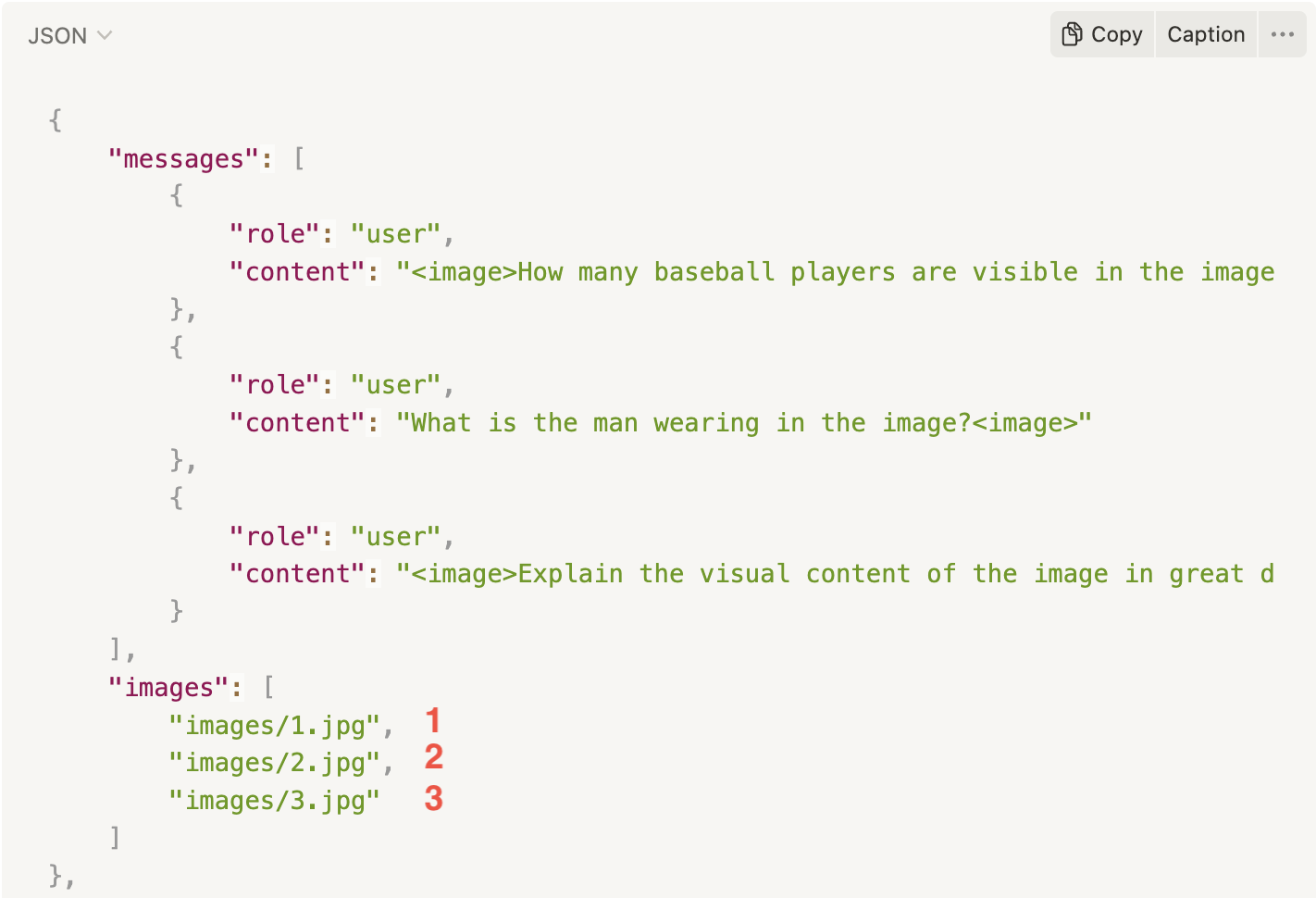
**Detailed Structures:**
\[ { “message”: \[ { “role”: “string”, “content”: “string” } ], “images”: \[ “images/0.jpg” ] } ]
**Examples:**
```json
[
{
"messages": [
{
"role": "user",
"content": "How many baseball players are visible in the image?"
},
{
"role": "assistant",
"content": "There are three baseball players visible in the image."
}
],
"images": [
"images/0.jpg"
]
},
{
"messages": [
{
"role": "user",
"content": "What is the man wearing in the image?"
},
{
"role": "assistant",
"content": "The man in the image is wearing chaps, a cowboy hat, and is dressed like a cowboy."
}
],
"images": [
"images/1.jpg"
]
},
{
"messages": [
{
"role": "user",
"content": "Explain the visual content of the image in great detail."
},
{
"role": "assistant",
"content": "The image presents a view of a hotel room, showing both the bathroom and bedroom areas. In the bathroom, there is a white sink under a mirror, accompanied by several bottles placed on the counter, and two cups nearby. \n\nLooking through a doorway into the bedroom area, a large bed can be seen dominating the space. A chair is also visible within the room, situated near the foot of the bed. The hair drier is located in the foreground, implying that it likely belongs to the bathroom area as well. The arrangement of the objects and the furniture suggests a comfortable and well-equipped hotel room."
}
],
"images": [
"images/2.jpg"
]
}
]
```
**Samples**:
### 3. Training and Validation Data
* Training data (required): the main dataset used for model training.
* Validation data (recommended): used to evaluate model quality during training.
**Data Split Recommendation**
* Train/Validation split:\*\* 80% / 20%.
* Small dataset (<1,000 samples): you may use the entire dataset for training, but quality will be harder to verify.
* Large dataset (>10,000 samples): always prepare a separate validation set.
### 4. How to Prepare Your Dataset?
In addition to checking file format (CSV, JSON, JSONL, Parquet, ZIP), the system should also validate the dataset content before fine-tuning.
>
| Trainer | Supported data format | Supported file format | Supported file size |
| ------- | --------------------- | ----------------------------------------------------------- | ------------------- |
| SFT | Alpaca | - CSV
- JSON
- JSONLINES
- ZIP
- PARQUET
| Limit 100MB |
| SFT | ShareGPT | - JSON
- JSONLINES
- ZIP
- PARQUET
| Limit 100MB |
| SFT | ShareGPT\_Image | - ZIP
- PARQUET
| Limit 100MB |
#### 4.1. Basic Validation (Format-level)
* File size must not exceed **100MB**.
* Must be in a supported format.
* Training set must contain at least **100 samples**.
#### 4.2. Content Validation (Content-level)
**Structure:**
* Each record must contain **2 fields: `prompt` and `completion`**.
* Records with missing or empty fields are not accepted.
**Text Quality:**
* Both prompt and completion must be text (not empty objects, numbers, or binary).
* Must not contain invalid characters or tokens.
**Sample Length:**
* Each sample ≤ **2048 tokens** (standard).
* Some models support up to **16k tokens**, but require correct configuration.
* If exceeded → the system will raise an error.
**Duplication:**
* The system automatically warns if duplicate samples > **10%**.
* Users are encouraged to clean duplicates before upload.
**Balance:**
* Prompts and completions should be well-distributed, not biased toward a single type of question.
#### 4.3. Advanced Validation (Recommended)
* Check for dataset bias (no harmful or sensitive content).
* Ensure **UTF-8 encoding** to avoid parsing errors.
### 5. Common Issues & How to Avoid Them
* Context drift: Always keep prompt formatting consistent.
* Overly long or redundant completions: Keep only the necessary output.
* Noisy data (typos, duplicates): Clean before uploading.
* Oversized files (>100MB): Split or compress into ZIP.
* Exceeding max length (2048 or 16k tokens): Normalize data before upload.
---
# Agent Instructions
This documentation is published with GitBook. GitBook is the documentation platform designed so that both humans and AI agents can read, navigate, and reason over technical content effectively. Learn more at gitbook.com.
## Querying This Documentation
If you need additional information that is not directly available in this page, you can query the documentation dynamically by asking a question.
Perform an HTTP GET request on the current page URL with the `ask` query parameter, and the optional `goal` query parameter:
```
GET https://ai-docs.fptcloud.com/api-reference/ai-marketplace/guideline-for-fine-tuning-with-lora-md.md?ask=&goal=
```
`ask` is the immediate question: it should be specific, self-contained, and written in natural language.
`goal` is optional and describes the broader end goal you are ultimately trying to accomplish on behalf of the user. GitBook uses it to tailor the answer towards what is most useful for that goal.
The response will contain a direct answer to the question and relevant excerpts and sources from the documentation.
Use this mechanism when the answer is not explicitly present in the current page, you need clarification or additional context, or you want to retrieve related documentation sections.