> For the complete documentation index, see [llms.txt](https://ai-docs.fptcloud.com/llms.txt). Markdown versions of documentation pages are available by appending `.md` to page URLs; this page is available as [Markdown](https://ai-docs.fptcloud.com/fpt-ai-studio/full-flow-usecases-the-hands-on-tutorials/log-analyzer-chatbot.md).
# Log Analyzer Chatbot
> Here is a tutorial on building a Log Analyzer Chatbot using FPT AI Studio. Check the [GitHub repository](https://github.com/fpt-corp/ai-studio/tree/main/tutorials/log-analyzer-chatbot) for more details.
## Overview
**Log Analyzer Chatbot** demonstrates how a **Large Language Model (LLM)** can serve as an intelligent assistant for **log analysis**, helping users **find root causes**, **summarize logs**, **detect patterns**, and **interactively explore system behaviors** through natural conversation.
Powered by a fine-tuned **Llama-3.1-8B-Instruct** model, the chatbot interprets raw log data, identifies underlying issues, summarizes key insights, and delivers clear, human-readable explanations via an intuitive chat interface.
We utilize **FPT AI Studio** to streamline and automate the entire model development workflow:
* [**Model Fine-tuning**](https://fptcloud.com/en/documents/model-fine-tuning/?doc=quick-start)**:** train and adapt the **Llama-3.1-8B-Instruct** model for domain-specific log analysis.
* [**Interactive Session**](https://fptcloud.com/en/documents/model-testing-interactive-sessions/?doc=quick-start)**:** experiment with the model’s behavior in dialogue form, compare performance before and after fine-tuning, and deploy the fine-tuned version as an API for chatbot integration.
* [**Test Jobs**](https://fptcloud.com/en/documents/model-testing-test-jobs/?doc=step-by-step)**:** benchmark model performance on a designated test set using multiple NLP metrics to ensure robustness and reliability.
In addition, [**Model Hub**](https://fptcloud.com/en/documents/model-hub-2/?doc=quick-start) and [**Data Hub**](https://fptcloud.com/en/documents/data-hub/?doc=initial-setup) are employed for efficient storage and management of large models and datasets.
## Pipeline
The end-to-end pipeline for this project includes the following stages:
{% stepper %}
{% step %}
### Data Preparation
* Download and preprocess log data from a public repository ([loghub2.0](https://github.com/logpai/loghub-2.0)).
* Chunk raw log files into manageable samples.
{% endstep %}
{% step %}
### Synthetic Data Generation
* Use a teacher model (gpt-4o-mini) to generate labeled data from raw logs.
* Produce multiple task-specific outputs (root cause, summarization, pattern detection, conversation).
{% endstep %}
{% step %}
### Model Training
* Fine-tune [meta-llama/Llama-3.1-8B-Instruct](https://huggingface.co/meta-llama/Llama-3.1-8B-Instruct) on the synthesized dataset.
* Use Data Hub and Model Hub for dataset and model management.
{% endstep %}
{% step %}
### Model Evaluation
* Evaluate the fine-tuned model using Test Jobs with NLP metrics.
{% endstep %}
{% step %}
### Model Deployment
* Deploy the trained model as an API endpoint via Interactive Session on FPT AI Studio.
{% endstep %}
{% step %}
### Demo Application
* Provide a Streamlit chat-based interface for users to paste/upload logs and interact with the model.
{% endstep %}
{% endstepper %}
## 1. Data Preparation
For this project, we utilized a publicly available log dataset.
* **Data Source**: The log data was obtained from the **Loghub** repository. Loghub is a collection of system log datasets from various real-world systems, making it an excellent resource for developing and testing log analytics tools.
* **Data Chunking**: The raw log files was chunked into smaller samples, each containing between 50 and 150 lines. This was done to create manageable contexts for the data synthesis model and to simulate the batch processing nature of the final application.
* **Refer**: [chunking code](https://raw.githubusercontent.com/fpt-corp/ai-studio/refs/heads/main/tutorials/log-analyzer-chatbot/src/split_log.py)
## 2. Synthetic Data Generation with gpt-4o-mini
To train our smaller model effectively, we needed a labeled dataset that identified potential risks and summarized log entries. Instead of manually labeling the data, which is time-consuming and requires domain expertise, we leveraged a larger, more powerful model to generate synthetic training data.
* **Teacher Model**: `gpt-4o-mini` was used for this task due to its strong reasoning and instruction-following capabilities in math and coding.
* **Process**: Each log data chunk was processed by `gpt-4o-mini` using **task-specific** prompts tailored for different log analysis objectives:
* [Root Cause Identification](https://raw.githubusercontent.com/fpt-corp/ai-studio/refs/heads/main/tutorials/log-analyzer-chatbot/prompts/teacher_prompts/deep_ask_why.txt)
* [Log Summarization](https://raw.githubusercontent.com/fpt-corp/ai-studio/refs/heads/main/tutorials/log-analyzer-chatbot/prompts/teacher_prompts/deep_summarize.txt)
* [Pattern Detection](https://raw.githubusercontent.com/fpt-corp/ai-studio/refs/heads/main/tutorials/log-analyzer-chatbot/prompts/teacher_prompts/deep_find_pattern.txt)
* [Conversation Generation](https://raw.githubusercontent.com/fpt-corp/ai-studio/refs/heads/main/tutorials/log-analyzer-chatbot/prompts/teacher_prompts/create_conversation.txt)
* **Output Format**: The prompt strictly enforced a JSON output format, which was then used to create our structured training dataset.
* **Refer**: [synthesize\_data code](https://raw.githubusercontent.com/fpt-corp/ai-studio/refs/heads/main/tutorials/log-analyzer-chatbot/src/synthesize_data_accelerate.py), [process\_synthesized\_data code](https://raw.githubusercontent.com/fpt-corp/ai-studio/refs/heads/main/tutorials/log-analyzer-chatbot/src/preprocess_synthesized_data.py), [split\_data code](https://raw.githubusercontent.com/fpt-corp/ai-studio/refs/heads/main/tutorials/log-analyzer-chatbot/src/split_and_merge_no_json.py)
## 3. Model Training on FPT AI Studio
With our synthetic dataset ready, the next step was to fine-tune a smaller, more efficient model that could serve as an intelligent assistant. We fine-tuned the model using the LoRA technique.
* **Model**: [meta-llama/Llama-3.1-8B-Instruct](https://huggingface.co/meta-llama/Llama-3.1-8B-Instruct).
* **Data**: The synthetically generated dataset: [data/final\_data/chat](https://github.com/fpt-corp/ai-studio/tree/main/tutorials/log-analyzer-chatbot/data/final_data/chat)
* [Train set](https://github.com/fpt-corp/ai-studio/blob/main/tutorials/log-analyzer-chatbot/data/final_data/chat/train_no_json.json): 8,971 samples
* [Val set](https://github.com/fpt-corp/ai-studio/blob/main/tutorials/log-analyzer-chatbot/data/final_data/chat/val_no_json.json): 500 samples
* [Test set](https://github.com/fpt-corp/ai-studio/blob/main/tutorials/log-analyzer-chatbot/data/final_data/chat/test_no_json.json): 500 samples
* [Train subset](https://github.com/fpt-corp/ai-studio/blob/main/tutorials/log-analyzer-chatbot/data/final_data/chat/train_no_json_mini.json): 1,000 samples (for demo purpose)
By fixing the hyperparameters and varying only the number of training samples and GPUs, we obtained the following results:
| **Base Model** | **Train Samples** | **Val Samples** | **Test Samples** | **GPUs** | **Training Time** |
Our Cost ($2.31/GPU-hour)
|
| ------------------------- | ----------------- | --------------- | ---------------- | -------- | ----------------- | --------------------------------------------------------------------- |
| **Llama-3.1-8B-Instruct** | 8,971 | 500 | 500 | 4 | 2h19m55s | $5.39 |
| **Llama-3.1-8B-Instruct** | 8,971 | 500 | 500 | 8 | 1h15m29s | $2.89 |
| **Llama-3.1-8B-Instruct** | 1,000 | 500 | 500 | 4 | 21m22s | $0.85 |
Explanation of Costs:
* At **FPT AI Studio**, we charge **$2.31 per GPU-hour**. The table above shows the estimated cost of running this tutorial. Importantly, we only charge for **actual GPU usage time** and time spent on tasks such as **model downloading, data downloading, data tokenization,** and **pushing data to the Model Hub** is **not included** in the calculation.
* Please note that, for simplicity, the costs shown include the time spent on **model downloading, data downloading, data tokenization,** and **pushing data to the model hub**. In practice, since we only charge for **actual GPU usage time**, the **real cost will be lower** than the values shown in the table.
The data is uploaded to **Data Hub** for management. For datasets larger than 100 MB, we first upload the data to **S3**, then create a **Connection** in **Data Hub**, and finally create a **Dataset** in **Dataset Management** that points to the corresponding S3 dataset path. To upload data to S3, please refer to the code in: [upload\_s3.py](https://raw.githubusercontent.com/fpt-corp/ai-studio/refs/heads/main/tutorials/log-analyzer-chatbot/src/upload_s3.py)

For log-related tasks, the context length is typically very long. The ideal context length to train our model should be 16k tokens, but for demo purpose, we set **max\_sequence\_length = 8192** for faster training.

* **Hyper-parameters**:
```
{
"batch_size": 8,
"checkpoint_steps": 1000,
"checkpoint_strategy": "epoch",
"disable_gradient_checkpointing": false,
"distributed_backend": "ddp",
"dpo_label_smoothing": 0,
"epochs": 3,
"eval_steps": 1000,
"eval_strategy": "epoch",
"flash_attention_v2": true,
"full_determinism": false,
"gradient_accumulation_steps": 2,
"learning_rate": 0.00005,
"liger_kernel": true,
"logging_steps": 10,
"lora_alpha": 32,
"lora_dropout": 0.05,
"lora_rank": 16,
"lr_scheduler_type": "linear",
"lr_warmup_steps": 0,
"lr_warmup_ratio": 0.1,
"max_grad_norm": 1,
"max_sequence_length": 8192,
"merge_adapter": true,
"mixed_precision": "bf16",
"number_of_checkpoints": 1,
"optimizer": "adamw",
"pref_beta": 0.1,
"pref_ftx": 0,
"pref_loss": "sigmoid",
"quantization_bit": "none",
"resume_from_checkpoint": false,
"save_best_checkpoint": false,
"seed": 1309,
"simpo_gamma": 0.5,
"target_modules": "all-linear",
"training_type": "lora",
"unsloth_gradient_checkpointing": false,
"weight_decay": 0.01,
"zero_stage": 1
}
```
* **Infrastructure**: We trained the model on **4 H100 GPUs**, leveraging **distributed data parallelism** **(ddp)** along with **FlashAttention 2** and **Liger kernels** to accelerate the training process. The global batch size was set to 64.
* **Training**: Create pipeline and start training.

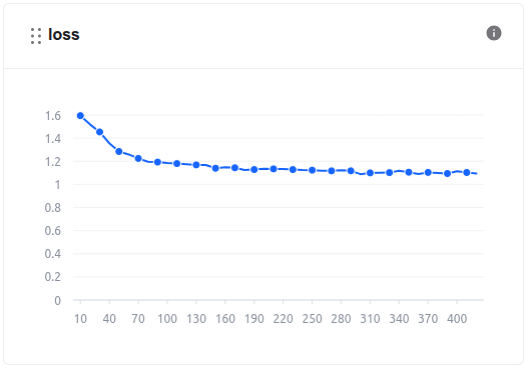
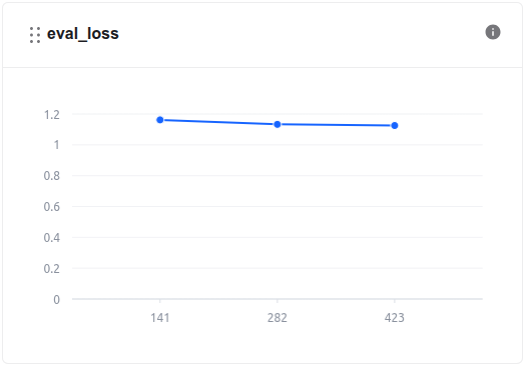
During the model training process, we can monitor the loss values and other related metrics in the **Model metrics** section.
In addition, we can observe the system-related metrics in the **System metrics** section.

The model, after being trained, is saved in the **Private Model** section of the **Model Hub**. Users **can download** it or use it **directly with other services** such as Interactive Session or Test Jobs.

## 4. Model Evaluation
After training, the model's performance was evaluated to ensure it met the required accuracy and efficiency. We use **FPT AI Studio's Test Jobs** with NLP metrics to evaluate the model on the **test set** in order to compare the model before and after fine-tuning.

**Result:**
**Note:**
* 📈 **All metrics saw a significant boost**, demonstrating that the model has **strongly internalized task-specific log analysis patterns**.
* 🎯 **Fuzzy Match surged from 0.27 → 0.49**, highlighting a **much tighter alignment with target phrasing**.
* ✨ **BLEU jumped from 0.02 → 0.28**, signaling **notable gains in lexical precision and phrase-level accuracy**.
* 📘 **ROUGE metrics improved markedly**, indicating a **deeper grasp of content structure and more coherent generated summaries**.
## 5. Model Deployment
The fine-tuned model was deployed on **FPT AI Studio's Interactive Session**. This made the model accessible via an API endpoint, allowing our Streamlit application to send log data and receive analysis results in real-time. In addition, we can chat directly on the **Interactive Session** interface.

## 6. Demo Application
The final piece of the project is the Streamlit dashboard, which provides a user-friendly interface for visualizing the real-time log analysis.

### How it works
{% stepper %}
{% step %}
### Interactive Chat Interface
Users can interact directly with the AI model through a chat-style interface. The app supports both freeform queries and predefined analysis tasks such as:
* Summarize Log: Generate concise summaries of lengthy log files.
* Find Root Cause: Identify potential root causes of detected issues.
* Find Patterns: Detect recurring behaviors or anomalies within the logs.
{% endstep %}
{% step %}
### Log Input
Log data can be pasted directly into the sidebar input area.
{% endstep %}
{% step %}
### AI-Powered Analysis
When the user triggers a task or sends a question, the app composes a structured request containing both the user’s prompt and the provided log content. This is then sent to the **fine-tuned Llama-3.1-8B-Instruct model** deployed via **FPT AI Studio API**, which processes the input and streams back results in real time.
{% endstep %}
{% endstepper %}
### How to run the demo
{% stepper %}
{% step %}
### Clone the repository
```bash
git clone https://github.com/fpt-corp/ai-studio.git
cd tutorials/log-analyzer-chatbot
```
{% endstep %}
{% step %}
### Install the required libraries
```bash
pip install -r requirements.txt
```
{% endstep %}
{% step %}
### Set up environment variables
Take the API endpoint and credentials on FPT AI Studio as shown on the above figure, you will need to configure the following environment variables in `scripts/run_app.sh`:
```
export TOKEN="BEARER_TOKEN"
export ENDPOINT_URL="API_ENDPOINT"
export MODEL="MODEL_ID"
```
{% endstep %}
{% step %}
### Run the Streamlit application
```bash
bash scripts/run_app.sh
```
{% endstep %}
{% endstepper %}
**Streamlit demo results integrating the fine-tuned model:**

Step-by-step usage within the app:
{% stepper %}
{% step %}
Paste your log data into the “Paste the log content here” box in the sidebar. (You should paste 50–150 lines of log.)
{% endstep %}
{% step %}
Choose the desired analysis task:
* ✂️ Summarize Log: generate a concise summary of the log.
* 🔍 Find Root Cause: identify the root cause of errors or incidents.
* 🧩 Find Patterns: detect patterns or recurring behaviors in the log.
{% endstep %}
{% step %}
The chatbot will automatically send the request to the model and stream the response in real time.
{% endstep %}
{% step %}
You can continue chatting with the bot by typing new questions in the input box.
{% endstep %}
{% step %}
Click New Chat in the sidebar to clear all messages and start a new session.
{% endstep %}
{% endstepper %}
---
# Agent Instructions
This documentation is published with GitBook. GitBook is the documentation platform designed so that both humans and AI agents can read, navigate, and reason over technical content effectively. Learn more at gitbook.com.
## Querying This Documentation
If you need additional information that is not directly available in this page, you can query the documentation by asking a question.
Perform an HTTP GET request on the following URL with the `ask` and `goal` query parameters:
```
GET https://ai-docs.fptcloud.com/fpt-ai-studio/full-flow-usecases-the-hands-on-tutorials/log-analyzer-chatbot.md?ask=&goal=
```
`ask` is the immediate question: it should be specific, self-contained, and written in natural language.
`goal` is what the user is ultimately trying to achieve, the reason they need the answer. Sharing it helps GitBook give you a better, more relevant answer. A goal is most helpful when it describes the outcome the user wants rather than restating the question. For example, with `ask=how do I create an API token`, a goal like `automate deployments from our CI pipeline` lets GitBook tailor the answer to that use case.
The response will contain a direct answer to the question and relevant excerpts and sources from the documentation.
Use this mechanism when the answer is not explicitly present in the current page, you need clarification or additional context, or you want to retrieve related documentation sections.