> For the complete documentation index, see [llms.txt](https://ai-docs.fptcloud.com/llms.txt). Markdown versions of documentation pages are available by appending `.md` to page URLs; this page is available as [Markdown](https://ai-docs.fptcloud.com/fpt-ai-studio/services/model-testing-interactive-sessions/tutorials/how-to-create-a-session.md).
# How to Create a Session?
{% stepper %}
{% step %}
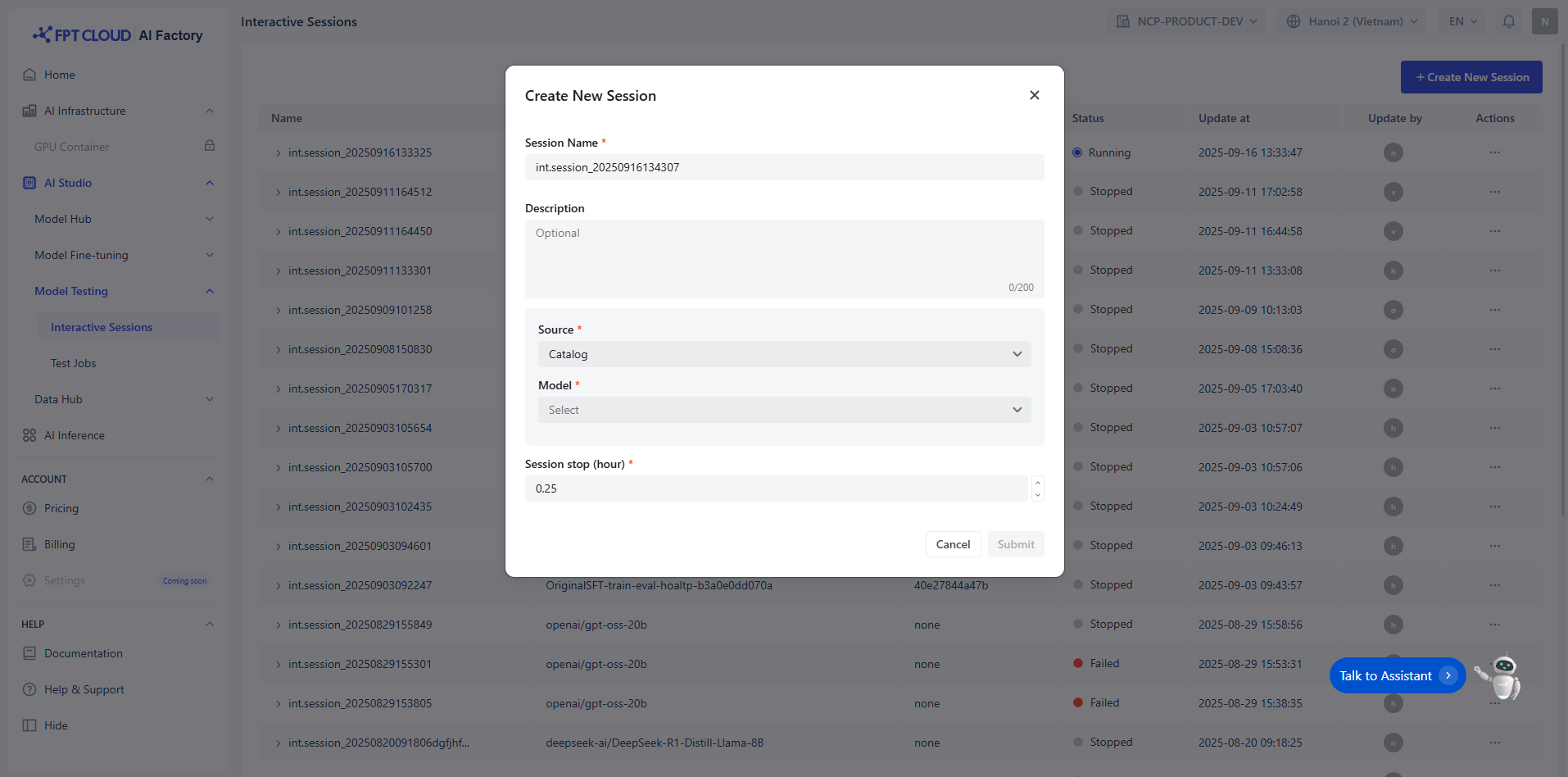
### Enter Session Name and Description
You must enter a unique name session (e.g., int.session\_20250915155915) that satisfies the following conditions:
* Maximum 100 characters
Optional note session description with maximum 200 characters.
{% endstep %}
{% step %}
### Select Model
You select model from the **Model Hub** in two ways:
* **Model Catalog:** A repository of model sources from various providers such as DeepSeek, Gemma, Llama, and Qwen.
* **Private Model:** A repository for user-owned models and fine-tuned models. These models must already have **all necessary files uploaded**. Must include **specific tags** to indicate compatibility and readiness.
{% hint style="info" %} **Note:** To be used in Interactive Sessions, models must meet the following criteria:
* **Model type:**
* LLM: Accepts only text input
* VLM: Accepts both text and image input
* **Model size** > 0
* **Learning stage:** Must be **Instruction-tuned**
{% endhint %}
Example:
| Model name | Model version | Model family | Model type | Model size | Learning stage |
| ----------------------------------------------------- | ------------- | ------------ | ------------------------------------------------ | ----------------------------------------------- | -------------------------------------------------------------- |
| ft\_Llama-3.1-8B\_20250508124054\_samples-15d5e2f6fe7 | 15d5e2f6fe7 | Llama |
LLM
(→ available)
|
8B
(→ available)
|
Instruction-tuned
(→ available)
|
| {% endstep %} | | | | | |
{% step %}
### Select Session Stop
You can enter and adjust the icon up-down to select appreciated time for the session.
We recommend you define how the session should automatically terminate based on one or more of the following condition:
* Maximum number of interactions
* Time duration
* Model-specific limits
This ensures efficient resource usage and prevents unintended long-running sessions.
{% endstep %}
{% step %}
### Submit
You review and submit a session
{% hint style="info" %} **Note**: For the PAYG user
To run a pipeline successfully, ensure:
* Balance has sufficient funds. Reference page:
* Create up to **20** pipelines in total
* Only **2** pipelines can be started concurrently at any given time
* Each pipeline can be configured with a maximum of 2 nodes
{% endhint %}
{% hint style="info" %} **Note****:** For the user to sign a contract
To run a pipeline successfully, ensure:
* Balance has sufficient funds. Reference page: [https://ai.fptcloud.com/prici](https://ai.fptcloud.com/pricing)
{% endhint %}
{% endstep %}
{% endstepper %}
---
# Agent Instructions
This documentation is published with GitBook. GitBook is the documentation platform designed so that both humans and AI agents can read, navigate, and reason over technical content effectively. Learn more at gitbook.com.
## Querying This Documentation
If you need additional information that is not directly available in this page, you can query the documentation by asking a question.
Perform an HTTP GET request on the following URL with the `ask` and `goal` query parameters:
```
GET https://ai-docs.fptcloud.com/fpt-ai-studio/services/model-testing-interactive-sessions/tutorials/how-to-create-a-session.md?ask=&goal=
```
`ask` is the immediate question: it should be specific, self-contained, and written in natural language.
`goal` is what the user is ultimately trying to achieve, the reason they need the answer. Sharing it helps GitBook give you a better, more relevant answer. A goal is most helpful when it describes the outcome the user wants rather than restating the question. For example, with `ask=how do I create an API token`, a goal like `automate deployments from our CI pipeline` lets GitBook tailor the answer to that use case.
The response will contain a direct answer to the question and relevant excerpts and sources from the documentation.
Use this mechanism when the answer is not explicitly present in the current page, you need clarification or additional context, or you want to retrieve related documentation sections.