> For the complete documentation index, see [llms.txt](https://ai-docs.fptcloud.com/llms.txt). Markdown versions of documentation pages are available by appending `.md` to page URLs; this page is available as [Markdown](https://ai-docs.fptcloud.com/fpt-gpu-cloud/gpu-cluster/managed-k8s-with-gpu-virtual-machine/initial-setup.md).
# Initial Setup
If you are using M-FKE for the first time, please first verify and complete the following tasks.
* Create an FPT Cloud account and log in to the FPT Portal
* Create a subnet in Static Pool
* Request to enable the M-FKE service and allocate resource quotas
#### 1. Create an FPT Cloud account and log in to the FPT Portal
To register for an FPT Cloud account, visit the homepage.
After that, select the "Sign Up" feature and follow the system instructions to enter your information. The support department will contact you promptly to verify the information for account creation.
To log in to the FPT Portal, please access [https://console.fptcloud.com](https://console.fptcloud.com/)/.
After logging in with the provided account and password, correctly select the Tenant , Region, and VPC.
If you have any questions about the above information, or if the error persists after three attempts, please contact the support team.
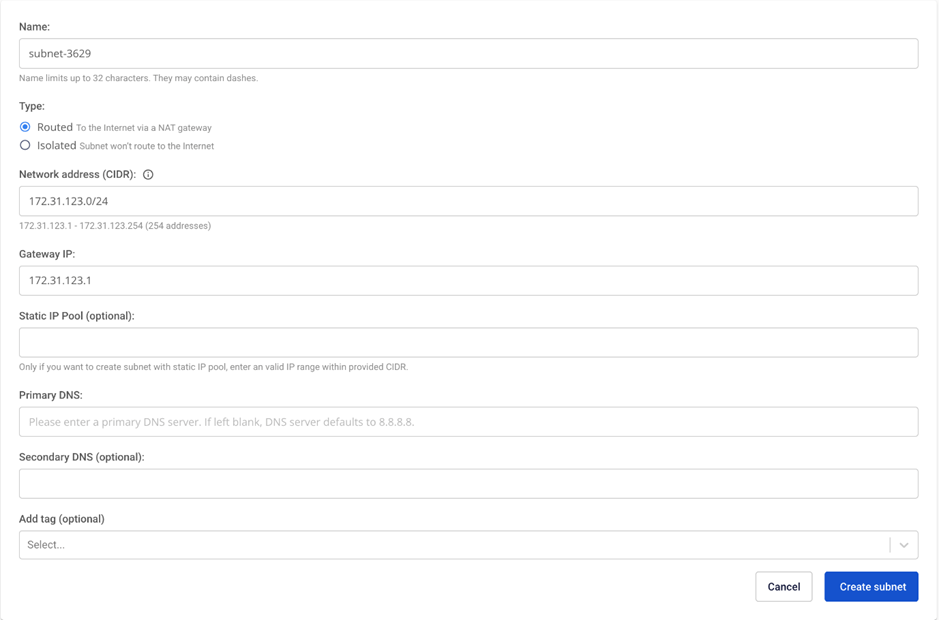
#### 2. Creating a Subnet Using a Static Pool
Since **Kubernetes clusters** only operate on subnets with the **Static** Pool option enabled, you must create **a subnet using** Static **Pool** by following the steps below.
**Step 1**: Select the **\[Subnets]** tab under **\[Networking].**

**Step 2:** On the **\[Subnets Management]** page, select **\[Create].**

**Step 3:** Enter the following information.
* **Name:** Enter a **memorable name** for the subnet.
* **CIDR:** Enter a valid **CIDR.**
* Select the " " option. **Advanced Settings**
* **Static IP Pool:** Enter a valid IP range derived from the CIDR.
Select " ". Click **"Save"** to create the new subnet. The system will process the request and notify you of the result.
#### 3. Requesting FKE Service Activation and Resource Quota Allocation
If you are new to FPT Cloud, some services may not yet be available on your account. Please contact our support team and provide information about the desired services and settings. We will allocate the resources required to use the M-FKE service (RAM + CPU, storage, public IP, etc.).
---
# Agent Instructions
This documentation is published with GitBook. GitBook is the documentation platform designed so that both humans and AI agents can read, navigate, and reason over technical content effectively. Learn more at gitbook.com.
## Querying This Documentation
If you need additional information that is not directly available in this page, you can query the documentation dynamically by asking a question.
Perform an HTTP GET request on the current page URL with the `ask` query parameter, and the optional `goal` query parameter:
```
GET https://ai-docs.fptcloud.com/fpt-gpu-cloud/gpu-cluster/managed-k8s-with-gpu-virtual-machine/initial-setup.md?ask=&goal=
```
`ask` is the immediate question: it should be specific, self-contained, and written in natural language.
`goal` is optional and describes the broader end goal you are ultimately trying to accomplish on behalf of the user. GitBook uses it to tailor the answer towards what is most useful for that goal.
The response will contain a direct answer to the question and relevant excerpts and sources from the documentation.
Use this mechanism when the answer is not explicitly present in the current page, you need clarification or additional context, or you want to retrieve related documentation sections.