> For the complete documentation index, see [llms.txt](https://ai-docs.fptcloud.com/llms.txt). Markdown versions of documentation pages are available by appending `.md` to page URLs; this page is available as [Markdown](https://ai-docs.fptcloud.com/fpt-gpu-cloud/gpu-cluster/managed-k8s-with-gpu-virtual-machine/tutorial/hibernation-and-wake-up.md).
# Hibernation and Wake-up
In production environments, clusters typically run 24/7, 365 days a year. However, in environments like development, testing, staging, and demos, scaling down unused Kubernetes resources can help users reduce costs.
However, manual scaling down can be time-consuming, so the hibernate feature was developed to automate this task.
When users utilize the Hibernate feature, resources within the cluster change as follows:
* Worker nodes (instances) are deleted.
* The pod will be in a "pending" state
* The service will remain intact
* State-saving components (such as PVCs) and state within etcd are also preserved.
Wake-up is the opposite of Hibernate and helps restore the cluster to its original state before Hibernate.
In the portal, you can operate the Hibernate and Wake-up functions as follows.
**\* For Hibernate**
**Step 1**: Select **\[Containers] > \[Kubernetes]** from the menu to display the **Kubernetes Management** page.
**Step 2:** Click the Hibernate button to start the process.
**Step 3:** Enter the cluster name to confirm starting the process.
Once the notification appears, the hibernation process begins, and the status on the portal reverts to "*Hibernating (Running)".*
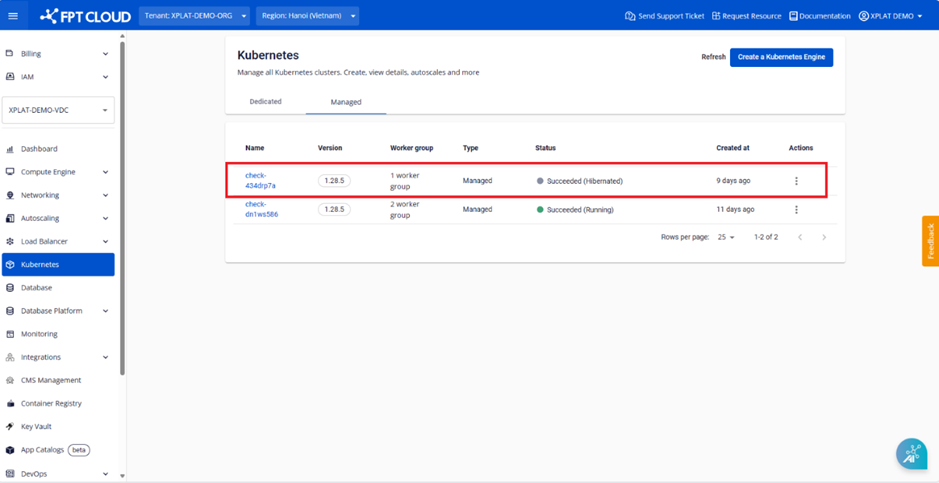
Once the process completes, the cluster status changes to "*Succeeded (Hibernated)*", indicating successful hibernation.
**\* About Wakeup**
For clusters with a status of *"Succeeded (Hibernated)",* users can use the wake-up feature to restore the cluster to its original state.
**Step 1:** Select **\[Containers] > \[Kubernetes]** from the menu to display the **Kubernetes Management** page.
**Step 2:** Click the ***Wakeup*** button to start the process.
**Step 3:** Enter the cluster name to confirm the process.
Once the notification appears, the Hibernate process begins, and the Portal status reverts to *Processing (Running)*.
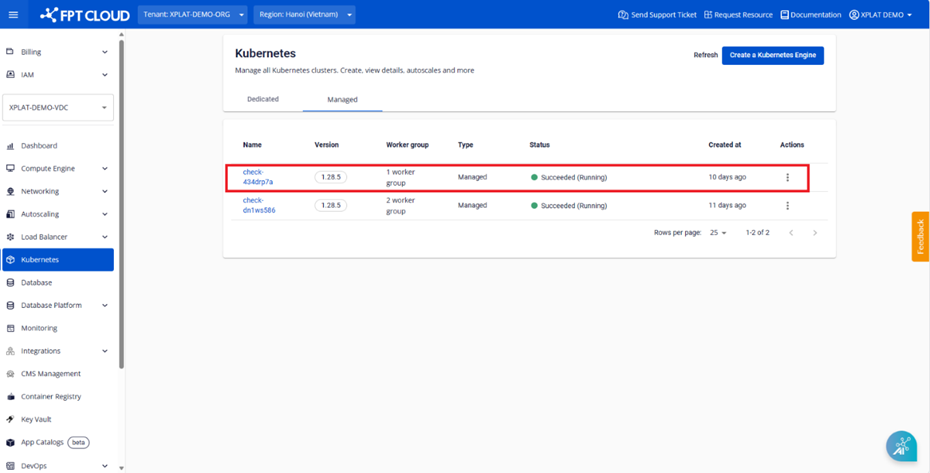
Once the process completes, the cluster status will revert to "*Success (Running)"*, indicating the cluster wakeup was successful.
**\*Note:**
Before starting the hibernate process, it is recommended to verify that *all pods* within the cluster *are in the Running state* and that other resources (such as svc type LB, ingress, Persistent Volume, secrets, configmaps, etc.) are functioning properly.
If a user adds another deployment while the cluster is in hibernation, all new resources will enter a *Pending* state until the user chooses to wake up the cluster.
---
# Agent Instructions
This documentation is published with GitBook. GitBook is the documentation platform designed so that both humans and AI agents can read, navigate, and reason over technical content effectively. Learn more at gitbook.com.
## Querying This Documentation
If you need additional information that is not directly available in this page, you can query the documentation dynamically by asking a question.
Perform an HTTP GET request on the current page URL with the `ask` query parameter, and the optional `goal` query parameter:
```
GET https://ai-docs.fptcloud.com/fpt-gpu-cloud/gpu-cluster/managed-k8s-with-gpu-virtual-machine/tutorial/hibernation-and-wake-up.md?ask=&goal=
```
`ask` is the immediate question: it should be specific, self-contained, and written in natural language.
`goal` is optional and describes the broader end goal you are ultimately trying to accomplish on behalf of the user. GitBook uses it to tailor the answer towards what is most useful for that goal.
The response will contain a direct answer to the question and relevant excerpts and sources from the documentation.
Use this mechanism when the answer is not explicitly present in the current page, you need clarification or additional context, or you want to retrieve related documentation sections.