# Cluster Tagging

The **tagging** feature allows users to assign custom tags to virtual machines, **enabling more efficient classification, search, and management of resources.**

* &#x20;**Intelligent Classification:** Easily organize virtual machines based on any criteria suitable for your environment (production, staging, development), project, department, or management process.
* **Quick Search:** Based on tags, users can easily filter and search for VMs without needing to remember complex names.
* **Efficient Management:** Supports cost tracking, resource usage monitoring, and report generation for each tagged VM group.
* **Flexible Customization:** Tags are customizable and can be applied for various purposes to meet specific enterprise needs.

&#x20;The tagging feature enables more scientific management of virtualized infrastructure, saving time and improving system operational efficiency.

&#x20;In the portal, you can operate the tagging feature as follows:

&#x20;**1. Creating Tags**

&#x20;To tag VMs within an MFKE worker group, users must create tags in advance according to their intended use.

&#x20;**2. Assigning Tags for Using Worker Groups Belonging to M-FKE**

&#x20;<mark style="color:blue;">**2.1. When Creating a New Cluster**</mark>

&#x20;**Step 1:** In Unify Portal, select Kubernetes → Managed → Create a Kubernetes Engine to create a new cluster.

<figure><img src="https://2158065032-files.gitbook.io/~/files/v0/b/gitbook-x-prod.appspot.com/o/spaces%2F2FDB5fvsiFxYI972UDTv%2Fuploads%2FN6qbJl2XnocfktJ0xrUU%2Fimage.png?alt=media&#x26;token=61e8266d-08c8-4991-9d74-3fee53904e12" alt=""><figcaption></figcaption></figure>

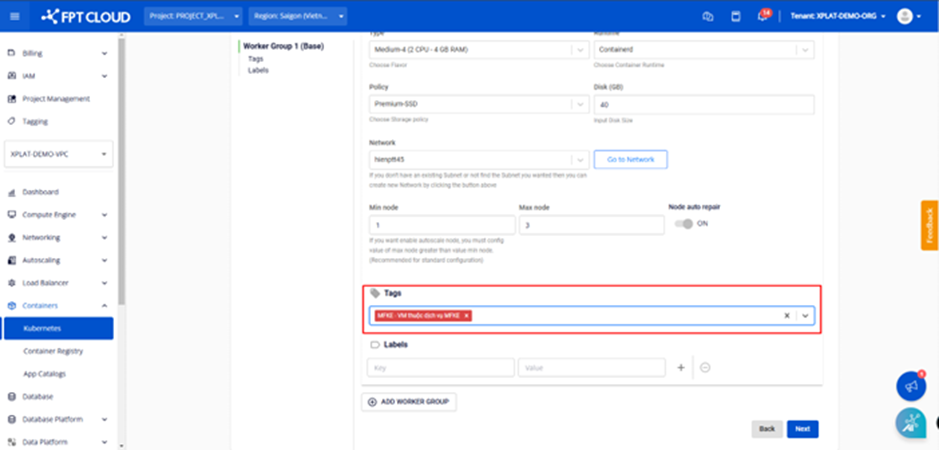
&#x20;**Step 2:** Under \[Nodes Pool], select the tag to use for the worker group.

<figure><img src="https://2158065032-files.gitbook.io/~/files/v0/b/gitbook-x-prod.appspot.com/o/spaces%2F2FDB5fvsiFxYI972UDTv%2Fuploads%2F0Do50KeDUcmI27vmMIwq%2Fimage.png?alt=media&#x26;token=68c304ed-5de7-45d4-9c2e-6074125a0308" alt=""><figcaption></figcaption></figure>

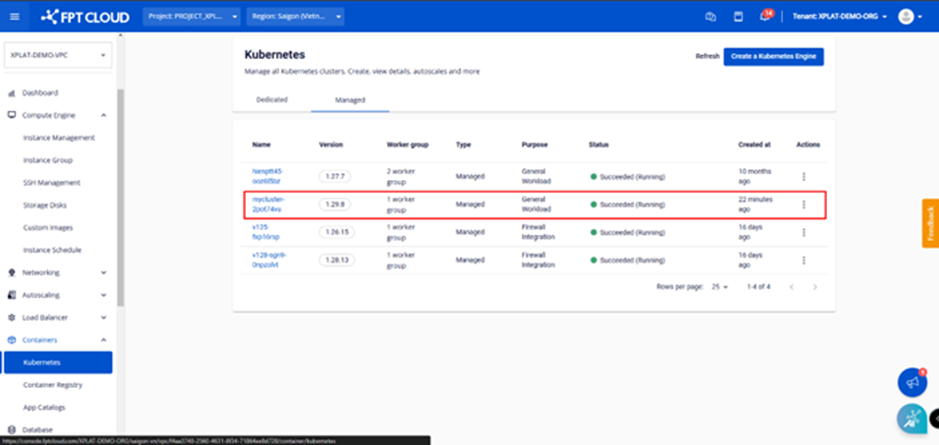
&#x20;Enter all required information for the cluster and click the Create a Kubernetes Engine button.

<figure><img src="https://2158065032-files.gitbook.io/~/files/v0/b/gitbook-x-prod.appspot.com/o/spaces%2F2FDB5fvsiFxYI972UDTv%2Fuploads%2Fd9U8AnMA5l9rY67DtGMa%2Fimage.png?alt=media&#x26;token=b0f9f184-c6c3-42f3-a9c2-9caec897530d" alt=""><figcaption></figcaption></figure>

<mark style="color:blue;">**2.2. Editing Worker Group Tags**</mark>

&#x20;**Step 1:** Select "Containers" > "Kubernetes" from the menu to display the Kubernetes Management page. Select the cluster whose tags you want to edit.

<figure><img src="https://2158065032-files.gitbook.io/~/files/v0/b/gitbook-x-prod.appspot.com/o/spaces%2F2FDB5fvsiFxYI972UDTv%2Fuploads%2FbQxBqosgRRgLoiGbOYx0%2Fimage.png?alt=media&#x26;token=1740a856-903f-4462-bde6-da0adb595723" alt=""><figcaption></figcaption></figure>

&#x20;**Step 2**: Select Node Pools > Edit Workers.

<figure><img src="https://2158065032-files.gitbook.io/~/files/v0/b/gitbook-x-prod.appspot.com/o/spaces%2F2FDB5fvsiFxYI972UDTv%2Fuploads%2F71uD7WnPP0VlTxQkB5OH%2Fimage.png?alt=media&#x26;token=d6150397-e288-4408-9b74-76638bc78aca" alt=""><figcaption></figcaption></figure>

&#x20;**Step 3:** Add tags to the worker group and click the \[Save] button.

<figure><img src="https://2158065032-files.gitbook.io/~/files/v0/b/gitbook-x-prod.appspot.com/o/spaces%2F2FDB5fvsiFxYI972UDTv%2Fuploads%2F1sVzKWB7sPzM9TrnKoNL%2Fimage.png?alt=media&#x26;token=219565b4-e909-4e03-9535-4661b5360c4a" alt=""><figcaption></figcaption></figure>

<figure><img src="https://2158065032-files.gitbook.io/~/files/v0/b/gitbook-x-prod.appspot.com/o/spaces%2F2FDB5fvsiFxYI972UDTv%2Fuploads%2FXSvGyJZe9Qjb63ifpnTA%2Fimage.png?alt=media&#x26;token=afb93ae5-460e-4420-adbd-ecf0fd4d1528" alt=""><figcaption></figcaption></figure>

&#x20;

<figure><img src="https://2158065032-files.gitbook.io/~/files/v0/b/gitbook-x-prod.appspot.com/o/spaces%2F2FDB5fvsiFxYI972UDTv%2Fuploads%2FXQVa7fbYg7KySIuyKrAW%2Fimage.png?alt=media&#x26;token=32876610-91e1-4205-b386-4831c1c488da" alt=""><figcaption></figcaption></figure>

Tag editing completes within a few minutes, and the cluster status changes to "Processing." During this processing, users cannot edit the cluster.

&#x20;<mark style="color:blue;">**2.3. Removing Tags from a Worker Group**</mark>

&#x20;**Step 1:** Select Node Pools > Edit Workers

<figure><img src="https://2158065032-files.gitbook.io/~/files/v0/b/gitbook-x-prod.appspot.com/o/spaces%2F2FDB5fvsiFxYI972UDTv%2Fuploads%2FUTSSpfZLi6lhwlnkxEcs%2Fimage.png?alt=media&#x26;token=80c1f25c-6e67-4c47-ad96-49101ebdb303" alt=""><figcaption></figcaption></figure>

&#x20;**Step 2:** Click the ❎ mark to remove the tag from the worker group, then click Save.

<figure><img src="https://2158065032-files.gitbook.io/~/files/v0/b/gitbook-x-prod.appspot.com/o/spaces%2F2FDB5fvsiFxYI972UDTv%2Fuploads%2F85myv6CRtCgdJY48Xsai%2Fimage.png?alt=media&#x26;token=6d95604e-3713-4b69-8dfa-16c462708422" alt=""><figcaption></figcaption></figure>

<figure><img src="https://2158065032-files.gitbook.io/~/files/v0/b/gitbook-x-prod.appspot.com/o/spaces%2F2FDB5fvsiFxYI972UDTv%2Fuploads%2FRrWIO8BSSQ86dPwUrvx4%2Fimage.png?alt=media&#x26;token=c738963d-7d6e-46ca-87b1-0854644e053c" alt=""><figcaption></figcaption></figure>

<figure><img src="https://2158065032-files.gitbook.io/~/files/v0/b/gitbook-x-prod.appspot.com/o/spaces%2F2FDB5fvsiFxYI972UDTv%2Fuploads%2FgTeASjeyWFp46hKKzXex%2Fimage.png?alt=media&#x26;token=ac0d8e72-6ac9-4592-a1cb-6613fb213a50" alt=""><figcaption></figcaption></figure>

Tag removal will be executed within a few minutes, and the cluster status will change to "**Processing**." Users cannot perform cluster editing operations until the process is complete.