
🔬Healthcare & Food Chatbot
Here is a tutorial for Healthcare & Food Chatbot using FPT AI Studio. Check the GitHub repository for more details.
Overview
Healthcare & Food Chatbot demonstrates how a Large Language Model (LLM) can serve as an intelligent assistant for healthy eating guidance and regional cuisine exploration, helping users learn about dishes, understand nutritional benefits, and interactively explore healthcare-related conversations around food through natural dialogue.
Powered by a fine-tuned Llama-3.1-8B-Instruct model, the chatbot interprets dish descriptions, generates personalized nutrition advice, creates interactive conversations, and delivers clear, human-readable responses via an intuitive chat interface.
We utilize FPT AI Studio to streamline and automate the entire model development workflow:
Model Fine-tuning: train and adapt the Llama-3.1-8B-Instruct model for domain-specific healthcare.
Interactive Session: experiment with the model’s behavior in dialogue form, compare performance before and after fine-tuning, and deploy the fine-tuned version as an API for chatbot integration.
Test Jobs: benchmark model performance on a designated test set using multiple NLP metrics to ensure robustness and reliability.
In addition, Model Hub and Data Hub are employed for efficient storage and management of large models and datasets.
Pipeline

The end-to-end pipeline for this project as shown on the above figure includes following stages:
Data Preparation: Prepare a list of ~50 regional foods with basic information.
Synthetic Data Generation: Use a teacher model (GPT-4o-mini) to create detailed descriptions and healthcare-related dialogues around each food.
Model Training: Fine-tuning the meta-llama/Llama-3.1-8B-Instruct model on the synthesized dataset using Model Fine-tuning in FPT AI Studio platform. In this step, we use Data Hub to easily manage training data and Model Hub to manage different versions of trained models.
Model Evaluation: Assessing the performance of the fine-tuned model with Test Jobs.
Model Deployment: Deploying the trained model as an API endpoint on FPT AI Studio for inference with Interactive Session.
Demo Application: An interactive chat-based application built with Streamlit, allowing users to explore foods and discuss nutrition interactively.
1. Data Preparation
We start with a curated list of ~50 regional foods. Next, we generate initial food descriptions using GPT-4o-mini. These descriptions contain key nutritional information.
2. Synthetic Data Generation with gpt-4o-mini
To create a rich conversational dataset, we use GPT-4o-mini as a teacher model to produce dialogues around foods using food description of the previos stage, focusing on:
Healthcare & Nutrition: calorie info, balanced diet, ingredient substitutions
Interactive Q&A: questions about diet, allergies, health benefits
Prompt we used:
After processing, here is a sample:
3. Model Training on FPT AI Studio
With our synthetic dataset ready, the next step was to fine-tune a smaller, more efficient model that could serve as an intelligent assistant. We fine-tuned the model using the LoRA technique.
Model: meta-llama/Llama-3.1-8B-Instruct.
Data: The synthetically generated dataset: data/final_data/healthcare_and_vn_food
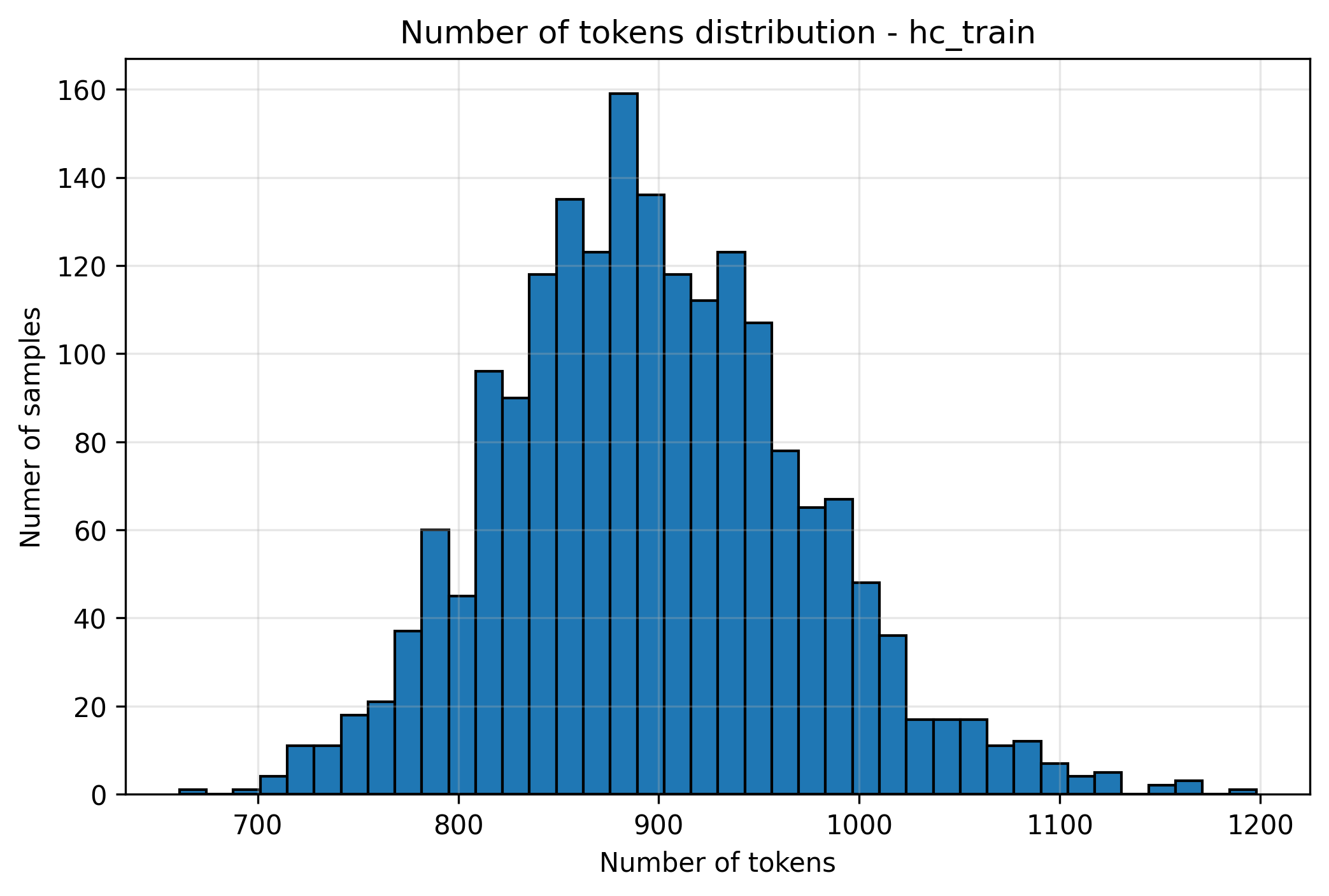
Based on the data distribution we have collected, we set max_sequence_length = 1024.
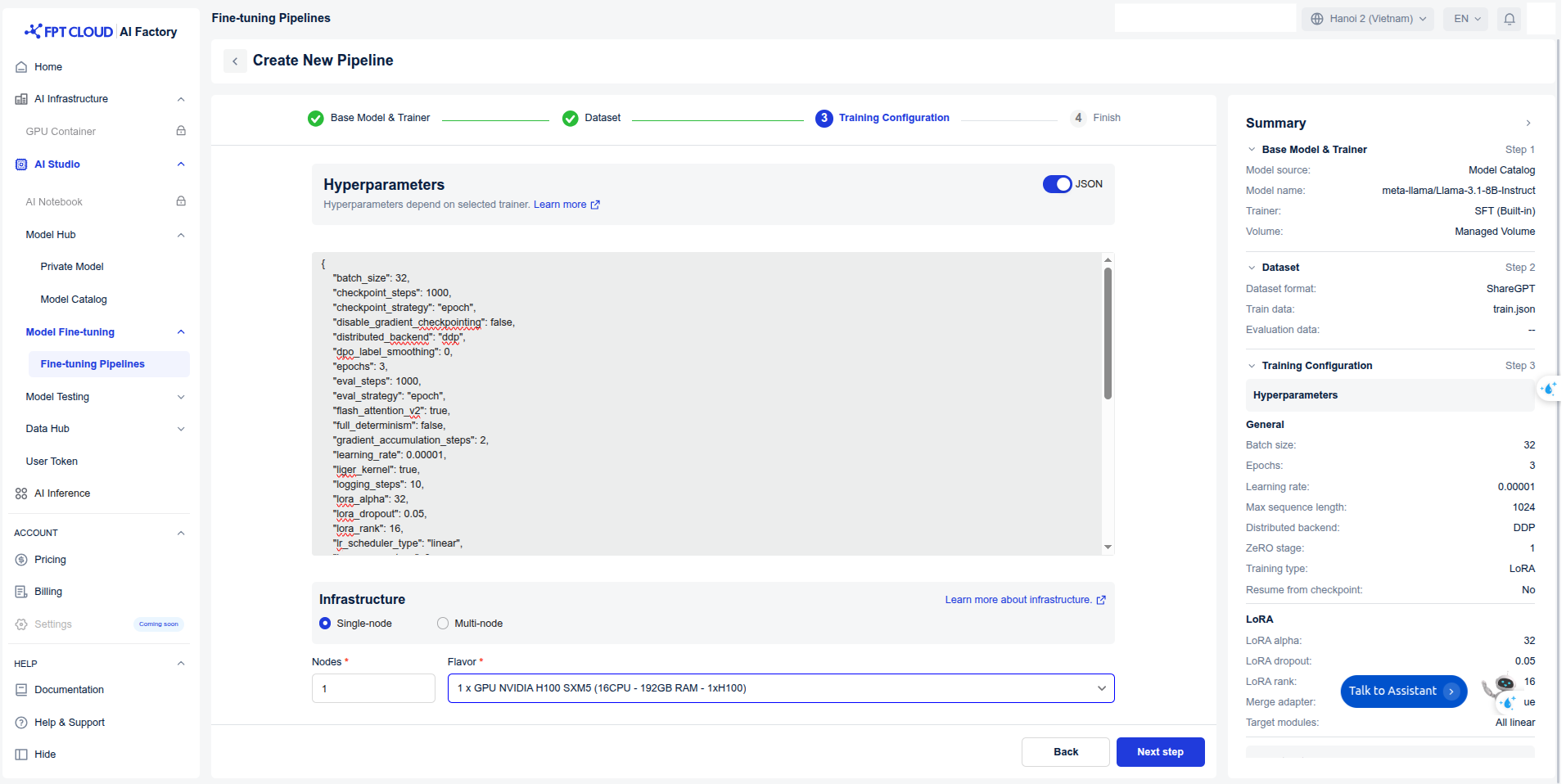
Hyper-parameters:
Infrastructure: We trained the model on 1 H100 GPUs, leveraging FlashAttention 2 and Liger kernels to accelerate the training process. The global batch size was set to 64.
Training: Create pipeline and start training.
During the model training process, we can monitor the loss values and other related metrics in the Model metrics section.
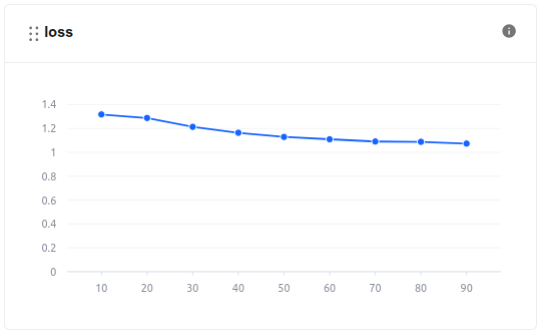
train loss 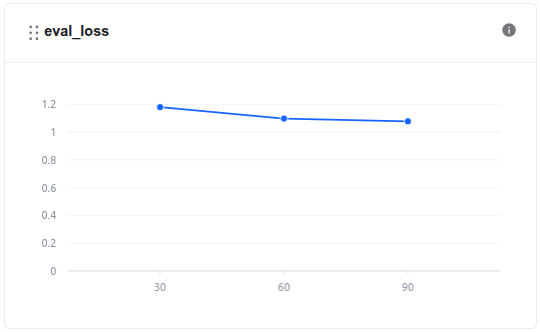
eval loss In addition, we can observe the system-related metrics in the System metrics section.

The model, after being trained, is saved in the Private Model section of the Model Hub. Users can download it or use it directly with other services such as Interactive Session or Test Jobs.

Training took 21 minutes, with GPU usage lasting 18 minutes. The cost of using the fine-tune model is ~$0.693.
Explanation of Costs: At FPT AI Studio, we charge $2.31 per GPU-hour. Importantly, we only charge for actual GPU usage time and time spent on tasks such as model downloading, data downloading, data tokenization, and pushing data to the Model Hub is not included in the calculation.
4. Model Evaluation
After training, the model's performance was evaluated to ensure it met the required accuracy and efficiency. We use FPT AI Studio's Test Jobs with NLP metrics to evaluate the model on the test set in order to compare the model before and after fine-tuning.
Choose fine-tuned model in Private Model.

Choose the Test suite, specify the Test criteria, and modify Parameters


Result:
ModelFuzzy MatchBLEUROUGE-1ROUGE-2ROUGE-LROUGE-LsumFinetuned Llama-3.1-8B-Instruct
0.458633
0.032079
0.634257
0.333767
0.412934
0.41459
Base Llama-3.1-8B-Instruct
0.387204
0.05343
0.535179
0.270515
0.349951
0.365346
5. Model Deployment
The fine-tuned model was deployed on FPT AI Studio's Interactive Session. This made the model accessible via an API endpoint, allowing our Streamlit application to send prompt. In addition, we can chat directly on the Interactive Session interface.

6. Demo Application
The final piece of the project is the Streamlit dashboard, which provides a user-friendly interface for talking directly to my assistant.
How to run the demo
To run this demo on your local machine, follow these steps:
Clone the repository:
Install the required libraries:
Set up environment variables: Take the API endpoint and credentials on FPT AI Studio as shown on above firgure, you will need to configure the following environment variables in
scripts/run_app.sh:Run the Streamlit application:
Streamlit demo results integrating the fine-tuned model:

Last updated
Was this helpful?