
✌️How to Create a Job?
Select Model
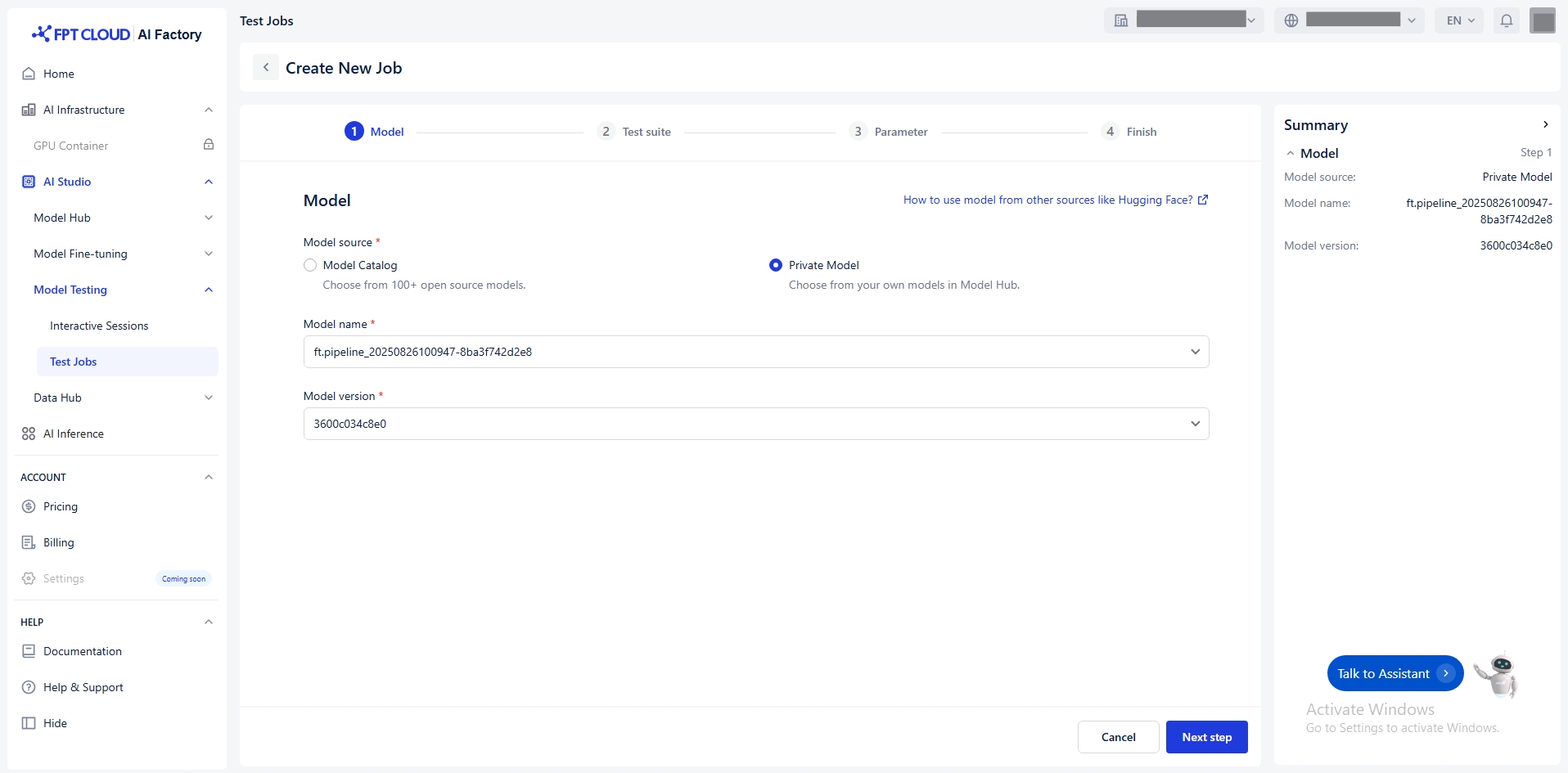
You select model from the Model Hub in two ways:
Model Catalog: A repository of model sources from various providers such as DeepSeek, Gemma, Llama, and Qwen.
Private Model: A repository for user-owned models and fine-tuned models. These models must already have all necessary files uploaded. Must include specific tags to indicate compatibility and readiness.
Example:
ft_Llama-3.1-8B_20250508124054_samples-15d5e2f6fe7
15d5e2f6fe7
Llama
LLM (→ available)
8B (→ available)
Instruction-tuned (→ available)
Select Test Suite
Select the appropriate test suite - which tests the model.
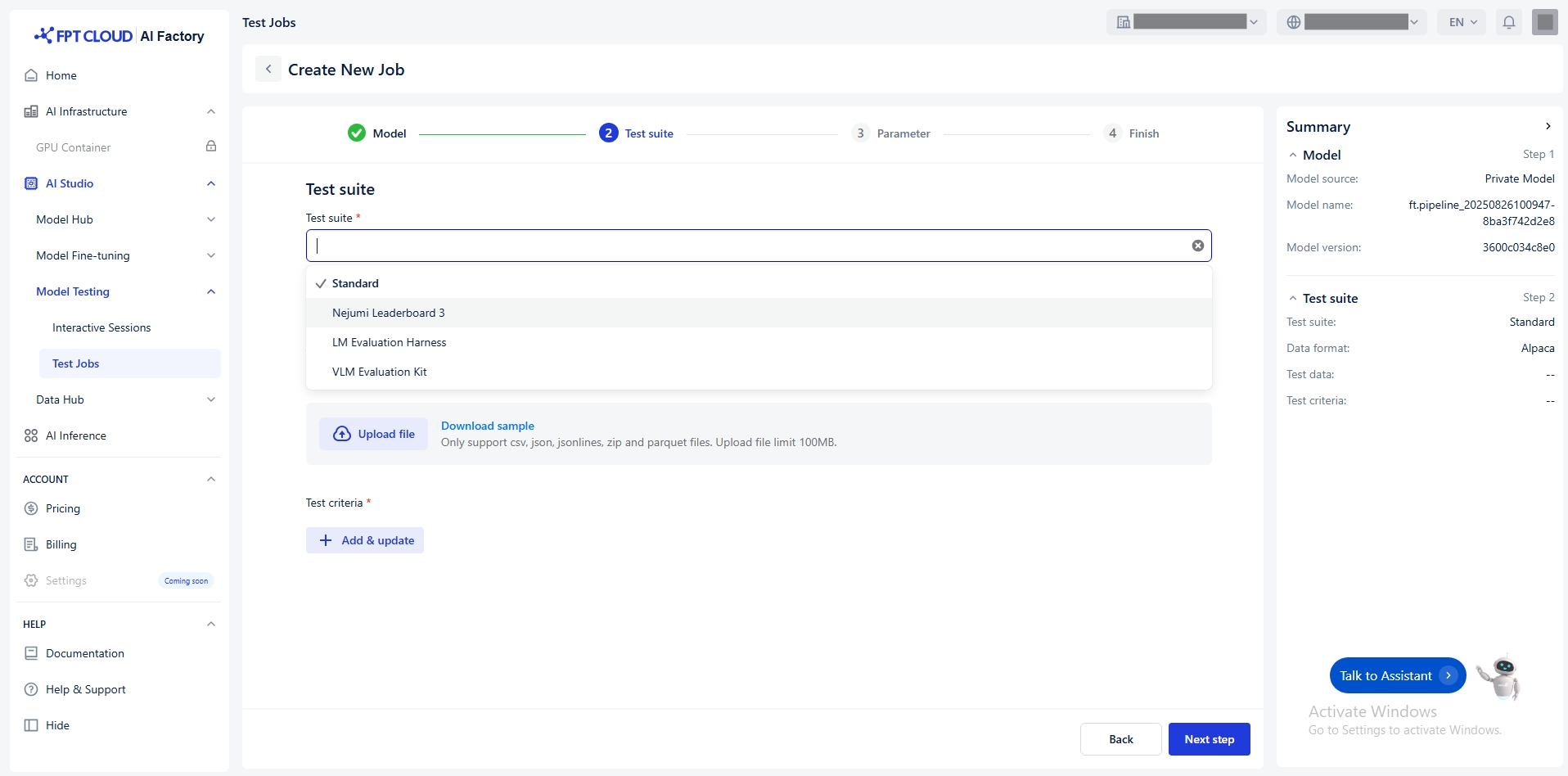
We offer this test suite:
Standard
Evaluate models using your own dataset.
Internal benchmarks, domain-specific tasks (e.g., finance, medical...)
Nejumi Leaderboard 3
Benchmark LLMs, especially for Japanese language tasks. Reference: Nejumi Leaderboard 3
Comparing LLMs on Japanese language tasks.
LM Evaluation Harness
General framework to benchmark language models across many standard NLP benchmarks. Reference: LM Evaluation Harness
Evaluating English-centric LLMs and ensuring comparability with research literature
VLM Evaluation Kit
Evaluate VLMs (Vision Language Models) on multimodel tasks. Reference: VLMEvalKit
Testing multimodal models
Select Data Format
Only select data format when you choose test suite = standard
Alpaca
- CSV - JSON - JSONLINES - ZIP - PARQUET
Limit 100MB
ShareGPT
- JSON - JSONLINES - ZIP - PARQUET
Limit 100MB
ShareGPT_Image
- ZIP - PARQUET
Limit 100MB
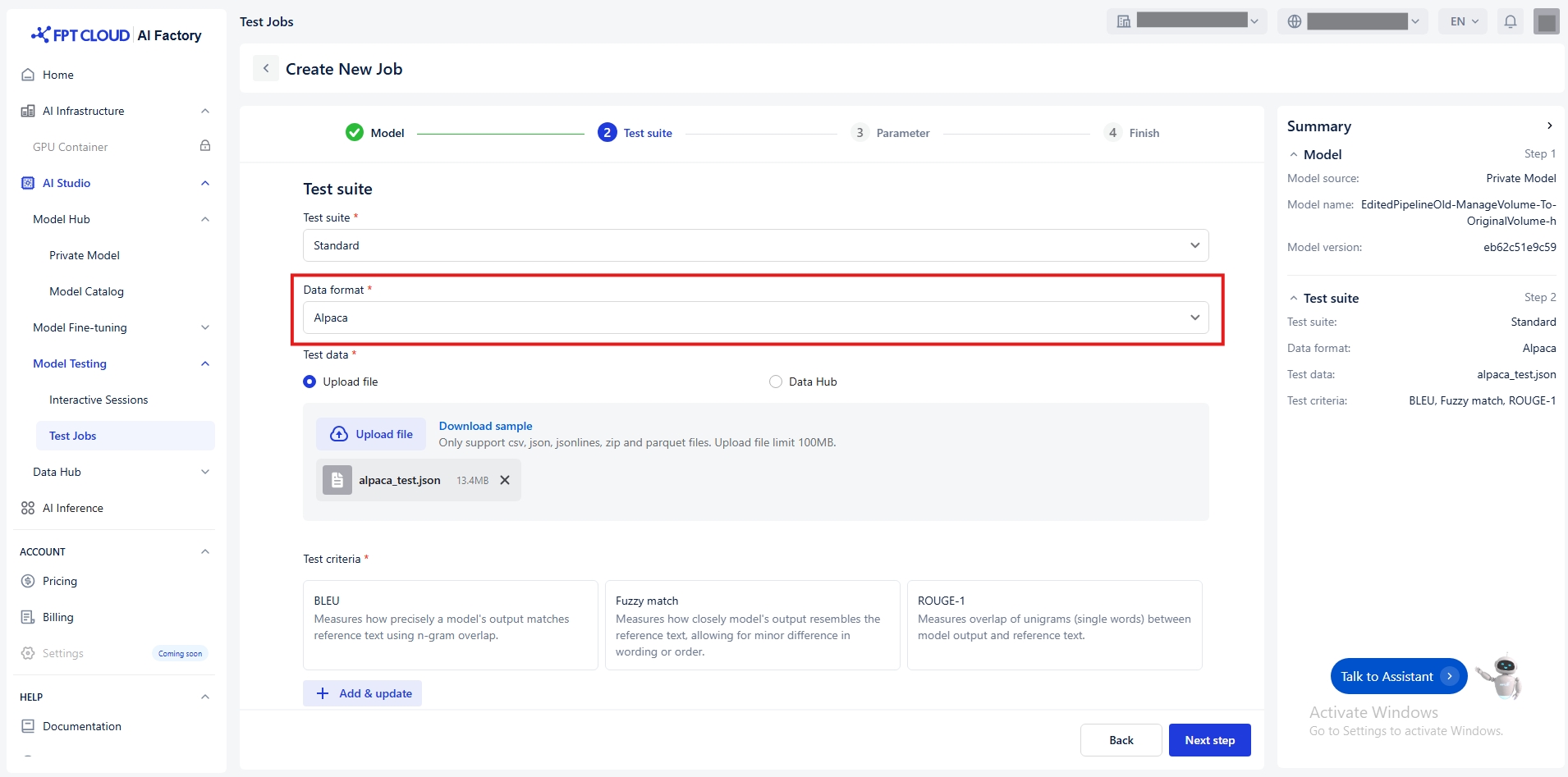
We currently support data formats for testing include:
a/ Alpaca
Alpaca uses a very simple structure to fine-tune the model with Instruction-following format with input, output pairs for supervised fine-tuning tasks. The basic structure includes:
Instruction: A string containing the specific task or request that the model needs to perform.
Input: A string containing the information that the model needs to process in order to carry out the task.
Output: A string representing the result the model should return, generated from processing the instruction and input.
Detailed Structure:
Examples:
Samples: https://github.com/fpt-corp/ai-studio-samples/tree/main/sample-datasets/alpaca
Supported file format: .csv, .json, .jsonlines, .zip, .parquet
b/ ShareGPT
ShareGPT is designed to represent multi-turn conversations (back-and-forth chats) between a user and an AI assistant. It is commonly used when training or fine-tuning models for dialogue systems or chatbots that need to handle contextual conversation over multiple turns.
Each data sample consists of a conversations array, where each turn in the chat includes:
from: Who is speaking — usually
"human"or"system".value: The actual message text from that speaker.
Detailed Structure:
Examples:
Samples: https://github.com/fpt-corp/ai-studio-samples/tree/main/sample-datasets/sharegpt
Supported file format: .json, .jsonlines, .zip, .parquet
c/ ShareGPT_Image
ShareGPT_Image is an extension of the ShareGPT multi-turn chat format, designed specifically for multi-modal training — that is, training models that handle both text and images in conversations.
It’s used in fine-tuning vision-language models (VLMs), which need to process images alongside natural language.
The structure includes:
A list of chat turns under
"message"(same as ShareGPT).A field called
"image"or"image_path"that points to the image used in the conversation (using format png, jpg, jpeg)
Notice:
Must include the
imagetoken in the chat content where an image should appear.If there are multiple images:
Image paths must be defined in an
imagesarray.The positions of the images in the chat flow are indicated by the
imagetokensThe number of
imagetokens in the chat must match the number of items in theimagesarray.Images will be mapped in order of appearance, with each
imagetoken replaced by the corresponding image from theimagesarray.
Detailed Structures:
Examples:
Samples: https://github.com/fpt-corp/ai-studio-samples/tree/main/sample-datasets/sharegpt-image
Supported file format: .zip, .parquet
Select Test Data

You have two ways to transfer the Test data:
Connect to Data Hub
Click Data Hub
Select a connection or dataset from the Data Hub. Notice: Ensure the dataset is compatible with the selected format.
(Optional) Click Open Data Hub to preview or manage datasets.
(Optional) Click Reload icon to update connection and dataset list.
Follow the detailed guide Data Hub
Alpaca
- CSV - JSON - JSONLINES - ZIP - PARQUET
Limit 100MB
ShareGPT
- JSON - JSONLINES - ZIP - PARQUET
Limit 100MB
ShareGPT_Image
- ZIP - PARQUET
Limit 100MB
Notice: Ensure the file matches the selected data format
Upload a file
Default value Upload file
Choose a local file from your computer.
(Optional) Click Download sample to see an example of the expected format.
Test Criteria

Click Add & update button
The Tasks window appears. Select the task type:
Text similarity: Measures similarity metrics between model outputs and reference texts.
Click Next to open the list of available metrics
Select one or more metrics
Click Update to apply changes
The following metrics of Text similarity are available:
BLEU
Measures how precisely a model’s output matches reference text using n-gram overlap.
Evaluating translation and short text similarity.
Fuzzy Match
Measures how closely the model’s output resembles the reference text, allowing for minor differences in wording or order.
Checking approximate correctness.
ROUGE-1
Measures unigram (single word) overlap between model output and reference text.
Short summarization and text generation tasks.
ROUGE-2
Measures bigram (two-word sequence) overlap between model output and reference text.
Evaluating contextual accuracy.
ROUGE-L
Measures the longest common subsequence (LCS) between model output and reference text to capture fluency and word order similarity.
Longer text evaluation where structure matters.
ROUGE-LSUM
Measures LCS-based similarity across multiple sentences, suitable for evaluating longer summaries.
Summarization tasks.
Tasks
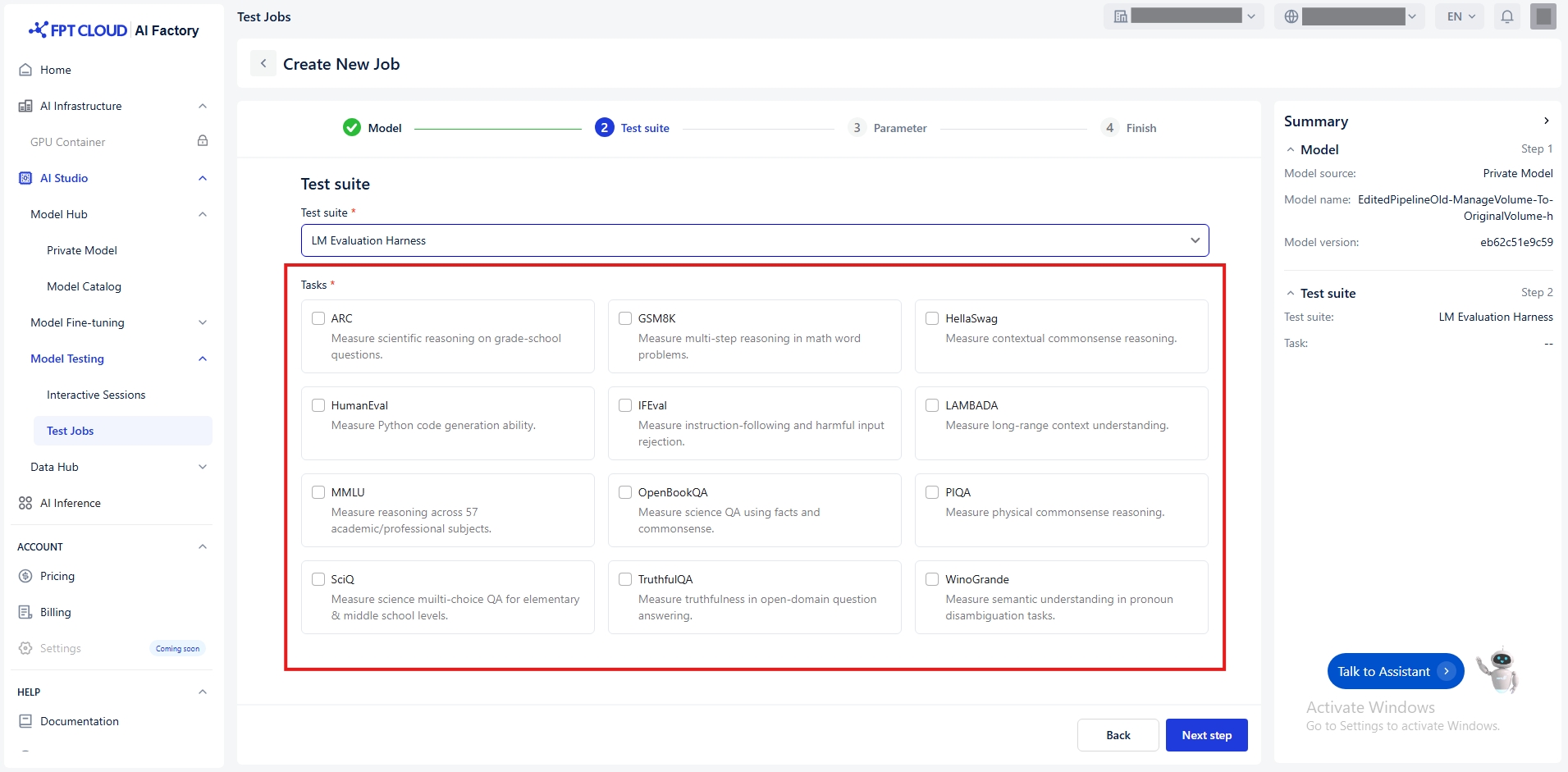
We offer the following tasks depend on the selected test suite:
Nejumi Leaderboard 3
Jaster
Measure the model’s ability to understand and process the Japanese language.
JBBQ
Measure social bias in Japanese question answering by LLMs.
JtruthfulQA
Measure the truthfulness of model answers to Japanese questions.
LM Evaluation Harness
ARC
Measure scientific reasoning on grade-school questions.
GSM8K
Measure multi-step reasoning in math word problems.
HellaSwag
Measure contextual commonsense reasoning.
HumanEval
Measure Python code generation ability.
IFEval
Measure instruction-following and harmful input rejection.
LAMBADA
Measure long-range context understanding.
MMLU
Measure reasoning across 57 academic/professional subjects.
OpenBookQA
Measure science QA using facts and commonsense.
PIQA
Measure physical commonsense reasoning.
SciQ
Measure science multiple-choice QA for elementary & middle school levels.
TruthfulQA
Measure truthfulness in open-domain question answering.
Winogrande
Measure semantic understanding in pronoun disambiguation tasks.
VLM Evaluation Kit
ChartQA
Measure chart-based data interpretation and question answering skills.
DocVQA
Measure question answering performance on document images.
InfoVQA
Measure question answering based on information embedded in images.
MTVQA
Measure multilingual visual-text question answering performance.
OCRBench
Measure optical character recognition accuracy across varied datasets.
Set up Parameters
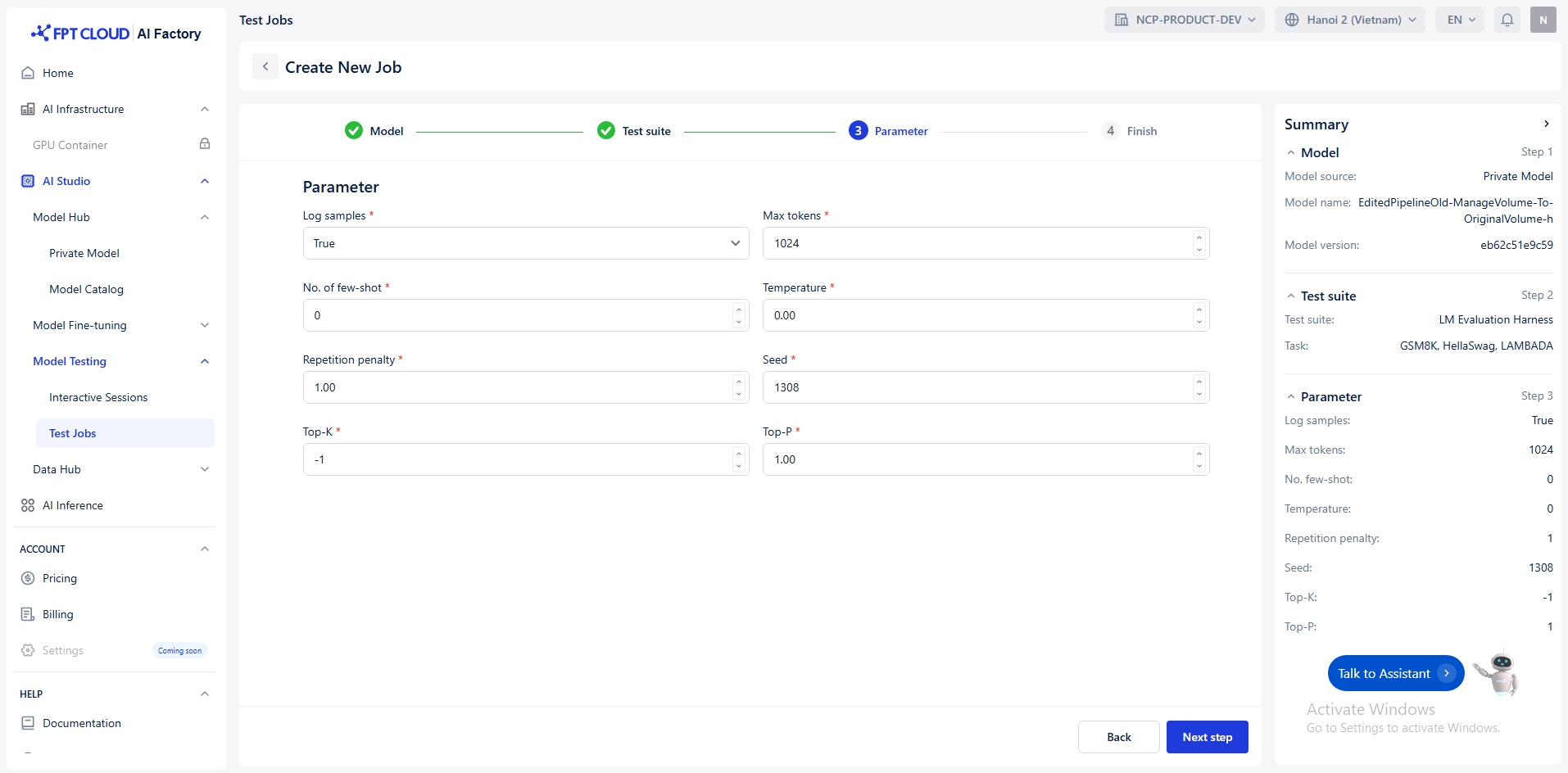
Parameter allows you to adjust the behavior of your model during testing. Below is a breakdown of each parameter and its purpose:
Log samples
Model’s outputs, and the text fed into the model, will be saved
bool
True / False
Max tokens
Maximum number of tokens to generate
int
(0, +∞)
No. of few-shot
Sets the number of few-shot examples to place in context. Must be an integer.
int
[0, +∞)
Temperature
The temperature for sampling
float
[0, +∞)
Repetition penalty
Float that penalizes new tokens based on whether they appear in the prompt and the generated text so far. - Values > 1 encourage new tokens. - Values < 1 encourage repetition.
float
(0, 5)
Seed
Random seed for reproducibility
int
[0, +∞)
Top-K
Integer that controls the cumulative probability of the top tokens to consider. Set to -1 to consider all tokens.
int
-1 or (0, +∞)
Top-P
Float that controls the cumulative probability of the top tokens to consider. Set to 1 to consider all tokens.
float
(0, 1]
Finish

Finally, you must enter a unique name job (e.g., testj_20250919145022) that satisfies the following conditions:
Start with a letter or number
Only use letters (a-z, A-Z), numbers (0-9), underscores “_” and hyphens “-”
Maximum 100 characters
Unduplicated name
Optional note job description with maximum 200 characters and receive an email notification ([email protected]) when pipeline is SUCCEEDED or FAILED.
Last updated