> For the complete documentation index, see [llms.txt](https://ai-docs.fptcloud.com/llms.txt). Markdown versions of documentation pages are available by appending `.md` to page URLs; this page is available as [Markdown](https://ai-docs.fptcloud.com/ai-factory-guideline-jp/fpt-gpu-cloud/gpu-cluster/gpu-cluster-managed-k8s-with-gpu-virtual-machine/gaidochtoriaru/sukejruniyoruto.md).
# スケジュールによる休止状態と復帰
ポータルで直接利用可能な休止状態と復帰機能に加え、FPT CLOUD では休止状態と復帰のスケジュール設定サービスを提供し、ユーザーがクラスターを自動的に休止状態に移行・復帰させることが可能です。
FPTCloudでは、ユーザーは必要に応じて1つまたは複数のスケジュールを同時に設定、編集、削除できます。
{% stepper %}
{% step %}
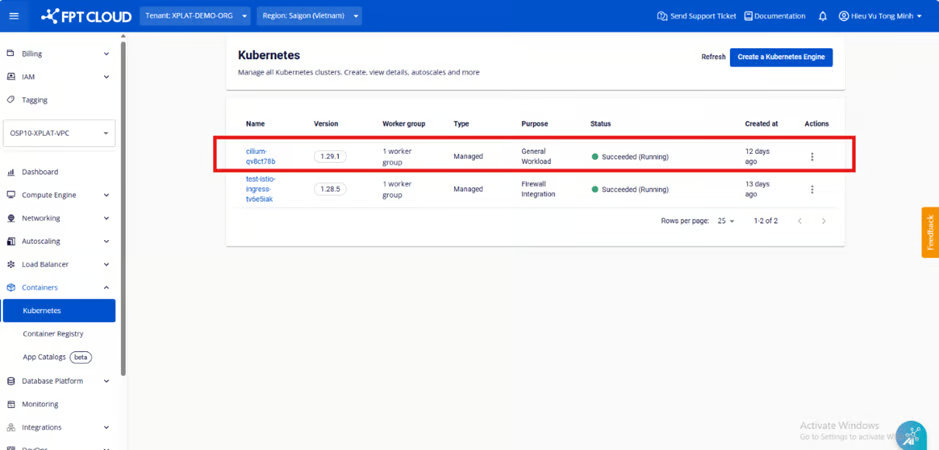
#### ステップ1: メニューから「コンテナ」>「Kubernetes」を選択し、Kubernetes管理ページを表示します。
{% endstep %}
{% step %}
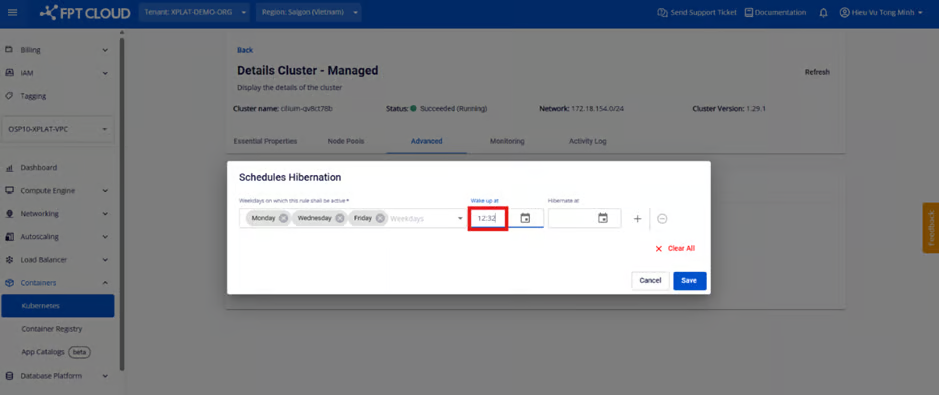
#### ステップ2: クラスター詳細ページにアクセス \[詳細設定] > \[休止状態のスケジュール設定]
{% endstep %}
{% step %}
#### ステップ3:スケジュールを適用する日付を選択します。1つまたは複数の日付を選択できます。
{% endstep %}
{% step %}
#### ステップ4: クラスターを起動および休止状態にする時刻を選択します(タイムゾーン: UTC+7)。
方法1:各フィールドのカレンダーアイコンをクリックして時間を設定します
時計に基づいて設定する
方法2:時間を直接テキストとして入力する
{% endstep %}
{% step %}
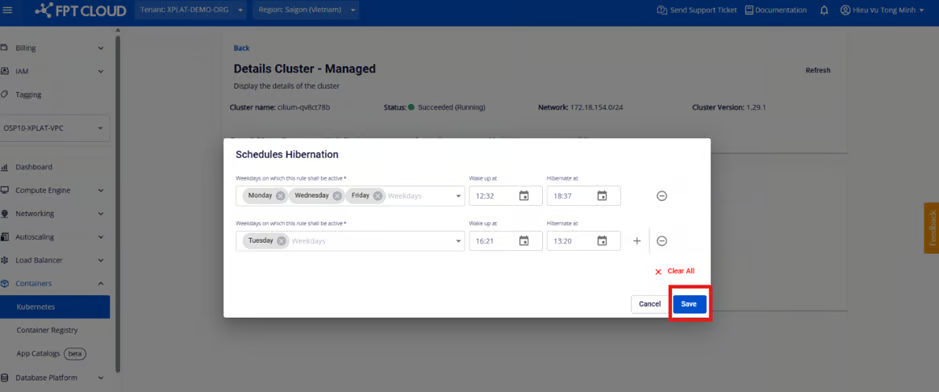
#### ステップ5: カレンダーの追加/削除
カレンダーを追加する
カレンダーを削除する
{% endstep %}
{% step %}
#### ステップ6: 新規作成/変更後のカレンダーを保存する
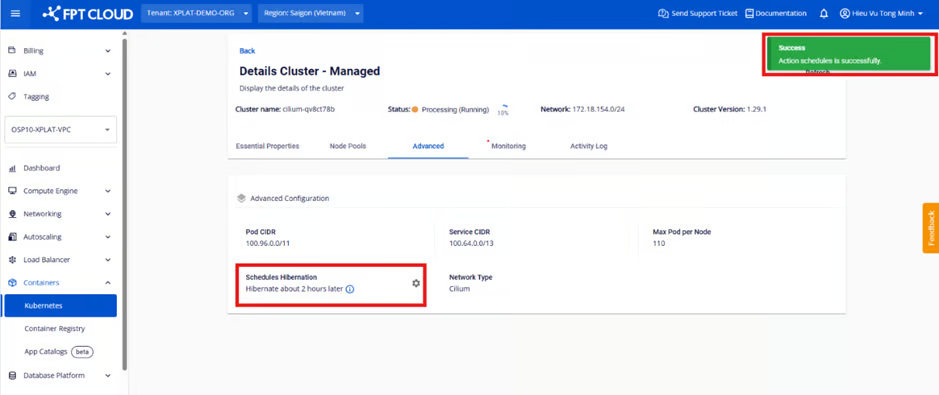
この時点で、ユーザーのスケジュールがシステム内で正常に更新されると、システムは「成功」ステータスを返します。さらに、表示セクションには次の休止状態/復帰までの残り時間が表示されます。
#### 注記:ユーザーは複数の日付および複数の異なる時間帯に対して、複数のカレンダーを同時に作成または削除できます。ただし、休止状態と復帰状態の間隔は少なくとも15分以上空ける必要があることにご注意ください。
{% endstep %}
{% endstepper %}
---
# Agent Instructions
This documentation is published with GitBook. GitBook is the documentation platform designed so that both humans and AI agents can read, navigate, and reason over technical content effectively. Learn more at gitbook.com.
## Querying This Documentation
If you need additional information that is not directly available in this page, you can query the documentation dynamically by asking a question.
Perform an HTTP GET request on the current page URL with the `ask` query parameter, and the optional `goal` query parameter:
```
GET https://ai-docs.fptcloud.com/ai-factory-guideline-jp/fpt-gpu-cloud/gpu-cluster/gpu-cluster-managed-k8s-with-gpu-virtual-machine/gaidochtoriaru/sukejruniyoruto.md?ask=&goal=
```
`ask` is the immediate question: it should be specific, self-contained, and written in natural language.
`goal` is optional and describes the broader end goal you are ultimately trying to accomplish on behalf of the user. GitBook uses it to tailor the answer towards what is most useful for that goal.
The response will contain a direct answer to the question and relevant excerpts and sources from the documentation.
Use this mechanism when the answer is not explicitly present in the current page, you need clarification or additional context, or you want to retrieve related documentation sections.