> For the complete documentation index, see [llms.txt](https://ai-docs.fptcloud.com/llms.txt). Markdown versions of documentation pages are available by appending `.md` to page URLs; this page is available as [Markdown](https://ai-docs.fptcloud.com/ai-factory-guideline-jp/fpt-gpu-cloud/gpu-cluster/gpu-cluster-managed-k8s-with-gpu-virtual-machine/gaidochtoriaru/to.md).
# 休止状態と復帰
本番環境では、クラスターは通常24時間365日稼働します。しかし、開発、テスト、ステージング、デモなどの環境では、未使用のKubernetesリソースを縮小することでコスト削減が可能です。
ただし手動での縮小には時間がかかるため、このタスクを自動化するハイバネート機能が開発されました。
ユーザーがハイバネート機能を利用すると、クラスター内のリソースは以下のように変化します:
* ワーカーノード(インスタンス)が削除されます。
* ポッドは「待機中」状態になります
* サービスはそのまま維持されます
* 状態保存コンポーネント(PVCなど)およびetcd内の状態も保持されます。
ウェイクアップはハイバネートの逆操作であり、ハイバネート前の元の状態にクラスターを復元します。
ポータルでは、ハイバネートとウェイクアップ機能を以下のように操作できます。
## **1. ハイバネートの場合**
{% stepper %}
{% step %}
#### ステップ1: メニューから[コンテナ]>[Kubernetes]を選択し、Kubernetes管理ページを表示します。
{% endstep %}
{% step %}
#### ステップ2: ハイバネートボタンをクリックしてプロセスを開始します。
{% endstep %}
{% step %}
#### ステップ3: クラスター名を入力し、プロセスの開始を確認します。
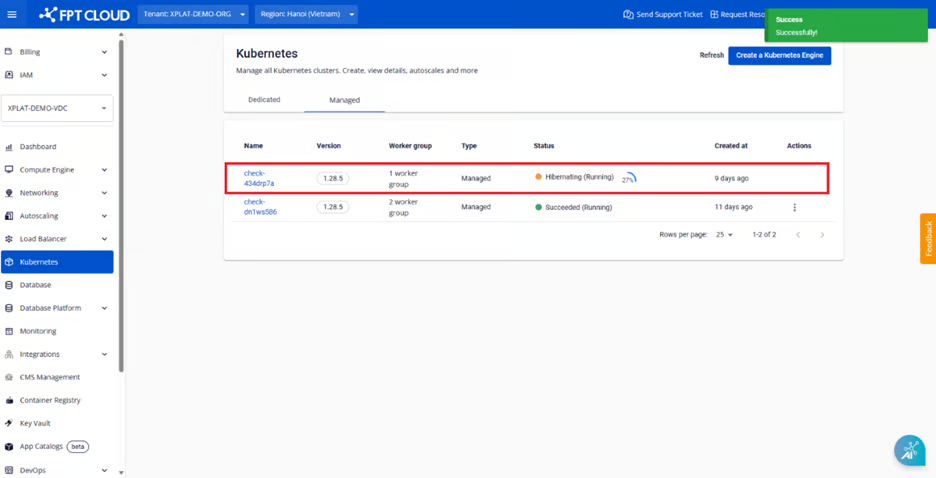
通知が表示されると、休止状態プロセスが開始され、ポータル上のステータスは「**休止状態(実行中)**」に戻ります。
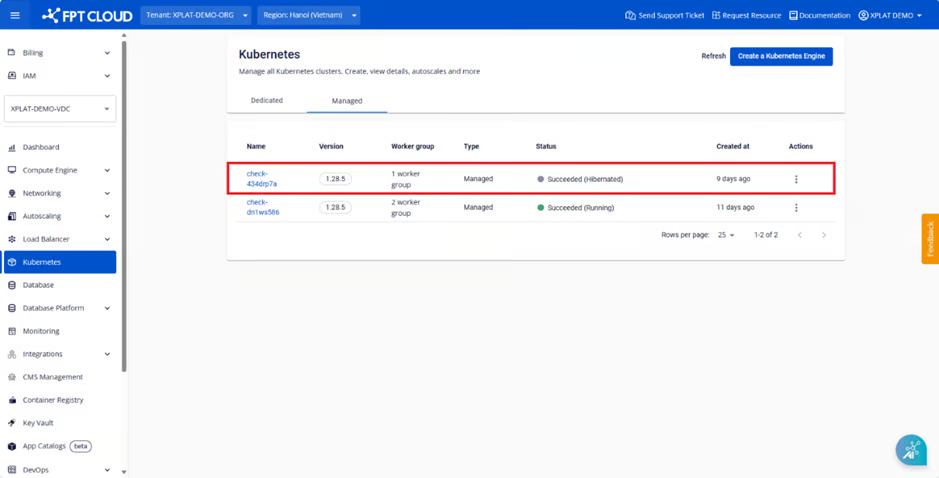
プロセスが完了すると、クラスターの状態が「**成功(休止状態)**」に変化し、休止状態への移行が正常に完了したことを示します。
{% endstep %}
{% endstepper %}
## 2. ウェイクアップについて
ステータスが「**成功(休止状態)**」のクラスターについては、ユーザーはウェイクアップ機能を使用してクラスターを元の状態に復元できます。
{% stepper %}
{% step %}
#### ステップ1: メニューから[コンテナ]>[Kubernetes]を選択し、Kubernetes管理ページを表示します。
{% endstep %}
{% step %}
#### ステップ2:起動ボタンをクリックしてプロセスを開始します。
{% endstep %}
{% step %}
#### ステップ3: クラスター名を入力してプロセスを確認します。
通知が表示されると、ハイバネート処理が開始され、ポータルのステータスは処理中(実行中)に戻ります。
処理が完了すると、クラスタのステータスは「**成功(実行中)**」に戻り、クラスタのウェイクアップが成功したことを示します。
#### 注記:
#### ハイバネーション処理を開始する前に、クラスター内のすべてのポッドがRunning状態にあること、およびその他のリソース(サービスベースのロードバランサー、Ingress、Persistent Volume、シークレット、ConfigMapなど)が正常に機能していることを確認することを推奨します。
#### クラスターがハイバネーション状態にある間にユーザーが別のデプロイメントを追加した場合、すべての新しいリソースはユーザーがクラスターをウェイクアップするまでPending状態になります。
{% endstep %}
{% endstepper %}
---
# Agent Instructions
This documentation is published with GitBook. GitBook is the documentation platform designed so that both humans and AI agents can read, navigate, and reason over technical content effectively. Learn more at gitbook.com.
## Querying This Documentation
If you need additional information that is not directly available in this page, you can query the documentation dynamically by asking a question.
Perform an HTTP GET request on the current page URL with the `ask` query parameter, and the optional `goal` query parameter:
```
GET https://ai-docs.fptcloud.com/ai-factory-guideline-jp/fpt-gpu-cloud/gpu-cluster/gpu-cluster-managed-k8s-with-gpu-virtual-machine/gaidochtoriaru/to.md?ask=&goal=
```
`ask` is the immediate question: it should be specific, self-contained, and written in natural language.
`goal` is optional and describes the broader end goal you are ultimately trying to accomplish on behalf of the user. GitBook uses it to tailor the answer towards what is most useful for that goal.
The response will contain a direct answer to the question and relevant excerpts and sources from the documentation.
Use this mechanism when the answer is not explicitly present in the current page, you need clarification or additional context, or you want to retrieve related documentation sections.