> For the complete documentation index, see [llms.txt](https://ai-docs.fptcloud.com/llms.txt). Markdown versions of documentation pages are available by appending `.md` to page URLs; this page is available as [Markdown](https://ai-docs.fptcloud.com/ai-factory-guideline-jp/fpt-gpu-cloud/gpu-cluster/gpu-cluster-managed-k8s-with-gpu-virtual-machine/gaidochtoriaru/kurasutasukringu/gpukasutamumetorikusuwoshitakurasutanosukringu.md).
# GPUカスタムメトリクスを使用したクラスタの自動スケーリング
KubernetesはPrometheusとの連携により、GPUメトリクスなどのカスタムメトリクスに基づく自動スケーリングをサポートします。本記事では、FPT Kubernetes Engineプラットフォーム上で動作するGPUベースのアプリケーション向けに自動スケーリングを設定する方法をご紹介します。
## 要件:
* GPUが接続されたKubernetesクラスター
* 実行状態にあるGPUベースのアプリケーション
## 手順
{% stepper %}
{% step %}
#### ステップ1: kube-prometheus-stack および prometheus-adapter パッケージをインストールする
#### FPT App Catalog サービスを使用する
* FPT App Catalog サービスを使用し、App Catalog を作成した後、\[クラスターに接続] を選択して GPU クラスターに接続します。
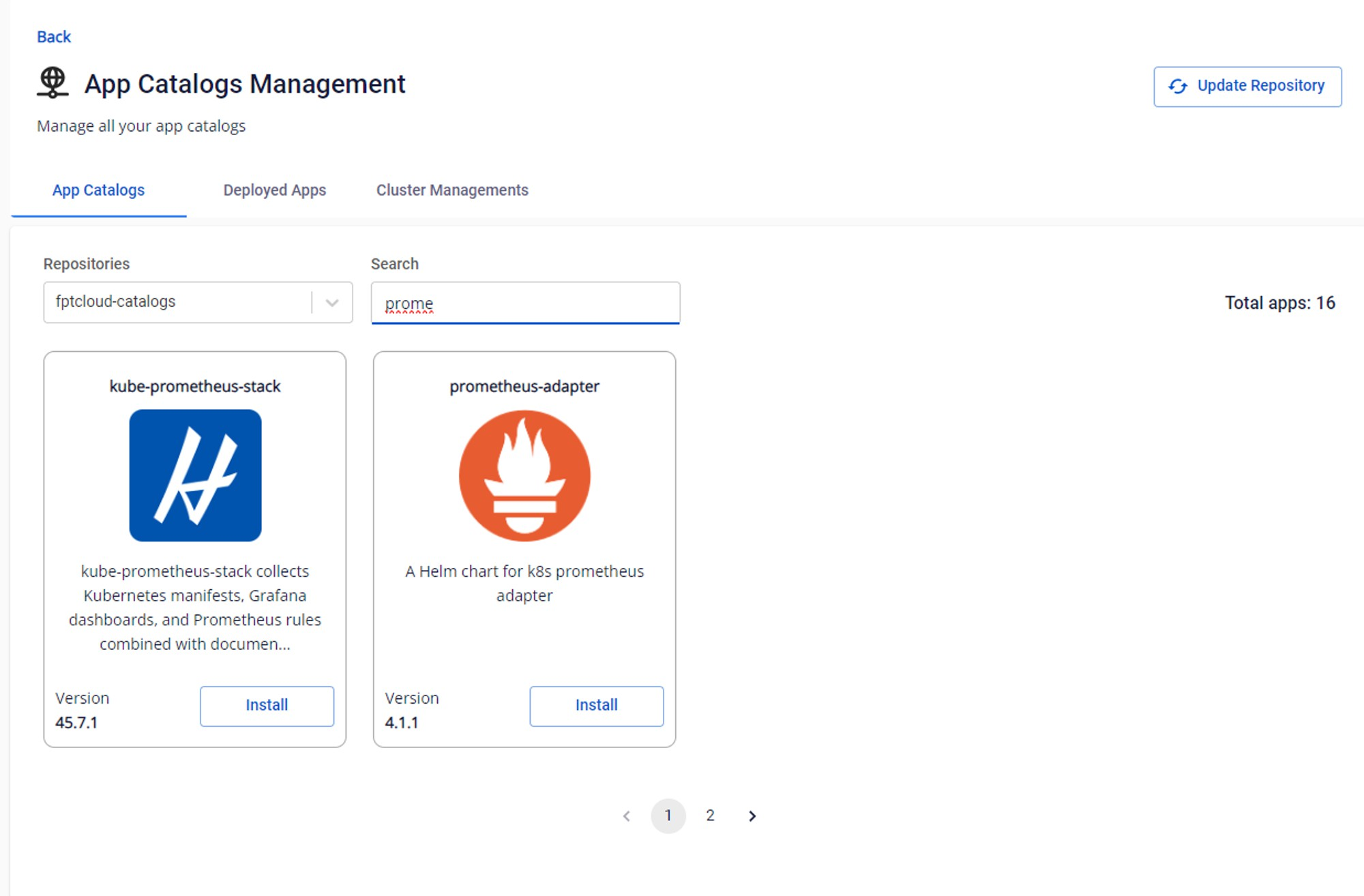
* App Catalogs メニューで、リポジトリとして fptcloud-catalogs を選択し、prometheus を検索して kube-prometheus-stack パッケージのインストールを選択します。パッケージをデプロイするためのリリース名とネームスペースを入力します。
#### Helmチャートを使用する:
```
helm repo add xplat-fke
https://registry.fke.fptcloud.com/chartrepo/xplat-fke
&& helm repo update
helm install --wait --generate-name \
-n prometheus --create-namespace \ xplat-fke/kube-prometheus-stack
prometheus_service=$(kubectl get svc -n prometheus -lapp=kube-prometheus-stack-prometheus -ojsonpath='{range .items[*]}{.metadata.name}{"\n"}{end}')
helm install --wait --generate-name \
-n prometheus --create-namespace \ xplat-fke/prometheus-adapter \
--set prometheus.url=http://${prometheus_service}.prometheus.svc.cluster.local
```
* kube-prometheus-stack パッケージのデプロイ後、prometheus-adapter のデプロイを続行しますが、kube-prometheus-stack の正しい prometheus サービスを指すようパッケージの値を変更する必要があります。例えば、kube-prometheus-stack のネームスペースが prometheus に設定されている場合、入力が必要な値は以下の通りです:
```
<>.<>.svc.cluster.local
prometheus-kube-prometheus-prometheus.prometheus.svc.cluster.local
```
次に、2つのパッケージの状態を確認します
{% endstep %}
{% step %}
#### ステップ2: GPUアプリケーションの水平ポッドオートスケーラーを設定する
水平ポッドオートスケーラー(HPA)は、構成で指定された条件を満たすようポッドを自動的にスケーリングします。前のセクションでは、prometheus-addapterを設定した後、GPUワークロードを監視するためにDCGMのカスタムメトリクスをエクスポートします。
HPAマニフェストファイルの例
```
apiVersion: autoscaling/v2
kind: HorizontalPodAutoscaler
metadata:
name: my-gpu-app
spec:
maxReplicas: 3 # Update this accordingly
minReplicas: 1
scaleTargetRef:
apiVersion: apps/v1beta1
kind: Deployment
name: my-gpu-app # Add label from Deployment we need to autoscale
metrics:
- type: Pods # scale pod based on gpu
pods:
metric:
name: DCGM_FI_PROF_GR_ENGINE_ACTIVE # Add the DCGM metric here accordingly
target:
type: AverageValue
averageValue: 0.8
```
以下のリンクにあるNVIDIAのDCGMメトリクスに関するドキュメントを参照してください。
その後、新しく作成されたHPAを確認します:
`kubectl get hpa -A`
{% endstep %}
{% endstepper %}
---
# Agent Instructions
This documentation is published with GitBook. GitBook is the documentation platform designed so that both humans and AI agents can read, navigate, and reason over technical content effectively. Learn more at gitbook.com.
## Querying This Documentation
If you need additional information that is not directly available in this page, you can query the documentation by asking a question.
Perform an HTTP GET request on the following URL with the `ask` and `goal` query parameters:
```
GET https://ai-docs.fptcloud.com/ai-factory-guideline-jp/fpt-gpu-cloud/gpu-cluster/gpu-cluster-managed-k8s-with-gpu-virtual-machine/gaidochtoriaru/kurasutasukringu/gpukasutamumetorikusuwoshitakurasutanosukringu.md?ask=&goal=
```
`ask` is the immediate question: it should be specific, self-contained, and written in natural language.
`goal` is what the user is ultimately trying to achieve, the reason they need the answer. Sharing it helps GitBook give you a better, more relevant answer. A goal is most helpful when it describes the outcome the user wants rather than restating the question. For example, with `ask=how do I create an API token`, a goal like `automate deployments from our CI pipeline` lets GitBook tailor the answer to that use case.
The response will contain a direct answer to the question and relevant excerpts and sources from the documentation.
Use this mechanism when the answer is not explicitly present in the current page, you need clarification or additional context, or you want to retrieve related documentation sections.